Jan 17, 2026

Pawel Gola
Framer & Webflow Expert
In 2026, standing out with exceptional digital design is more crucial than ever. As brands compete for attention, crafting unique, high-quality visuals can make all the difference.
Figma has emerged as the go-to platform for rapid prototyping and seamless team collaboration. In this article, we handpick the 8 best figma templates to supercharge your workflow, spark creativity, and deliver outstanding results this year.
From dynamic dashboards and versatile UI kits to landing pages and specialized systems, these templates cover every need. Ready to save time, elevate your quality, and outshine the competition? Explore our curated selection and discover even more options on our Figma Templates Category page.
Why Figma Templates Are Essential for Modern Designers
In the fast-paced world of digital design, standing out requires more than creativity—it demands efficiency, consistency, and adaptability. Figma templates have become a vital asset for designers who want to streamline their process, maintain quality, and stay ahead in 2026.
Time Efficiency and Rapid Prototyping
Figma templates save designers countless hours by eliminating repetitive setup tasks. Instead of building every component from scratch, teams can jump straight into prototyping with ready-made assets. Recent industry reports reveal agencies using figma templates deliver projects up to 30 percent faster, helping clients get to market sooner.
This speed is especially valuable for fast-moving startups and agencies juggling multiple projects. By reducing busywork, figma templates let designers spend more time on strategic decisions and creative problem-solving.
Consistency and Professionalism
Brand consistency is crucial for building trust and recognition. Figma templates, especially those built around robust design systems, ensure every element aligns with brand guidelines across all products. Many successful companies now rely on figma templates to scale their visual identity as they grow.
For example, design teams at leading SaaS platforms use shared figma templates to maintain a polished, unified look—even as new features and pages are added. This approach reduces errors and strengthens professionalism across every touchpoint.
Collaboration and Handoff
Figma’s real-time collaboration, paired with shared figma templates, transforms teamwork. Multiple designers can work on the same file simultaneously, while developers receive consistent, organized assets for smoother handoff.
Top design teams report fewer miscommunications and faster iteration cycles when using figma templates as a common foundation. Documentation and component libraries within templates also help onboard new team members quickly.
Staying Ahead with 2026 Trends
Modern figma templates are designed with the future in mind. They reflect emerging UI/UX trends for 2026, such as AI-powered features, accessibility enhancements, and dark mode options.
By adopting up-to-date figma templates, designers can rapidly incorporate new patterns and interactions without starting from zero. This agility ensures projects not only look contemporary but also deliver cutting-edge user experiences aligned with industry expectations.
Cost-Effectiveness
Choosing figma templates over custom design can dramatically reduce project costs. Agencies and startups benefit from lower upfront investment and shorter timelines, translating to improved ROI.
Data shows that premium figma templates often pay for themselves after just one or two projects, thanks to time saved and fewer revisions. The availability of free and paid options lets teams match their budget and needs.
Ideal Users and Use Cases
Figma templates provide value for freelancers, agencies, SaaS startups, and creators alike. Freelancers can showcase portfolios quickly, agencies can deliver client dashboards efficiently, and SaaS teams can maintain scalable design systems.
Common use cases include portfolios, e-commerce sites, SaaS dashboards, and internal tools. The flexibility of figma templates empowers creators in virtually any niche to deliver professional results without reinventing the wheel.
Potential Drawbacks and How to Overcome Them
Some worry that figma templates may lead to generic or overused designs. However, most templates are highly customizable. By adjusting colors, typography, and components, designers can create truly unique products.
To ensure originality, start with a template as a foundation, then tailor it to your brand’s voice and goals. For those seeking a broader selection or inspiration, explore the Figma templates category to discover options that fit your project perfectly.
8 Best Figma Templates to Boost Your Designs in 2026
The world of figma templates is evolving rapidly, and in 2026, designers need resources that are flexible, current, and powerful. Our selection criteria focused on design quality, advanced features, adaptability, support, and readiness for the latest trends. Whether you’re building dashboards, launching SaaS products, or crafting landing pages, these figma templates will help you work faster, maintain consistency, and impress clients. For even more options and inspiration, explore the curated figma templates category page.
Gola Templates – Premium Figma Design Systems
Gola Templates stands out as a leader in the figma templates ecosystem, offering a suite of premium design systems built for modern web and app projects. Pricing begins at $79 per individual template, with an All Access Pass that includes lifetime updates and an unlimited license, making it a strong investment for design-forward teams.
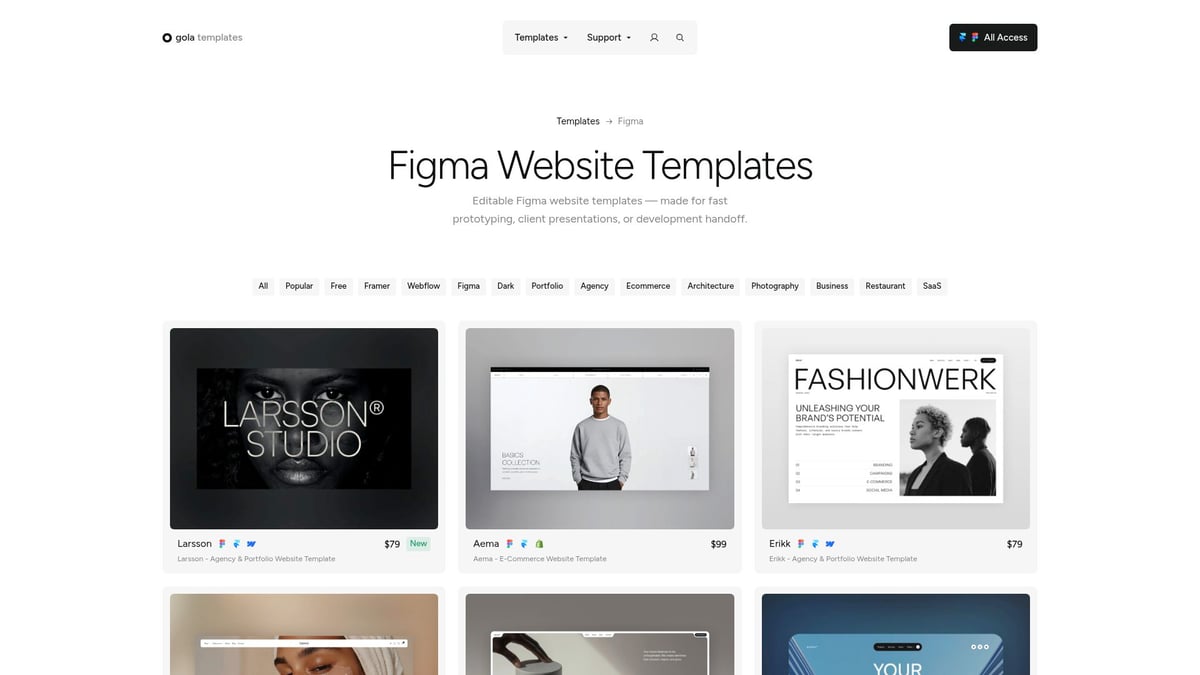
Core Features:
Pixel-perfect layouts and modular UI components
Fully responsive designs for seamless cross-device experiences
Performance-optimized and editable Figma files
No-code integration and fast personal support
Unique Selling Points: Gola Templates is trusted by over 17,000 creators globally. The templates are engineered for scalability, allowing agencies, startups, and freelancers to accelerate their workflow and maintain brand consistency. The inclusion of lifetime updates ensures your figma templates always stay current with industry trends.
Pros:
Modern, scalable designs
Unlimited commercial projects
Robust support and documentation
Cons:
Premium pricing structure
May require moderate Figma proficiency for deeper customization
Use Cases:
Websites and portfolios
SaaS dashboards and analytics
E-commerce stores and landing pages
For anyone serious about elevating their design process, Gola Templates delivers reliability and flexibility. Their figma templates offer a balance of structure and adaptability, helping you launch standout digital products efficiently.
Frames X – UI Kit and Design Handbook for Figma
Frames X is an all-encompassing UI kit and design system for Figma that brings together a massive library of ready-to-use components and a comprehensive design handbook. This makes it a top choice among figma templates for product teams and agencies needing robust, scalable solutions.
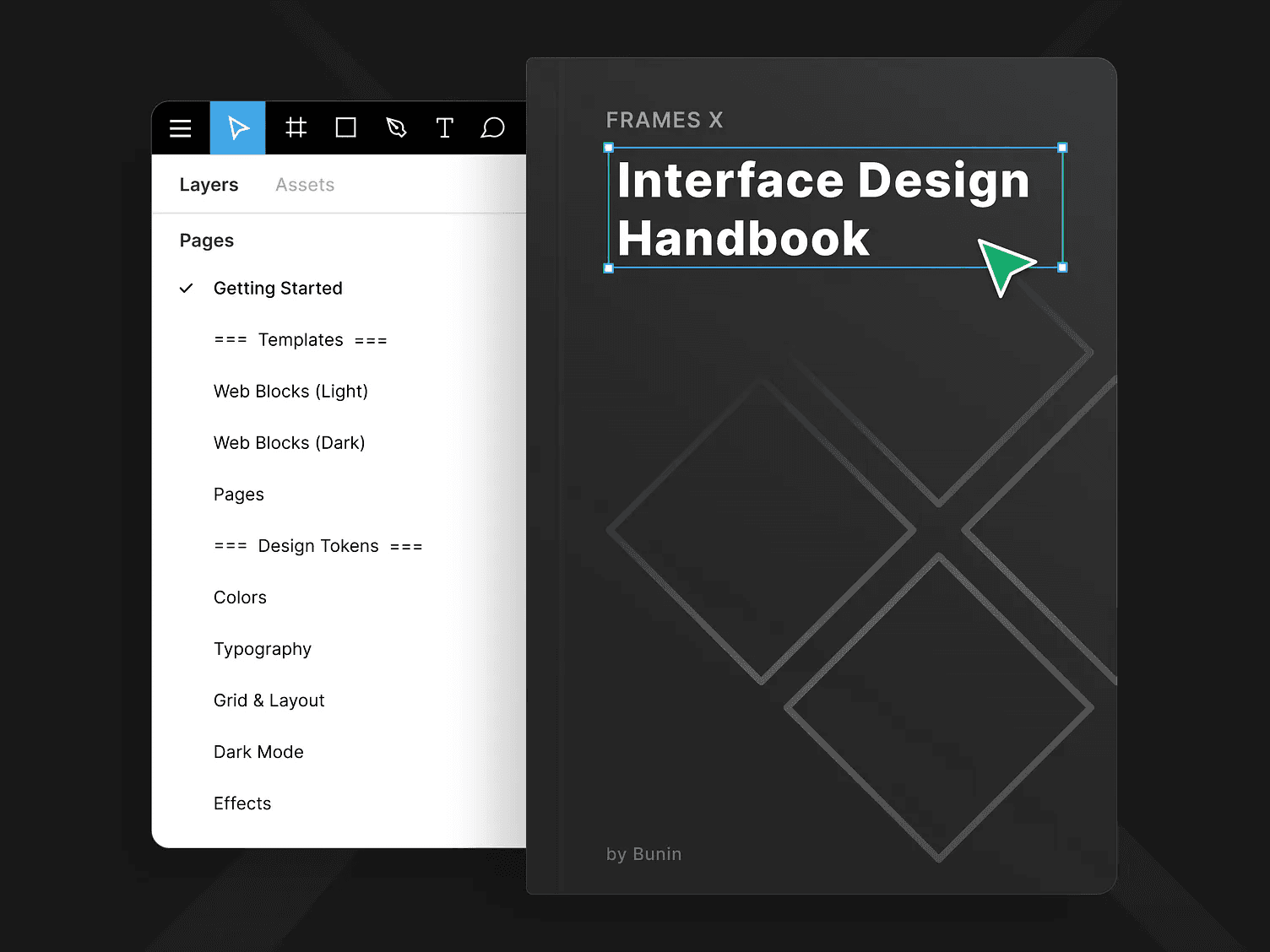
Core Features:
Extensive UI kit with hundreds of components
Auto-layout and variants for rapid prototyping
Detailed documentation and design tokens
Built-in support for dark and light modes, plus accessibility
Unique Selling Points: Frames X stands apart with its inclusive design documentation, helping teams standardize and scale their design systems. The figma templates in this kit are built for enterprise-level applications, supporting both speed and flexibility.
Pros:
Deeply detailed and scalable
Ideal for large, complex projects
Comprehensive support materials
Cons:
Steeper learning curve for beginners
Can be overwhelming for smaller projects
Use Cases:
Enterprise SaaS platforms
Internal business dashboards
Product design systems
If you’re looking for figma templates that enable team-wide consistency and future-proof your workflow, Frames X is a compelling option.
FitMove Widget – Fitness Dashboard Figma Template
FitMove Widget is a specialized figma template designed for health and fitness applications. It provides a visually engaging dashboard with health score visualizations, progress tracking, and integrated meal plans, making it ideal for startups and app designers in the wellness space.
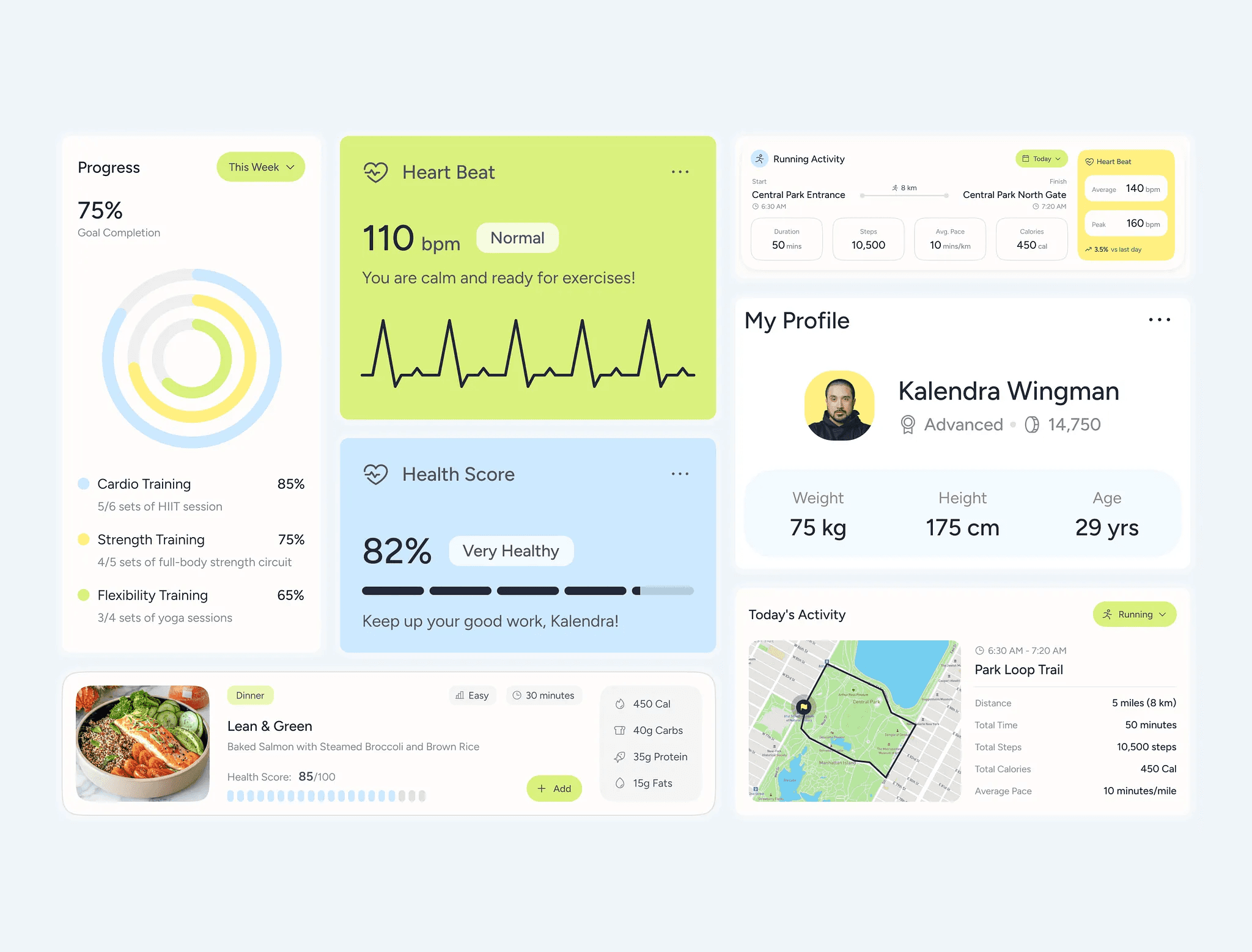
Core Features:
Fitness tracking and analytics widgets
Meal planning modules and progress charts
Modern, data-rich UI elements
Responsive and easy to customize
Unique Selling Points: Unlike generic figma templates, FitMove Widget focuses on the unique needs of health and fitness products. Its components are tailored for user engagement and actionable insights.
Pros:
Niche-specific with high visual appeal
Easy to adapt for various fitness platforms
Fast setup for MVPs or full-featured apps
Cons:
Limited to fitness and health use cases
May need extra customization for broader industries
Use Cases:
Fitness tracking apps
Wellness and health dashboards
Nutrition and activity platforms
This template is a perfect example of how figma templates can empower designers to quickly deliver professional, targeted solutions in specialized markets.
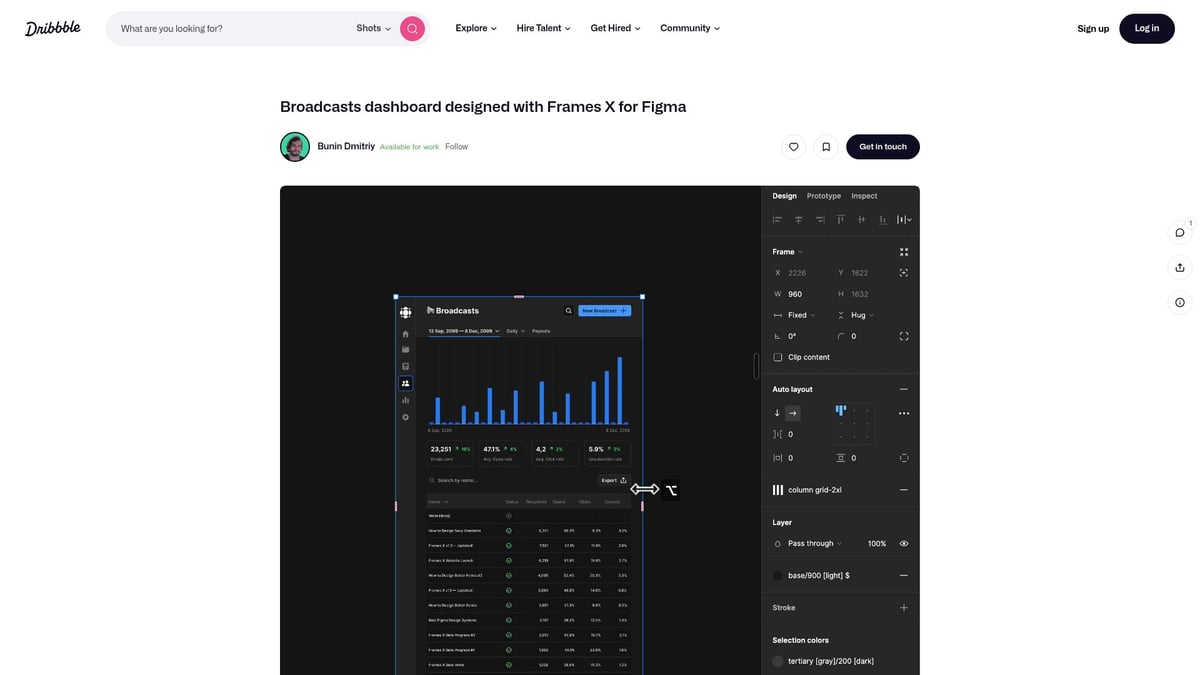
Broadcasts Dashboard Designed with Frames X
The Broadcasts Dashboard is engineered for media companies and analytics-driven platforms, leveraging the power of Frames X figma templates. It features modular, responsive layouts and real-time data widgets, making it a prime choice for content-rich environments.
Core Features:
Responsive dashboard structures
Modular analytics and content widgets
Real-time data visualization support
Unique Selling Points: Tailored for broadcast and media analytics, this figma template is flexible enough for a variety of dashboard-centric projects. Its clean structure supports complex data without overwhelming users.
Pros:
Easy integration with existing workflows
Supports advanced analytics and reporting
Clean, professional aesthetic
Cons:
Requires familiarity with Frames X for best results
Primarily suited for dashboard-focused applications
Use Cases:
Media management dashboards
SaaS analytics platforms
Content and campaign monitoring tools
With its specialized components, this figma template is particularly valuable for teams managing large data sets and real-time analytics.
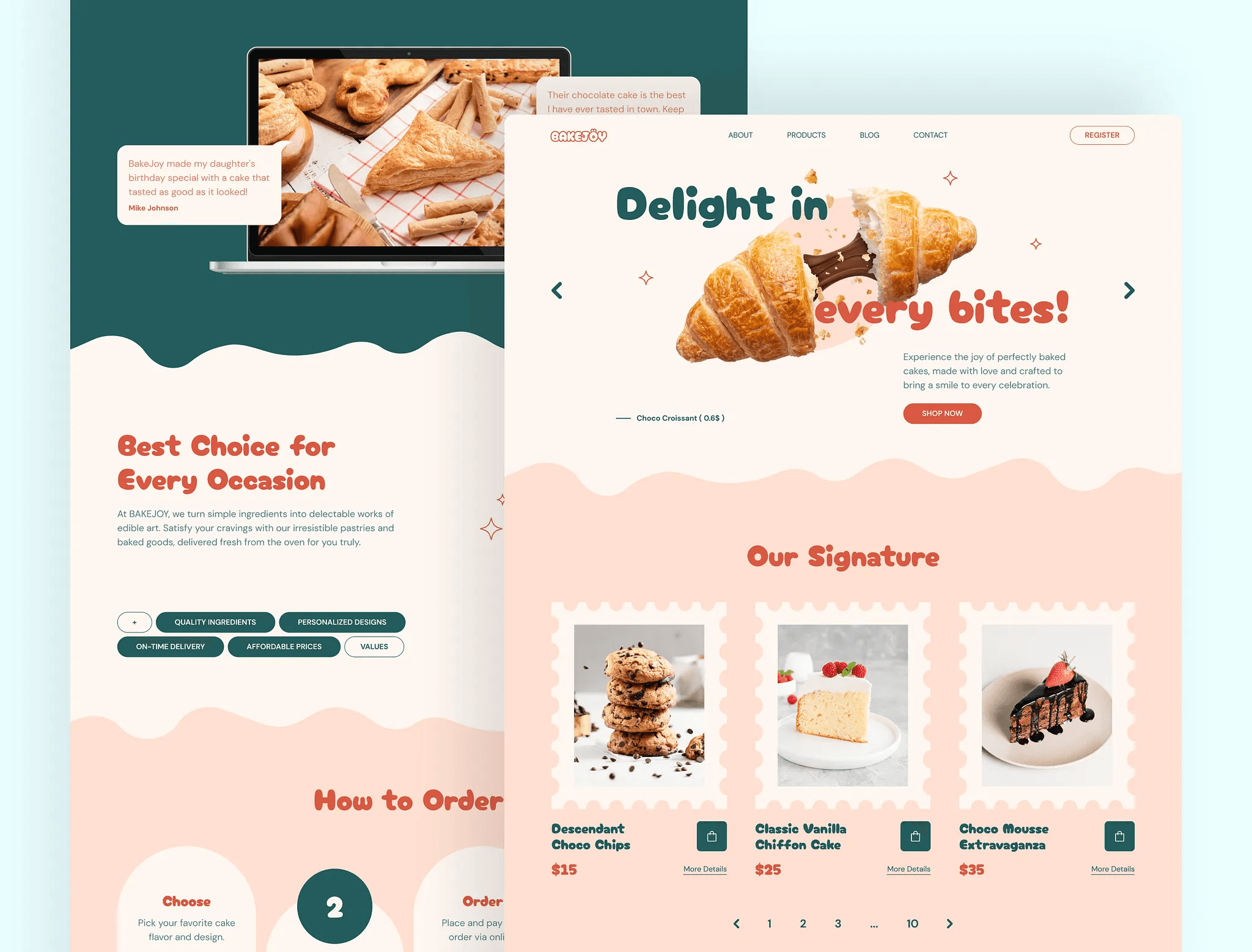
BakeJoy – Cake Shop Landing Page Figma
BakeJoy brings a delightful, niche-focused approach to figma templates, targeting small businesses and e-commerce startups. Its landing page design is visually rich, conversion-focused, and optimized for mobile, making it ideal for bakeries and product launches.
Core Features:
E-commerce landing page with product showcase
Modern, inviting visuals tailored to food and retail
Mobile-first design for on-the-go customers
Unique Selling Points: BakeJoy’s figma template is easy to brand and customize, allowing small businesses to quickly get online with a polished, attractive site. Its focus on conversion helps maximize ROI for new ventures.
Pros:
Fast to launch and easy to personalize
Highly visual, engaging design
Focused on driving conversions
Cons:
Niche-specific, best for food and small retail
Limited scalability for larger e-commerce operations
Use Cases:
Bakery and café websites
Product-focused landing pages
Local business promotions
BakeJoy demonstrates the versatility of figma templates for targeted industries, letting even small teams achieve professional results.
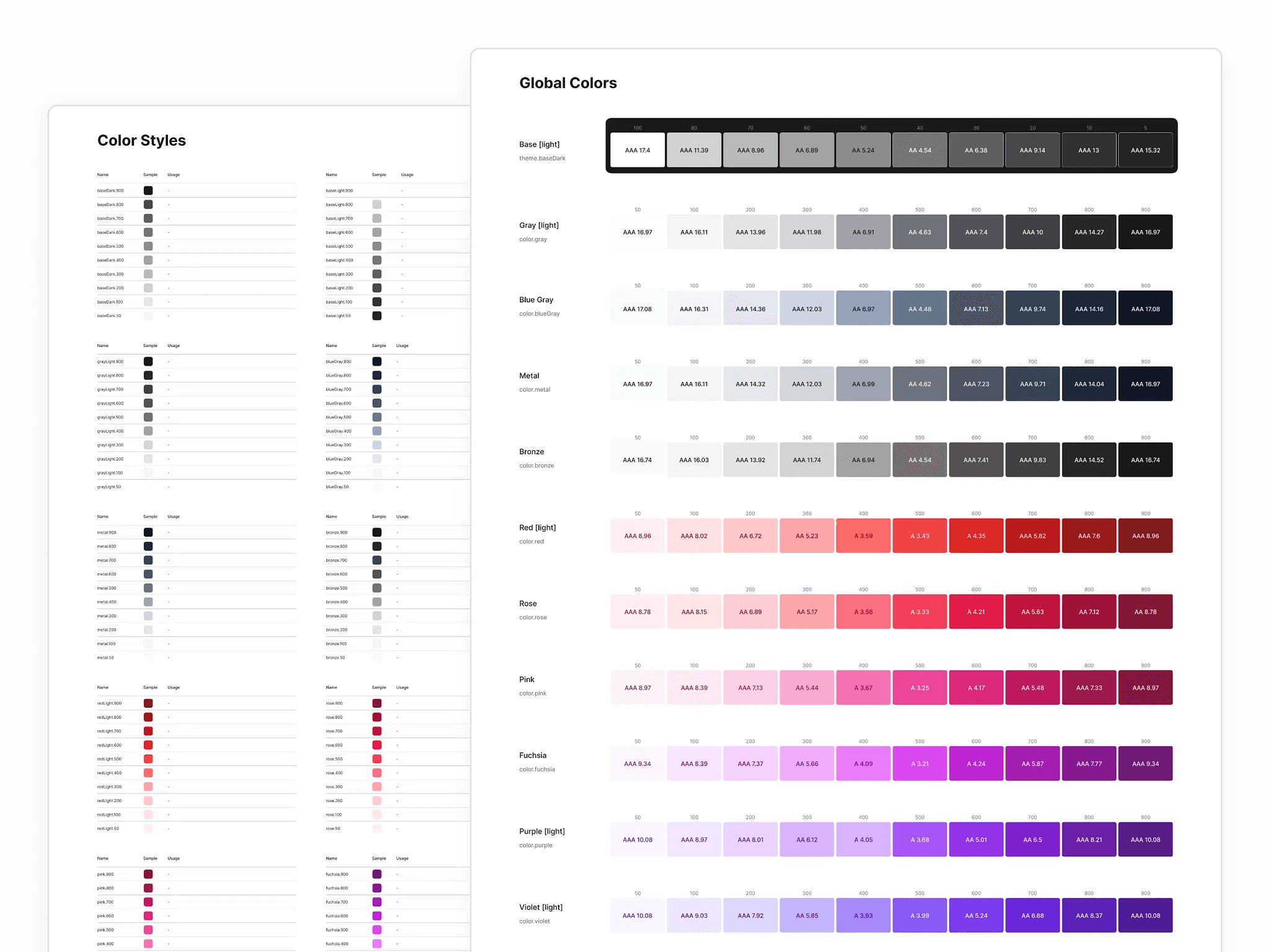
Color System for Figma—Frames X
Color System for Figma, a companion to Frames X, addresses one of the most critical aspects of design: color management. This figma template simplifies the process of maintaining brand consistency and accessibility across products.
Core Features:
Advanced color styles and palettes
Support for dark and light modes
Easy updates and design token integration
Unique Selling Points: The template streamlines color management, reducing the time spent updating palettes and ensuring accessibility standards are met. It’s a must-have for agencies and product teams working across multiple brands.
Pros:
Saves time on color updates
Guarantees brand and accessibility compliance
Easy to integrate with existing design systems
Cons:
Requires initial setup
Best suited for teams with established brand guidelines
Use Cases:
Design systems and rebranding projects
Multi-theme applications
Teams needing consistency across products
For those managing complex design ecosystems, this figma template is a powerful tool for maintaining a unified visual identity.
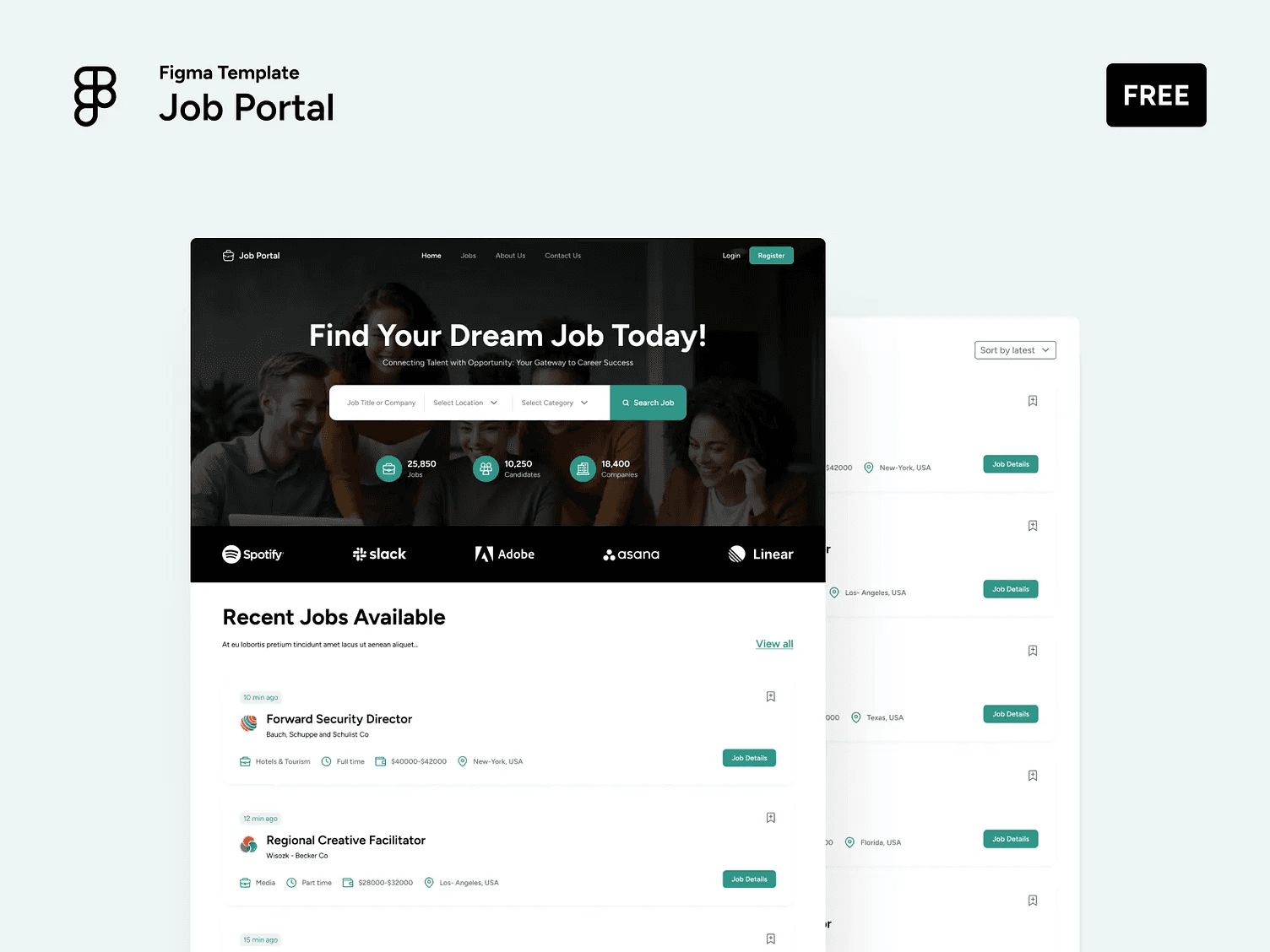
Job Portal Figma Template
The Job Portal Figma Template is tailor-made for recruitment, HR, and job board platforms. Its layouts and flows are optimized for candidate profiles, application processes, and responsive design, making it a cornerstone among figma templates for employment platforms.
Core Features:
Structured job board and candidate profile layouts
Application and onboarding flows
Mobile-responsive design for all devices
Unique Selling Points: This template is built for purpose, speeding up the development of hiring and recruitment platforms. It is scalable, allowing customization for different job markets and branding.
Pros:
Quick setup for HR and job platforms
Scalable and adaptable designs
Saves significant development time
Cons:
Niche focus, limited to recruitment use cases
May require branding adjustments for unique markets
Use Cases:
Public job boards
Internal hiring platforms
HR SaaS solutions
By using specialized figma templates like this, teams can cut project timelines and focus on delivering value to users.
Figma to HTML Website by Siter.io
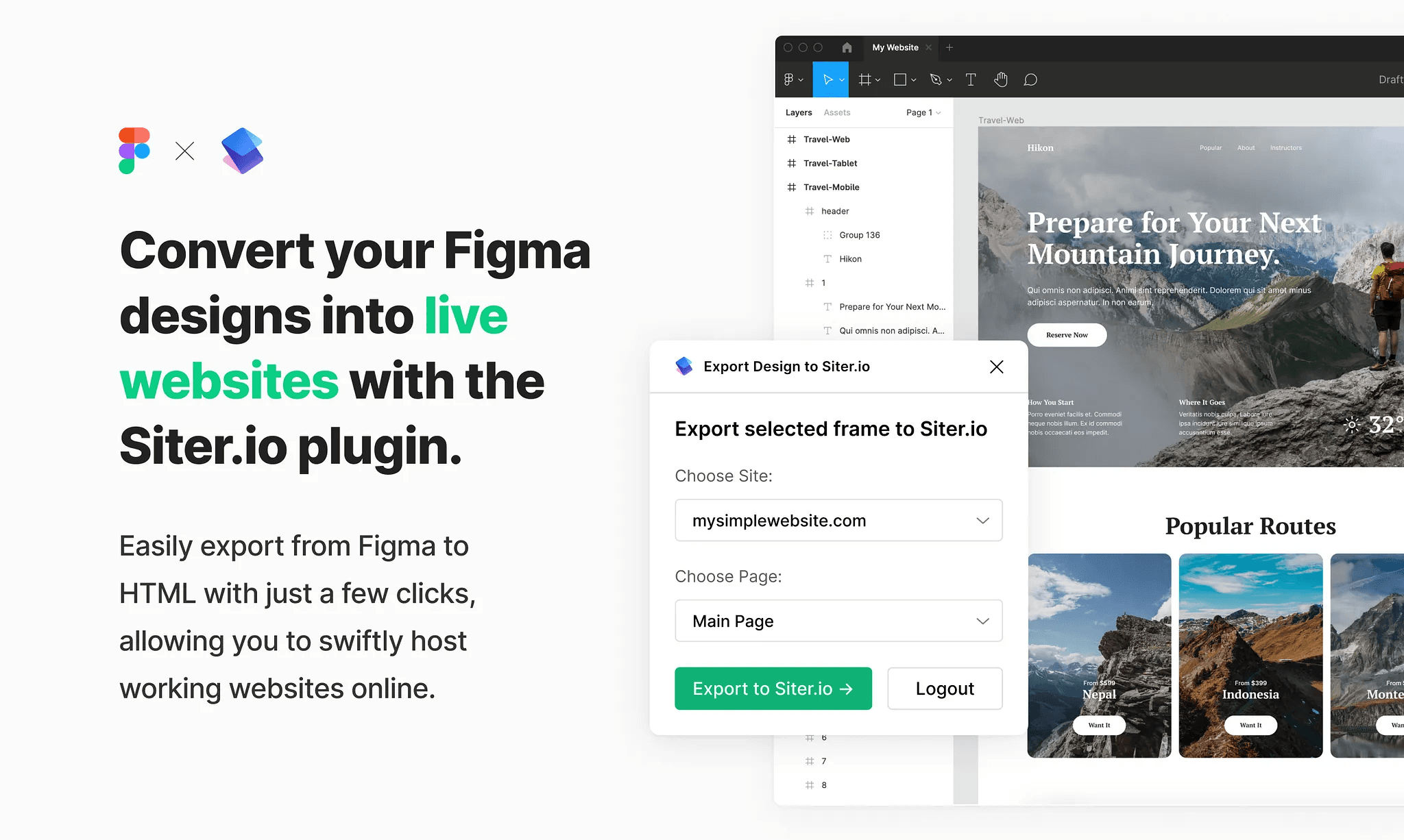
Figma to HTML Website by Siter.io bridges the gap between design and live deployment. This figma template, combined with Siter.io’s no-code platform, allows designers to export their work directly to HTML and publish instantly, making it ideal for rapid prototyping and launching MVPs.
Core Features:
Drag-and-drop website builder
Direct export from Figma to HTML
Responsive templates for multiple industries
Unique Selling Points: This solution eliminates technical barriers, letting non-coders and agencies launch sites without writing a single line of code. It supports a wide range of industries, from portfolios to landing pages.
Pros:
Streamlines design-to-launch workflow
No coding required
Flexible for various use cases
Cons:
Dependent on Siter.io’s platform
Advanced customization may be limited
Use Cases:
MVPs and rapid prototypes
Portfolio and business sites
Marketing landing pages
For anyone seeking to maximize the value of figma templates, this tool offers a fast, efficient way to turn designs into live products.
How to Choose the Right Figma Template for Your Project
Selecting the perfect figma templates for your next project is a strategic decision that impacts your process, outcomes, and brand perception. With so many choices available, a structured approach helps ensure your template aligns with both your vision and practical needs.
Assessing Your Project Goals and Scope
Begin by defining your project’s objectives, target audience, and desired outcomes. Are you building a portfolio, an e-commerce store, or a SaaS dashboard? The right figma templates should match your project’s complexity and user needs.
For instance, a portfolio may require a sleek, visual layout, while a SaaS dashboard demands robust data visualization components. Mapping out your goals helps filter template choices early.
Evaluating Features and Flexibility
Examine each template’s modularity, responsiveness, documentation, and scalability. Flexible figma templates adapt as your project evolves, making future updates smoother.
Check for features like editable components, auto-layout, and support for design tokens. Explore curated options on the Figma category page for a wide range of up-to-date templates, ensuring you find the right fit for your workflow.
Considering Design Trends and Brand Alignment
Modern figma templates often reflect the latest UI/UX trends, such as dark mode, micro-interactions, and accessibility. Ensure your chosen template aligns with your brand’s visual language and adapts to the evolving digital landscape.
Look for templates that incorporate trending elements, so your design feels fresh and relevant in 2026.
Budget and Licensing Factors
Balance quality and cost by comparing free and premium figma templates. Premium options may offer lifetime updates, enhanced support, and commercial licenses, providing greater long-term value.
Assess whether the upfront investment matches your projected ROI. Always verify licensing terms, especially for client or commercial projects.
Support, Updates, and Community
Ongoing support and regular updates add significant value to figma templates. Templates backed by an active community or dedicated support team can help resolve issues quickly.
Look for options with free updates or personal assistance to ensure your workflow remains efficient and current.
Customization Potential
The ability to customize figma templates is crucial for originality. Assess how easily you can edit layouts, swap components, or integrate your brand assets.
If you are new to customizing, the Frequently asked questions about Figma templates page offers practical tips and guidance to help you avoid common pitfalls and leverage templates effectively.
Mistakes to Avoid
Avoid over-customizing, which can complicate maintenance, or under-customizing, which may result in a generic look. Ignoring documentation or picking a template that does not match your project type can also hinder your results.
Take time to review instructions, align features with your goals, and ensure your choice enhances both creativity and productivity.
Maximizing the Value of Figma Templates in Your Workflow
Unlocking the true potential of figma templates requires a strategic approach. By following best practices, you can streamline your workflow, foster collaboration, and ensure your designs remain innovative and relevant in 2026.
Best Practices for Implementation
Start by importing your chosen figma templates into your workspace. Organize files using clear naming conventions and logical folder structures. Customize components to reflect your brand’s identity and project requirements. Refer to detailed documentation provided by premium templates for a smooth adaptation process. For an in-depth walkthrough, explore this Figma website template guide, which offers actionable steps for effective implementation.
Collaboration and Team Adoption
Figma templates thrive in collaborative environments. Share templates with your team using Figma’s built-in permissions and version control. Encourage designers and developers to adopt standardized templates to maintain consistency. Conduct onboarding sessions to familiarize everyone with shared assets, ensuring a unified workflow across disciplines.
Customizing for Uniqueness
Avoid the “template look” by personalizing figma templates. Swap out default components, adjust color palettes, and integrate your own brand assets. Leverage editable layers and modular structures for deeper customization. This approach ensures your designs stand out while retaining the efficiency of templates.
Integrating with No-Code Platforms
Figma templates are compatible with popular no-code platforms like Webflow, Framer, and Siter.io. Export assets and layouts seamlessly, bridging the gap between design and development. This integration accelerates the launch process, especially when rapid prototyping or MVPs are needed.
Maintaining Consistency and Scalability
Maintain design integrity by utilizing shared libraries, design tokens, and thorough documentation within your figma templates. For teams scaling their design systems, referencing design system templates in Figma can provide a strong foundation. Consistency across projects not only elevates professionalism but also simplifies ongoing maintenance.
Measuring Impact and ROI
Track the impact of figma templates by monitoring key performance indicators such as time saved, design quality improvements, and client satisfaction. Case studies show agencies increasing project throughput and reducing costs by adopting premium templates, making them a strategic investment for both short and long-term gains.
Staying Up-to-Date
Choose figma templates that offer regular updates to keep pace with evolving design trends. Monitor resources like the figma category page for the latest releases and innovations. Staying current ensures your workflow remains competitive as new features and styles emerge in 2026.
Share article

$249
$3601
All Access
Save with our all access bundle - get access to all premium Framer templates.
38
+
Framer Templates
51
+