Jan 7, 2026

Pawel Gola
Framer & Webflow Expert
In today’s competitive digital world, having a standout portfolio can make all the difference when trying to attract top clients or employers. That’s why selecting from the best free portfolio website templates is more crucial than ever.
This article reveals the 10 best options for 2026, each offering modern design, easy customization, and innovative features. You’ll discover a detailed comparison of templates, including their features, benefits, ideal use cases, and pros and cons.
Ready to upgrade your online presence? Explore your perfect template and launch a professional portfolio that gets noticed.
Why Use a Free Portfolio Website Template in 2026?
Building a strong digital presence is no longer optional. In 2026, free portfolio website templates allow creatives, freelancers, and professionals to stand out in a competitive landscape. Whether you are a designer, developer, writer, or photographer, these templates make it easier to present your work and attract new opportunities.
The Evolving Role of Online Portfolios
Today, digital portfolios are essential for anyone seeking to showcase their skills and achievements. Employers and clients expect to see a curated online presence before making decisions. Industries such as design, photography, writing, and technology now treat online portfolios as the standard, making free portfolio website templates a necessity for anyone aiming to remain competitive.
Cost-Effectiveness and Accessibility
Free portfolio website templates remove financial barriers for students, freelancers, and startups. They provide a practical alternative to paid options, letting users allocate resources elsewhere. Compared to premium offerings, free templates are more accessible worldwide, empowering individuals regardless of location or budget to launch a professional online portfolio with ease.
Modern Features in 2026 Templates
Templates in 2026 come equipped with responsive design, mobile optimization, and seamless cross-browser compatibility. Advanced integrations include social media, contact forms, and analytics dashboards. Many platforms now offer AI-driven customization, streamlining the process for all users. To explore innovative, no-cost examples, see Free Framer portfolio templates.
Customization and Branding Potential
A key advantage of free portfolio website templates is their flexibility. Users can tailor layouts, colors, and fonts to match their personal or business brand. These templates are designed for both non-coders and advanced users, providing intuitive editors or code access. Platforms like Canva and Framer highlight standout customization, making unique branding achievable for everyone.
SEO and Performance Benefits
Leading free portfolio website templates are built with SEO best practices in mind. Fast load times and optimized performance ensure visitors have a seamless experience. Competitor data from platforms like Framer and Canva consistently demonstrate superior template performance, helping users achieve greater visibility and engagement in search results.
Community Support and Updates
Community forums and user groups offer valuable support for those using free portfolio website templates. Regular updates and resource libraries keep templates current and secure. Both Framer and Canva foster active communities, ensuring users have guidance and new features as technology evolves.
Risks and Limitations
While free portfolio website templates offer substantial benefits, there are some limitations. Certain advanced features or branding controls may be restricted. Support levels can vary, and some templates display platform branding. For users needing more robust options, upgrading to a paid solution may eventually become necessary as their portfolio grows.
How We Selected the Best Free Portfolio Website Templates
Choosing the top free portfolio website templates for 2026 demanded a rigorous approach. We combined expert analysis, real user feedback, and industry benchmarks to ensure every recommendation delivers value, style, and functionality. Here’s how we identified the best options for your needs.
Research and Review Process
Our team started by scouring the internet for the most current and functional free portfolio website templates. We focused on platforms like Framer and Canva, comparing their latest releases and tracking updates.
To ensure broad coverage, we analyzed user reviews, community discussions, and popularity metrics. We also referenced resources such as the Portfolio templates collection to validate template quality and availability. This method helped us identify which free portfolio website templates consistently meet professional standards.
Core Features Evaluated
We assessed each template against core criteria including responsiveness, customization, SEO settings, and ease of integration. Templates were also judged on unique design elements and their overall visual impact.
To help readers compare options, we summarized feature sets in a table, focusing on elements that matter most in free portfolio website templates:
Feature | Importance | Example Platforms |
|---|---|---|
Responsiveness | Essential for all users | Framer, Canva |
Customization | Key for branding | Canva, Framer |
SEO Optimization | Boosts discoverability | Framer, Canva |
Integration | Enhances functionality | Both |
Target Audience Considerations
We selected free portfolio website templates that suit a range of creative and professional users. Our picks work for designers, photographers, writers, agencies, and students alike.
Templates were assessed for adaptability, ensuring they can be tailored for personal branding or niche industry requirements. This diversity ensures that anyone can find a template that aligns with their goals and audience.
Usability and Ease of Setup
A smooth setup process is vital. We prioritized templates with clear documentation, intuitive onboarding, and drag-and-drop builders for those less comfortable with code.
We also considered real-world testimonials and case studies, highlighting how quickly users could launch their portfolios using these free portfolio website templates. Both beginners and advanced users benefit from these streamlined workflows.
Security and Reliability
Data privacy and reliability are non-negotiable. We reviewed each template’s update frequency, support channels, and privacy safeguards.
Templates from leading platforms like Framer and Canva offer regular updates and active community support, reducing risks and ensuring your portfolio stays secure and up to date.
Unique Selling Points
Each recommended template stands out for its innovation, whether through creative layouts, integrated features, or access to a vibrant template marketplace.
We favored free portfolio website templates that push the envelope in design and functionality, offering users a chance to differentiate their online presence and leverage community-driven improvements.
Avoiding Common Pitfalls
Not all free portfolio website templates are created equal. We scrutinized each option for hidden costs, branding restrictions, and feature limitations.
Our guide helps you distinguish truly free options from freemium or trial-based models, so you can avoid unexpected expenses. Knowing these factors will help you choose the best template for your needs.
10 Best Free Portfolio Website Templates for 2026
Choosing the right portfolio template can transform your online presence in 2026. The best free portfolio website templates combine visual impact, flexibility, and modern features without sacrificing performance or usability. Below, we review the 10 top free portfolio website templates designed to help you stand out, whether you are a creative, freelancer, student, or professional.
Personal Brand Portfolio Website in Light Pink White Black Anti-Design Style (Canva)
This Canva template offers a bold anti-design approach that immediately grabs attention. Its layout uses a striking mix of light pink, white, and black, making it perfect for those seeking to break away from traditional styles.

Key features include a fully customizable color palette and intuitive drag-and-drop editing. Even beginners can quickly create a unique portfolio that reflects their personality.
Ideal for creatives, influencers, and students, this template stands out in the crowded world of free portfolio website templates. It is mobile responsive and offers fast setup, making it accessible for users without technical expertise.
Pros:
Unique visual style for strong personal branding
Seamless integration with Canva’s design suite
Fast and simple customization
Cons:
May not fit traditional industries
Limited advanced integrations
For those seeking a vibrant, unconventional look, this is a top choice among free portfolio website templates.
Portfolite (Framer)
Portfolite from Framer is a minimalist template designed for speed and clarity. Its clean lines and fast-loading sections make it ideal for professionals who want their work to take center stage.
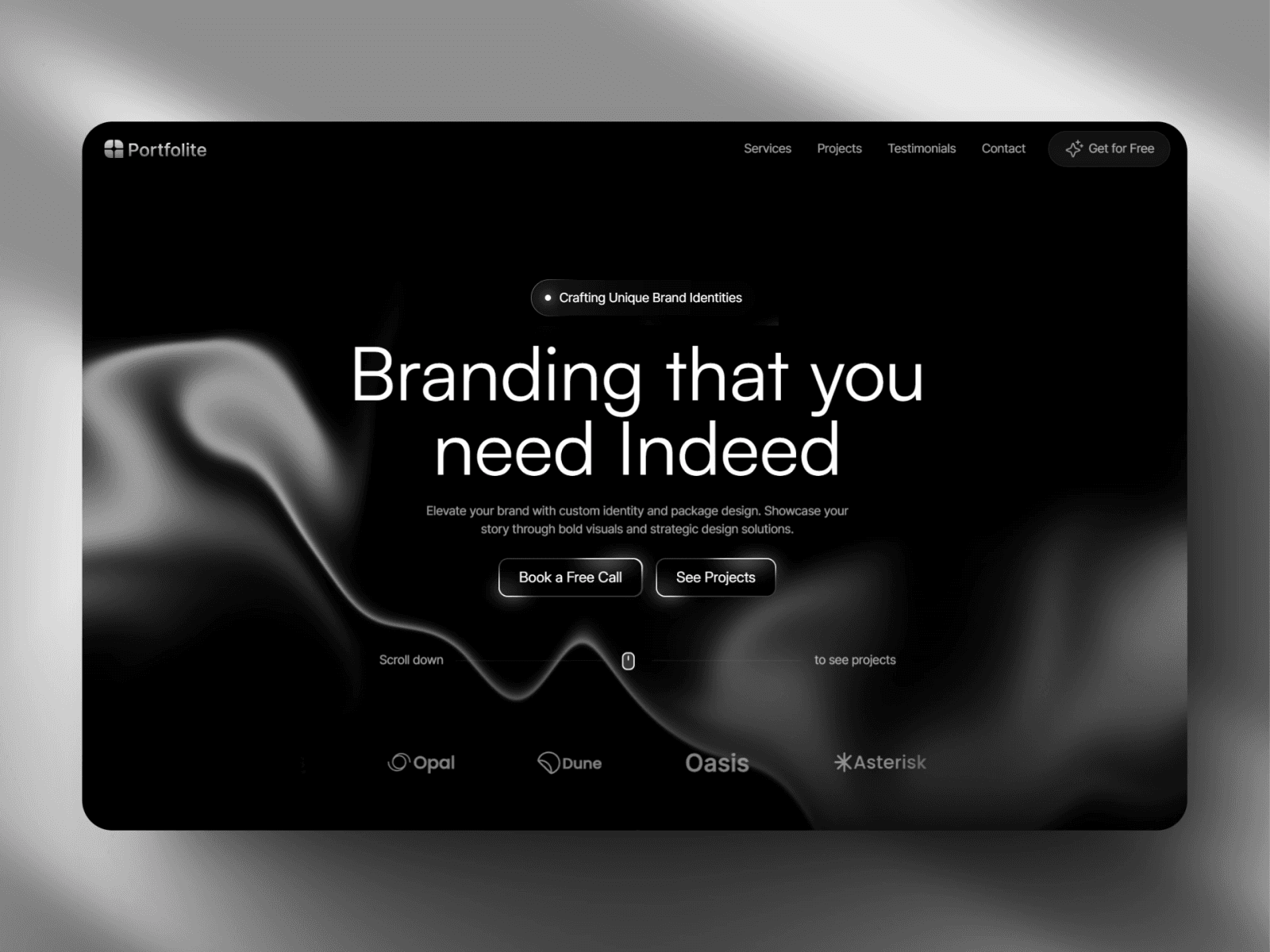
Key features include customizable sections, built-in animations, and seamless Framer CMS integration. The minimalist design ensures your portfolio looks sharp on any device.
This template is best for designers, developers, and agencies who want a sleek, modern presence. As one of the leading free portfolio website templates, it offers a strong balance between performance and aesthetics.
Pros:
Easy to personalize with Framer’s visual editor
Excellent performance and quick load times
Backed by Framer’s community support
Cons:
Some advanced features require Framer Pro
Initial learning curve for new users
Portfolite is a reliable, stylish option among free portfolio website templates for those prioritizing speed and simplicity.
Cream and White Photographic Wedding Photographer Portfolio & Resume Website (Canva)
This Canva template is crafted for photographers and visual artists. Its elegant cream and white palette provides a sophisticated backdrop for image galleries and project showcases.

The template includes integrated resume sections and customizable layouts, making it easy to present both visual work and professional experience. Contact and booking forms are built in, streamlining client inquiries.
Perfect for wedding photographers, visual artists, and anyone focusing on imagery, this is among the most versatile free portfolio website templates for showcasing photos.
Pros:
Beautiful, mobile-optimized galleries
Straightforward editing and layout adjustments
Built-in contact and booking sections
Cons:
Geared more towards image-heavy portfolios
Less flexibility for text-centric presentations
This template is a standout for photographers seeking refined, user-friendly free portfolio website templates.
JORGE (Framer)
JORGE is a bold, interactive template from Framer that leverages strong typography and dynamic transitions. Its design is perfect for personal branding and making a memorable impression.
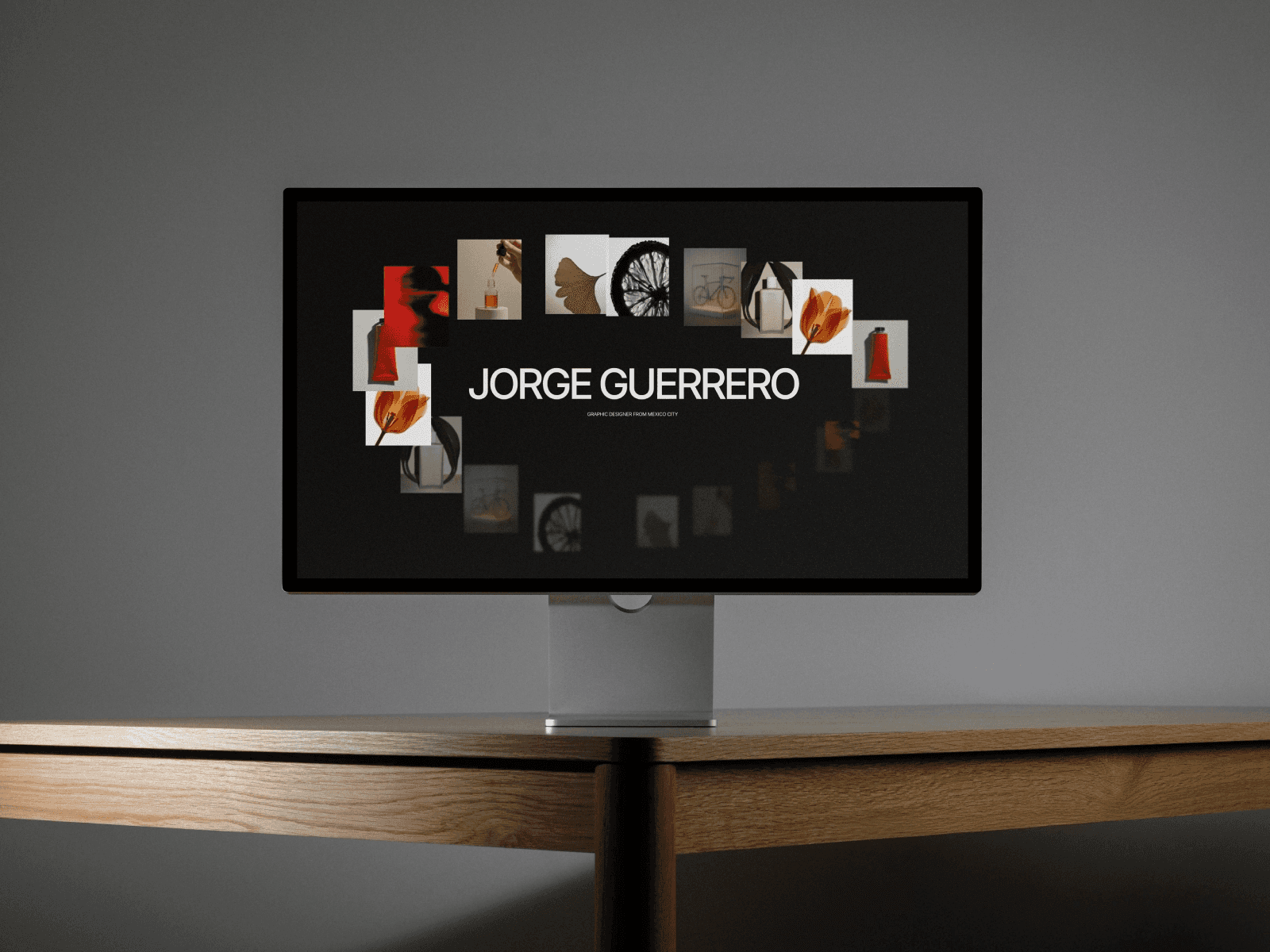
The template’s interactive elements and smooth transitions engage visitors, while customizable sections allow for tailored content. JORGE is ideal for creative professionals, digital marketers, and freelancers.
Its placement among the top free portfolio website templates is due to its modern visual hierarchy and adaptability.
Pros:
Dynamic, visually striking layout
Easy section customization with Framer’s editor
Engaging user experience
Cons:
Slight learning curve for beginners
Template-specific support may be limited
JORGE is a top pick for those wanting a standout, interactive experience in their free portfolio website templates.
Black Simple Dark Blogger Bio Link Website (Canva)
This Canva template features a dark, minimalist design tailored for bloggers and content creators. The link-in-bio style and strong social media integration make it easy to connect audiences to your work.
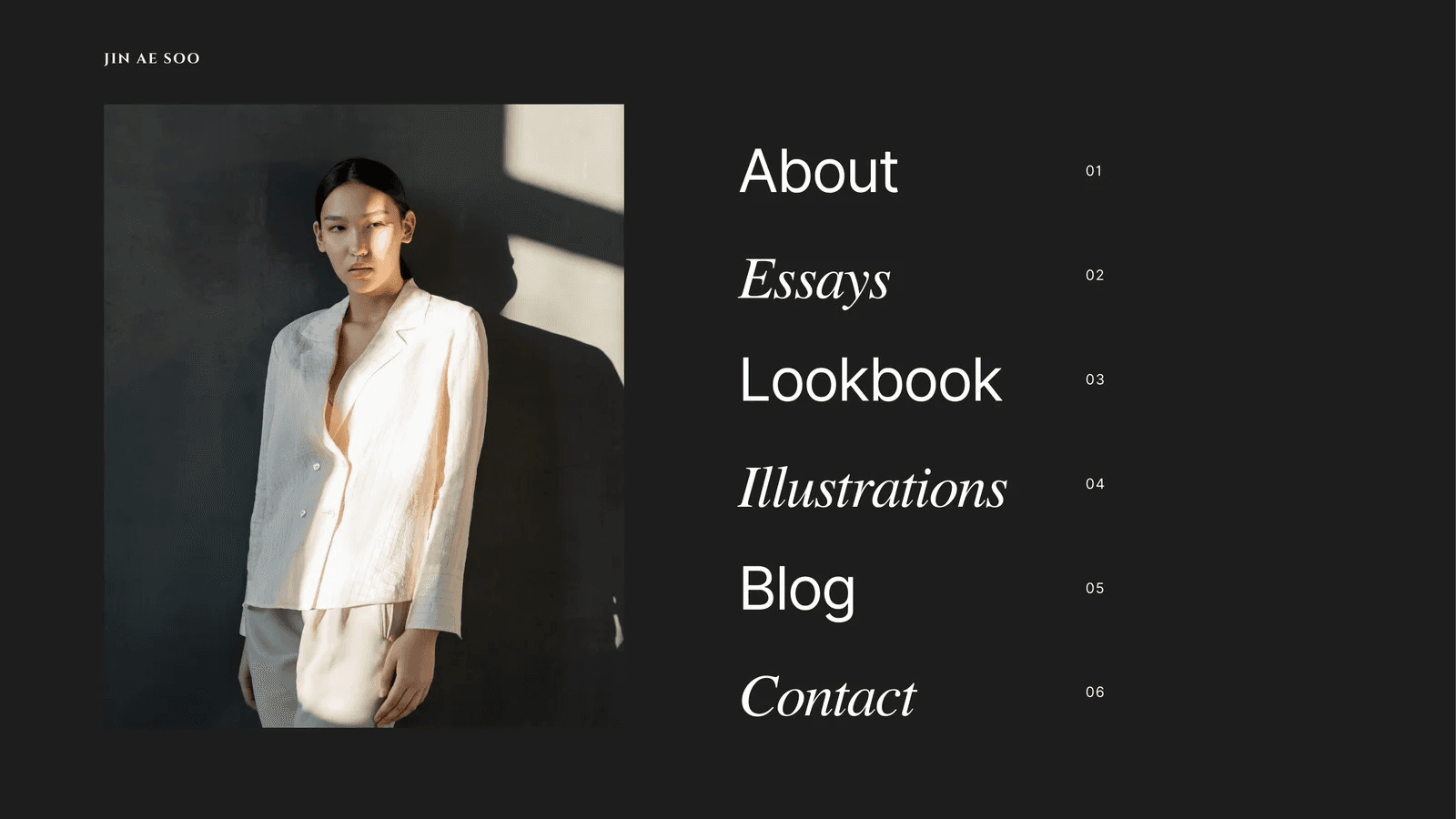
Key features include simple navigation, fast setup, and mobile responsiveness. For users managing multiple links or channels, this template excels among free portfolio website templates.
Pros:
Quick to set up and update
Visually impactful dark mode
Integrates with Canva’s broader design tools
Cons:
Limited for displaying detailed projects
Best for concise, link-focused portfolios
If you want a streamlined, modern look, this template is a strong choice from the current range of free portfolio website templates.
Palmer (Framer)
Palmer offers a grid-based, image-first design that adapts well to a range of creative industries. With customizable color schemes and easy section rearrangement, it supports both visual and written content.

The template is especially strong for agencies, photographers, and illustrators seeking professional free portfolio website templates. Its responsive design ensures a seamless experience across all devices.
Pros:
Adaptable, professional appearance
Fast performance thanks to Framer’s platform
Modular sections for flexible content arrangement
Cons:
Some Framer familiarity recommended
Less suited for portfolios with heavy text
Palmer stands out for those who value design and adaptability in free portfolio website templates.
Editorial Photography Website in Tan Sleek and Simple Style (Canva)
This Canva template is built for editorial photographers and stylists. Its tan color scheme and minimalist navigation create a sophisticated, uncluttered showcase for images.
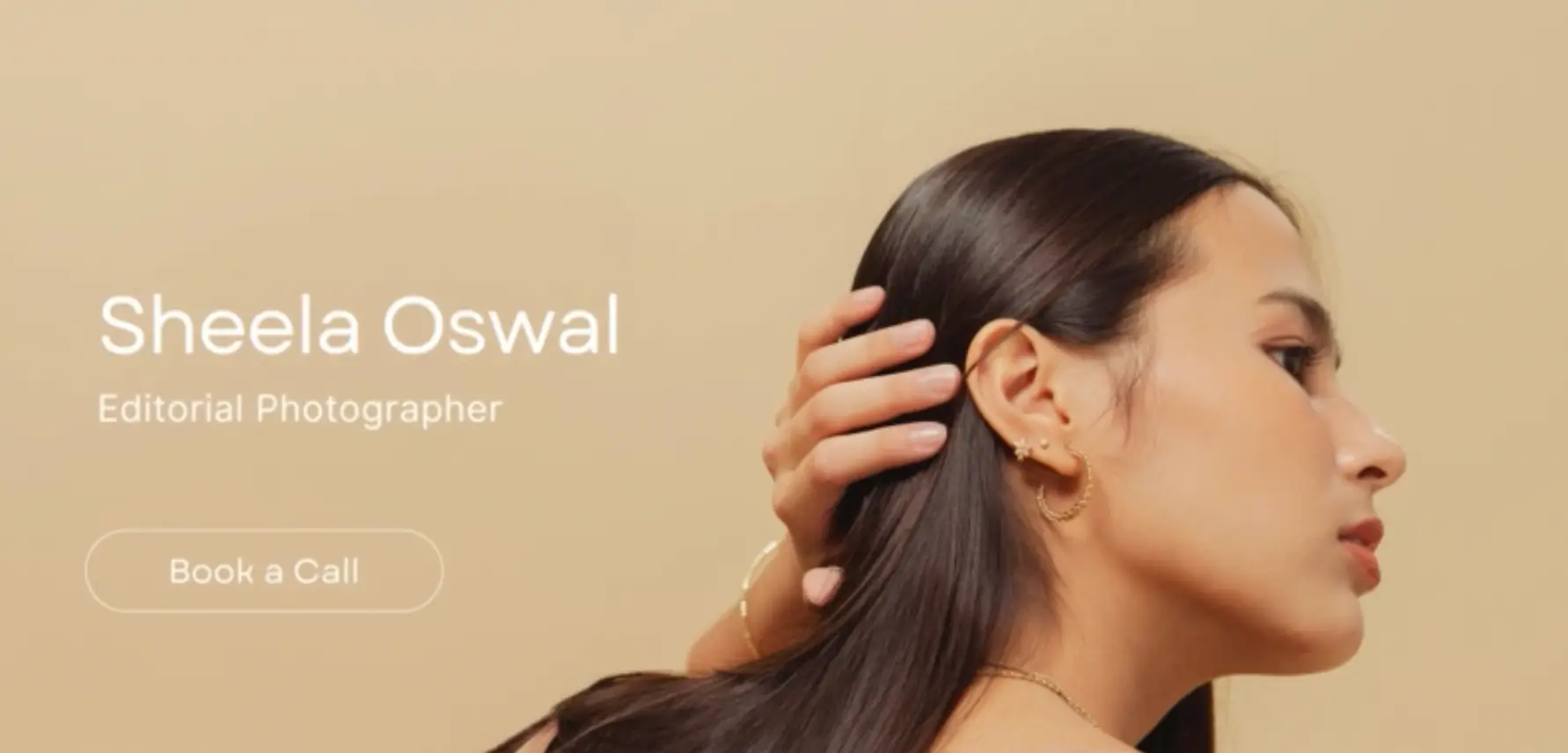
Editorial-style photo galleries highlight visual work, while customizable fonts add a personal touch. This is one of the most visually appealing free portfolio website templates for artists who want their work to speak for itself.
Pros:
Clean, elegant aesthetic
Easy to update with new projects
Fully mobile-friendly
Cons:
Limited space for in-depth project details
Primarily image-focused
This template is ideal for those prioritizing visual storytelling through free portfolio website templates.
Portavia (Framer)
Portavia delivers a modern, interactive experience with full-width sections and animated transitions. Strong call-to-action buttons help guide visitors to connect or inquire.
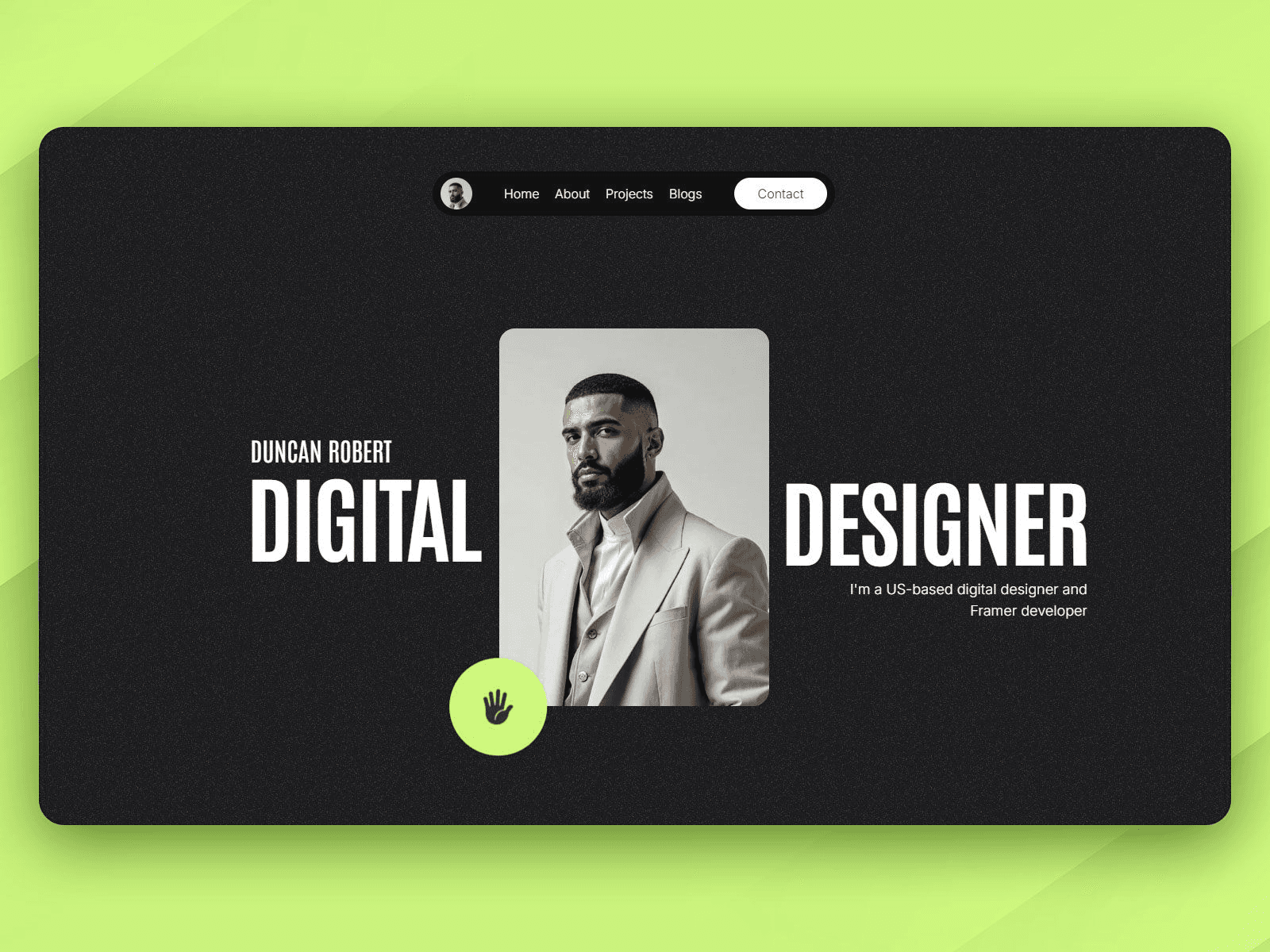
With customizable layouts and performance optimization, Portavia appeals to freelancers, consultants, and business professionals seeking effective free portfolio website templates.
Pros:
Engaging, interactive design
Built-in performance features via Framer
Strong focus on user interaction
Cons:
Some advanced features require Framer Pro
Less suited for extensive portfolios
Portavia is a compelling option for professionals looking for conversion-driven free portfolio website templates.
Beige and Green Classy Minimal Marketing Website (Canva)
This template combines a minimalist beige and green palette with marketing-focused sections. It is highly adaptable, supporting a range of branding needs for marketers, consultants, and small businesses.

Customizable branding and mobile optimization make it easy to create a professional presence. Its simplicity helps users stand out in the crowded field of free portfolio website templates.
Pros:
Clean, adaptable design for multiple industries
Seamless integration with Canva’s tools
Quick customization for branding
Cons:
Limited advanced features
Best for straightforward, simple portfolios
For those needing elegance and simplicity, this template is a reliable choice among free portfolio website templates.
YUYA (Framer)
YUYA boasts a creative grid layout and dynamic project showcases. Customizable backgrounds and smooth animations ensure every portfolio stands out.
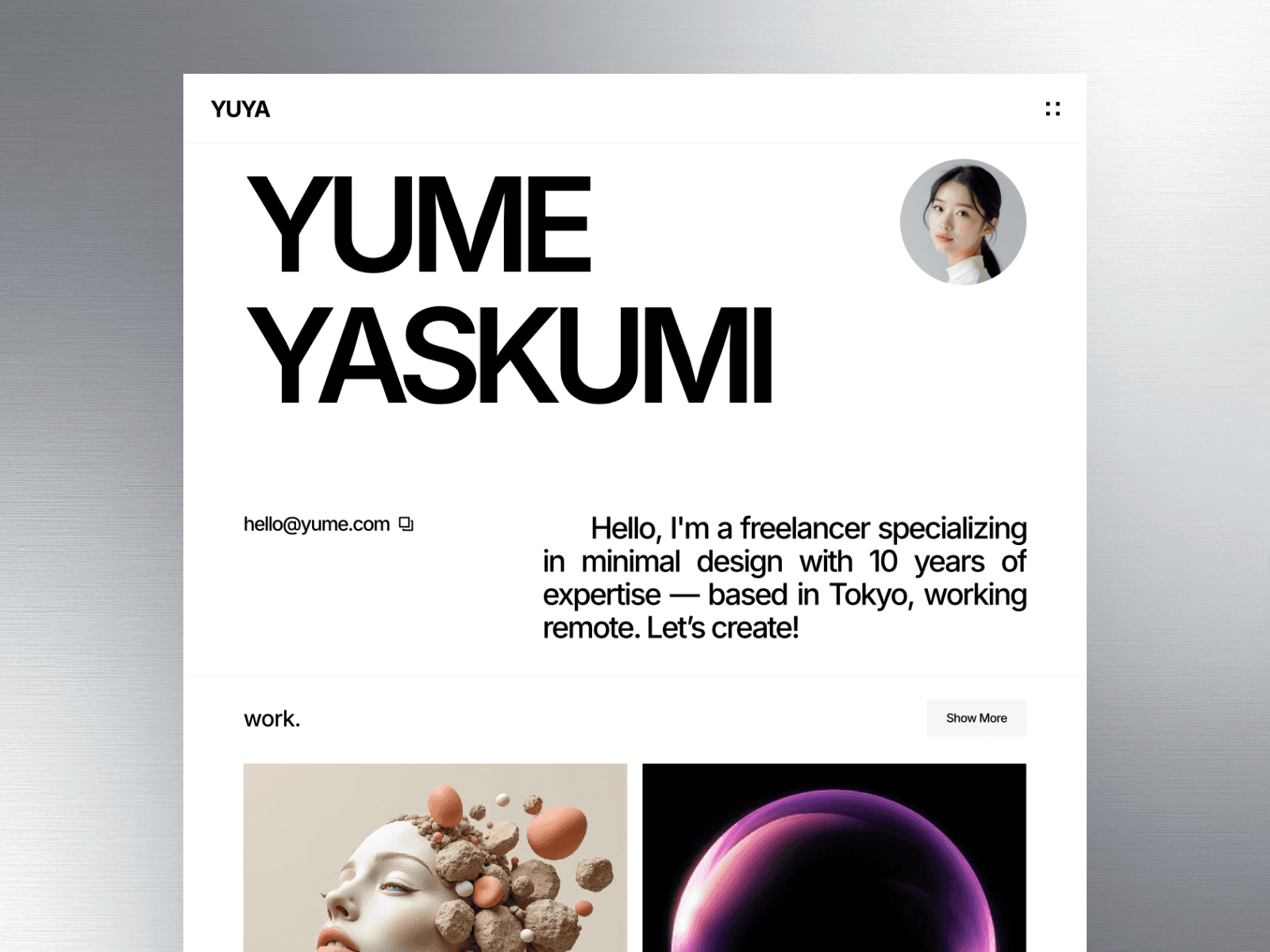
Best for designers, illustrators, and creative professionals, YUYA is among the most innovative free portfolio website templates available. Its eye-catching design makes a strong impression.
Pros:
Unique presentation style
Easy to modify with Framer’s tools
Smooth, modern animations
Cons:
Some Framer experience beneficial
Less suited for traditional portfolios
YUYA is a standout for creatives wanting to push the boundaries with their free portfolio website templates.
Comparison Table: Top 10 Free Portfolio Website Templates for 2026
Template Name | Platform | Best For | Key Feature | Customization | Mobile Friendly |
|---|---|---|---|---|---|
Personal Brand Anti-Design | Canva | Creatives, Students | Bold anti-design | High | Yes |
Portfolite | Framer | Designers, Agencies | Minimalist, fast | High | Yes |
Cream & White Photographer | Canva | Photographers | Elegant gallery | High | Yes |
JORGE | Framer | Creatives, Marketers | Bold typography | High | Yes |
Black Simple Blogger Bio | Canva | Bloggers, Influencers | Link-in-bio | Moderate | Yes |
Palmer | Framer | Agencies, Photographers | Grid-based | High | Yes |
Editorial Photography Tan | Canva | Photographers, Stylists | Editorial gallery | Moderate | Yes |
Portavia | Framer | Freelancers, Consultants | Animated CTA | High | Yes |
Beige & Green Marketing | Canva | Marketers, Businesses | Minimalist, marketing | Moderate | Yes |
YUYA | Framer | Designers, Creatives | Creative grid | High | Yes |
For those seeking even more inspiration or variety, you can explore additional Best free Framer templates to expand your options beyond these highlights.
Each of these free portfolio website templates is designed for easy setup, strong branding, and modern performance. Selecting the right template can help you put your best foot forward in 2026, regardless of your industry or experience level.
Key Features to Look for in a Free Portfolio Template
Choosing the right free portfolio website templates can significantly impact your online presence. With so many options in 2026, knowing which features to prioritize will help you build a portfolio that stands out and grows with your career.
Responsive and Mobile-First Design
In 2026, mobile optimization is non-negotiable for free portfolio website templates. More than 60 percent of global web traffic now comes from mobile devices, making responsive design essential for reaching clients and employers. A recent report showed mobile web traffic hits record 62.7%, so your portfolio must look flawless on any screen.
Templates from platforms like Framer and Canva are built with mobile-first principles, ensuring smooth navigation and fast load times on smartphones and tablets. Prioritize templates that automatically adjust layouts based on device type.
Customization and Branding Options
Personal branding is crucial for standing out, and free portfolio website templates should offer flexible customization. Look for templates that allow changes to color schemes, fonts, and layout structures without needing advanced coding skills.
Many templates feature drag-and-drop builders, making it easy for anyone to create a unique portfolio. Some also support custom CSS for advanced users, giving you full control over your brand’s visual identity.
Drag-and-drop editing for quick updates
Preset color palettes and font options
Support for personal logo and imagery
Review templates with real-world branding examples to ensure they align with your vision.
Integration and Functionality
Modern free portfolio website templates need to go beyond visuals. Seamless integration with social media, contact forms, and analytics tools is now expected. This functionality helps you connect with your audience, gather leads, and measure your portfolio’s performance.
Leading templates also support e-commerce features, allowing you to sell products or services directly from your site. Choose templates that make adding integrations simple, even if you have no technical background.
SEO and Performance Optimization
Visibility is key, and free portfolio website templates that include built-in SEO tools give you an edge. Look for templates with clean code, fast load times, and structured data support. These features help your portfolio rank higher in search engines.
Performance benchmarks from Canva and Framer show that well-optimized templates load quickly and retain visitors. Prioritize templates that offer meta tag editing, sitemap generation, and image optimization.
Feature | Framer Templates | Canva Templates |
|---|---|---|
SEO Tools | Yes | Yes |
Fast Load Times | Yes | Yes |
Image Optimization | Yes | Yes |
Security and Reliability
Your portfolio must protect both your data and your visitors’ privacy. The best free portfolio website templates include SSL support and privacy policy templates. Regular updates and active support communities ensure your site stays secure.
Check how often templates are updated and whether user forums or help centers are available. Reliable templates minimize downtime and security risks.
Accessibility and Inclusivity
Accessible design ensures your portfolio reaches the widest possible audience. Templates that follow ADA compliance guidelines and include features like high-contrast modes, screen reader support, and keyboard navigation are essential.
Platforms like Framer and Canva continue to improve accessibility features, helping creatives present their work to everyone, regardless of ability. Make accessibility a core part of your template checklist.
Scalability and Future-Proofing
As your career grows, your portfolio needs may change. The best free portfolio website templates are modular and support easy updates or expansion. Look for templates that allow you to add new sections, projects, or integrations without a complete redesign.
Templates that receive frequent updates and offer scalability features will keep your portfolio relevant in the years ahead.
How to Get Started with Your Chosen Template
Launching your professional presence online is easier than ever with free portfolio website templates. The right approach can help you create a standout portfolio that opens doors to new opportunities.
Begin by reviewing your goals and the type of work you want to showcase. Consider your industry, target audience, and whether you need a visual, text-heavy, or mixed-content portfolio. Next, browse popular free website templates to find options that fit your brand and offer the features you need.
Once you select a template, customize it to reflect your unique style. Adjust colors, fonts, and layout to match your branding. Add high-quality visuals, compelling case studies, and testimonials to build credibility. Make sure your contact and social media links are easy to find.
Leverage community resources and tutorials from platforms like Framer and Canva if you need guidance. These communities provide tips, troubleshooting, and inspiration for your portfolio journey.
Avoid these common mistakes:
Overloading your site with too many projects or cluttered visuals
Neglecting mobile optimization or accessibility
Using generic content instead of tailoring your message
Forgetting to test links and contact forms before launch
Finally, remember that free portfolio website templates are not a one-time solution. Regularly update your work, refine your branding, and adapt as your career evolves. With a strategic approach, your portfolio will continue to grow and impress.
Share article


$249
$3601
All Access
Save with our all access bundle - get access to all premium Framer templates.
38
+
Framer Templates
51
+