Jan 2, 2026

Pawel Gola
Framer & Webflow Expert
Creating an online course website can be overwhelming, but Framer templates simplify the process. These pre-designed templates help you build professional course platforms quickly, without coding. From free options like Course Hub to premium choices like Monetize ($79), these templates include essential features like CMS integration, responsive design, and payment tools. They cater to various needs, whether you’re launching a single course or managing a full academy.
Key Highlights:
Course Hub: Free, 9 pre-designed pages, supports FramerAuth for gated content.
Courseline: $59, sleek dark theme, focuses on enrollment.
FastCourse: Free, Quick setup, fully responsive, no-code customization.
Finlaxy: $49, CMS integration, drag-and-drop tools.
Monetize: $79, AI-ready features, SEO-optimized.
MonksHub: $59, tailored for agencies and startups.
Speako: $54, Ideal for video-based courses with customizable layouts.
Tradelab: $49, Designed for corporate training programs.
CourseSite: $59, supports multiple courses and project-based learning.
Educore: $59, built for UI/UX design courses with career-focused features.
Quick Comparison:
Template | Price (USD) | CMS Integration | Best Use Cases |
|---|---|---|---|
Course Hub | Free | Yes | Membership platforms, new instructors |
Courseline | $59 | Yes | Single-course launches |
Fastcourse | Free | Yes | Rapid course deployment |
Finlaxy | $49 | Yes | Dynamic course management |
Monetize | $79 | Yes | High-conversion course platforms |
Monks Hub | $59 | Yes | Agencies, startups |
Speako | $54 | Yes | Video-based courses |
Tradelab | Free | Yes | Corporate training |
CourseSite | $59 | Yes | Web design education |
Educore | $59 | Yes | UI/UX design courses |
Whether you're an individual instructor or managing a large-scale platform, these templates offer tailored solutions to meet your needs. Explore the Framer Marketplace to find the perfect fit and launch your course site today.
Framer Course Templates Comparison: Features and Pricing Guide
1. Course Hub - Online Course Framer Template
Course Hub is a free template designed for online course creators who want a polished, professional platform without spending upfront. With over 36,000 views on the Framer Marketplace, it’s clear that many instructors have found it useful.
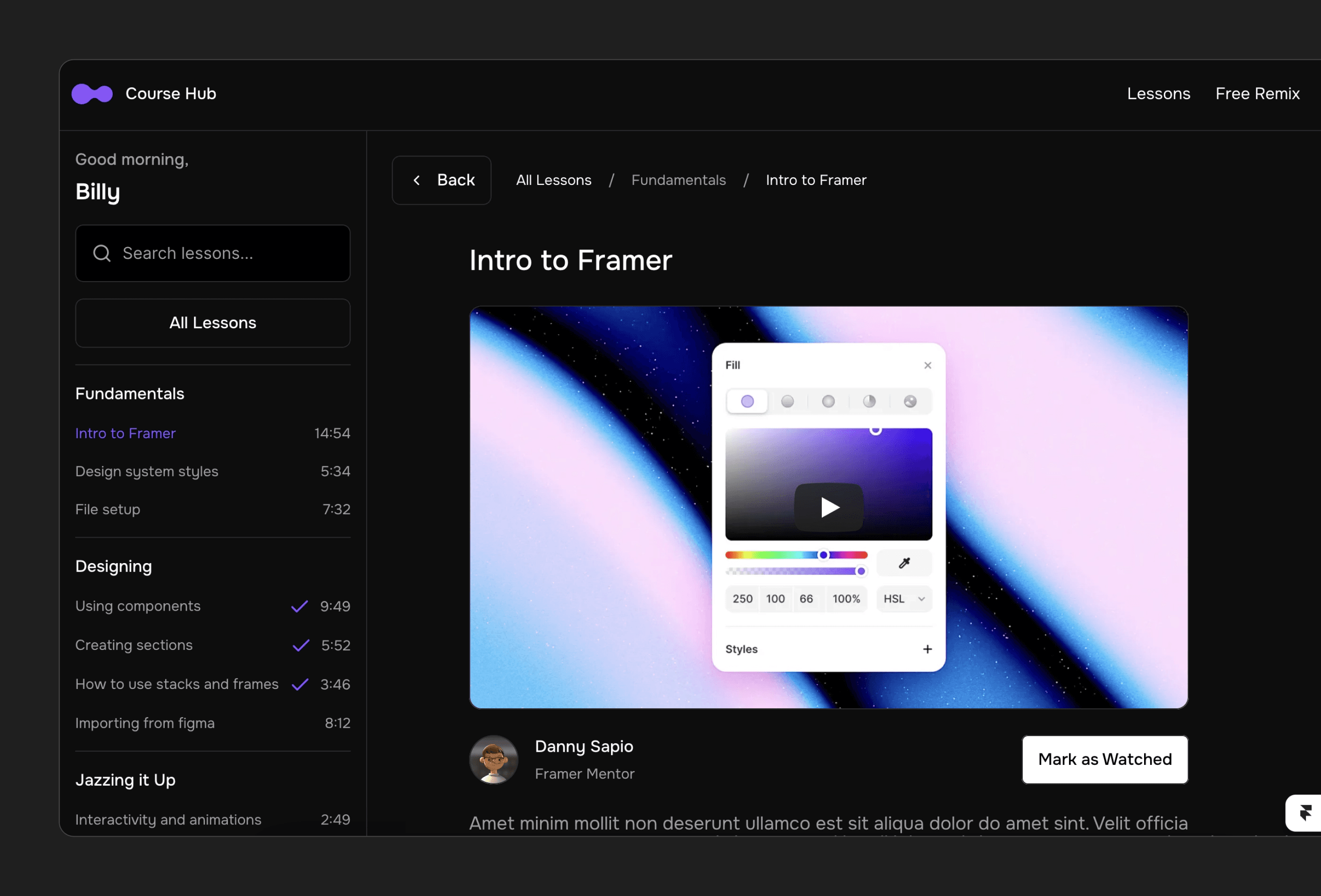
Course Hub is free to use and comes with 9 pre-designed pages: Home, Upgrade, Course Pages, Sign In, Sign Up, Account, Forgot Password, Reset Password, and 404. However, to enable membership functionality, you’ll need the paid FramerAuth add-on.
CMS Integration
Using Framer’s built-in CMS, Course Hub allows you to manage your course catalog and lesson content with ease. Whether you’re adding new courses or updating existing material, you can handle it all without writing a single line of code. Plus, the FramerAuth integration ensures your gated content is secure.
This setup ensures a streamlined experience across all devices.
Responsiveness
Course Hub is fully responsive, meaning it looks and works great on mobile phones, tablets, and desktops. From course previews to purchasing workflows, everything is designed to function smoothly, no matter the device.
Target Use Cases
Course Hub is perfect for individual experts and new instructors looking to turn their knowledge into a revenue-generating platform. It provides a solid starting point to share your expertise with the world.
View Course Hub Framer Template Now
2. Courseline - Online Course Framer Template
Courseline is all about turning visitors into students. This $59 template, available on the Framer Marketplace, has already racked up over 4,500 views, making it a favorite among educators aiming to boost enrollment.
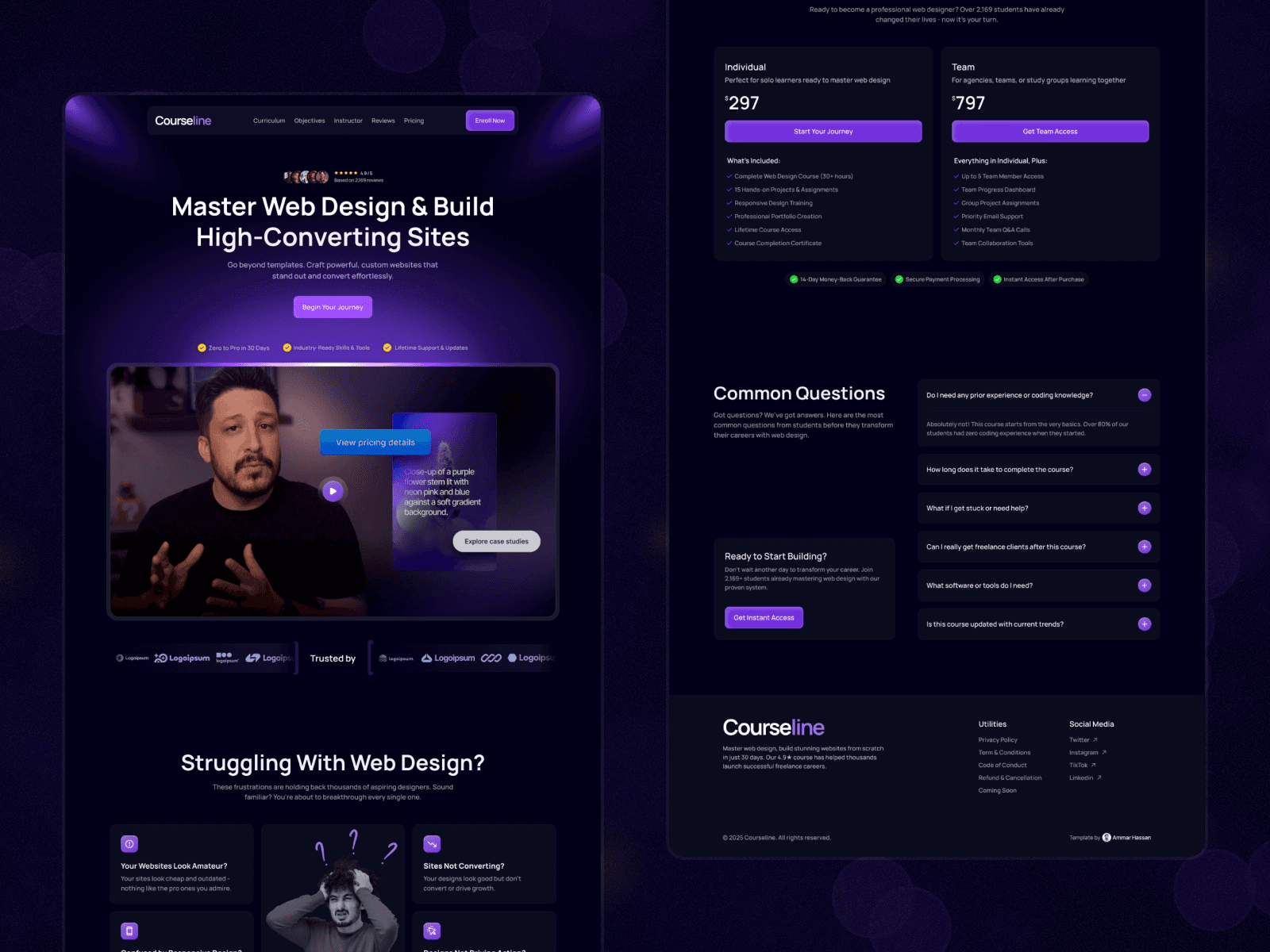
Courseline comes with four key pages: Home, Coming Soon, Legal, and 404. Its sleek dark theme, enhanced with gradient accents and smooth animations, gives off a polished and professional vibe that keeps visitors engaged.
Responsiveness
Designed to be fully responsive, Courseline ensures quick loading times across all devices - whether it's a phone, tablet, or desktop.
Customization
The template is simple to tailor to your brand’s needs. Its layout includes sections for testimonials and social proof, both of which are powerful tools for driving conversions.
"Every element is designed to guide visitors toward enrollment with clear, persuasive messaging." – Ammar Hassan, Creator
Target Use Cases
Courseline is perfect for educators who prioritize enrollment. Whether you're launching your first course or building excitement for an upcoming one using the "Coming Soon" page, this template is built to focus on conversions. It’s not meant for managing a large course catalog but rather for creating a streamlined, high-impact experience.
View Courseline Framer Template Now
3. FastCourse - Online Course Framer Template
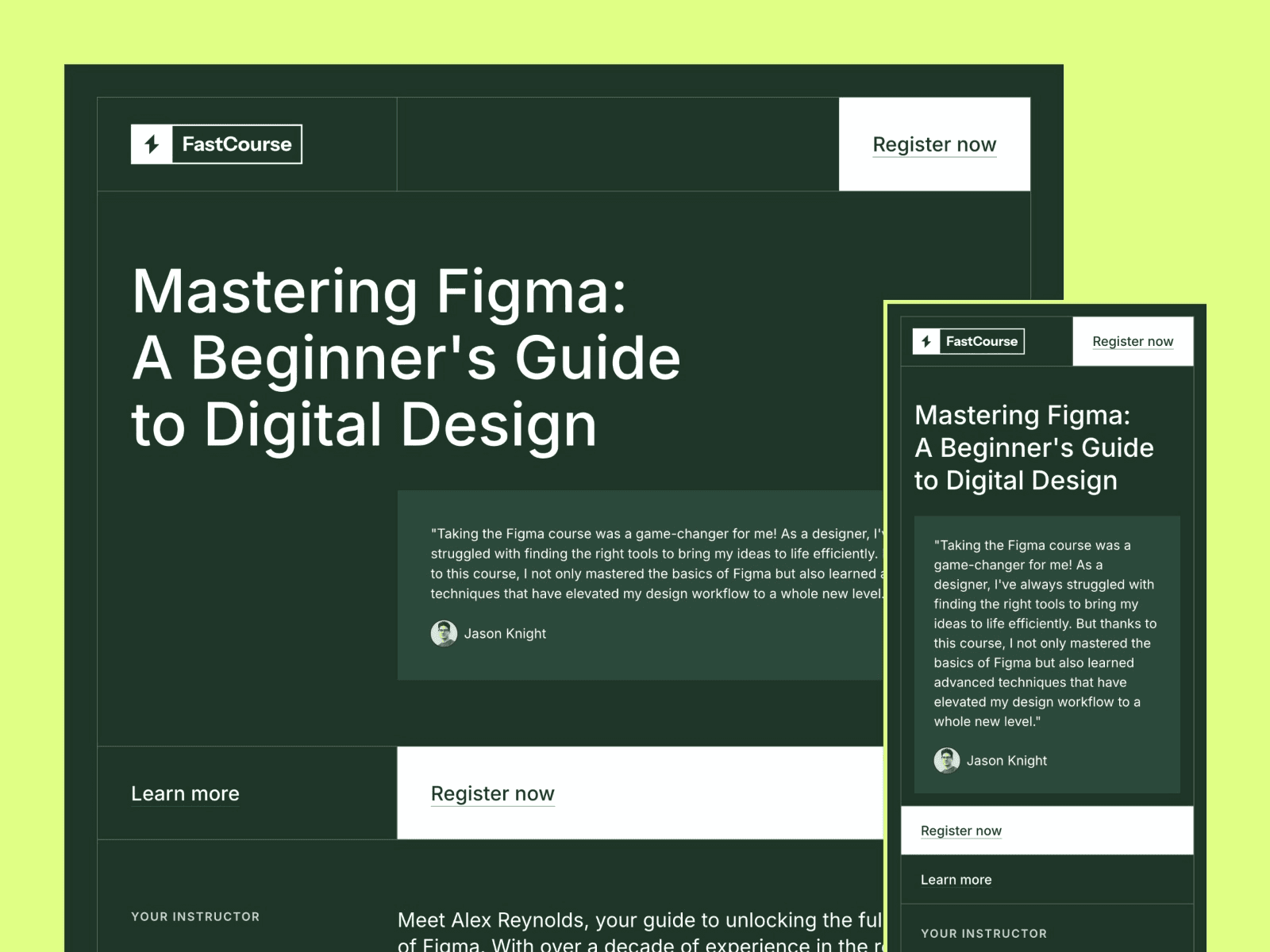
FastCourse is designed for those who want to launch courses quickly without unnecessary complications. Pricing aligns with the standard terms of the Framer Marketplace. Its layout naturally adjusts to fit any device, ensuring a seamless experience for users.
Responsiveness
FastCourse is fully responsive and retina-ready, meaning your content will look sharp and professional on any screen, whether it’s a smartphone, tablet, or desktop.
Customization Level
With global style variables and no-code customization, FastCourse makes it easy to update content, tweak styles, and adjust layouts in minutes. This feature is especially useful for educators or course creators who need to set up their sites quickly without diving into complex design tools.
Target Use Cases
FastCourse is ideal for creators who need to launch fast and refine as they go. Whether you're testing a new course concept, gauging interest, or simply want to get your material in front of students without spending weeks on design, this tool provides a practical and efficient solution. Its focus on speed and simplicity makes it a great choice for immediate course deployment.
View FastCourse Framer Template Now
4. Finlaxy - Online Course Framer Template
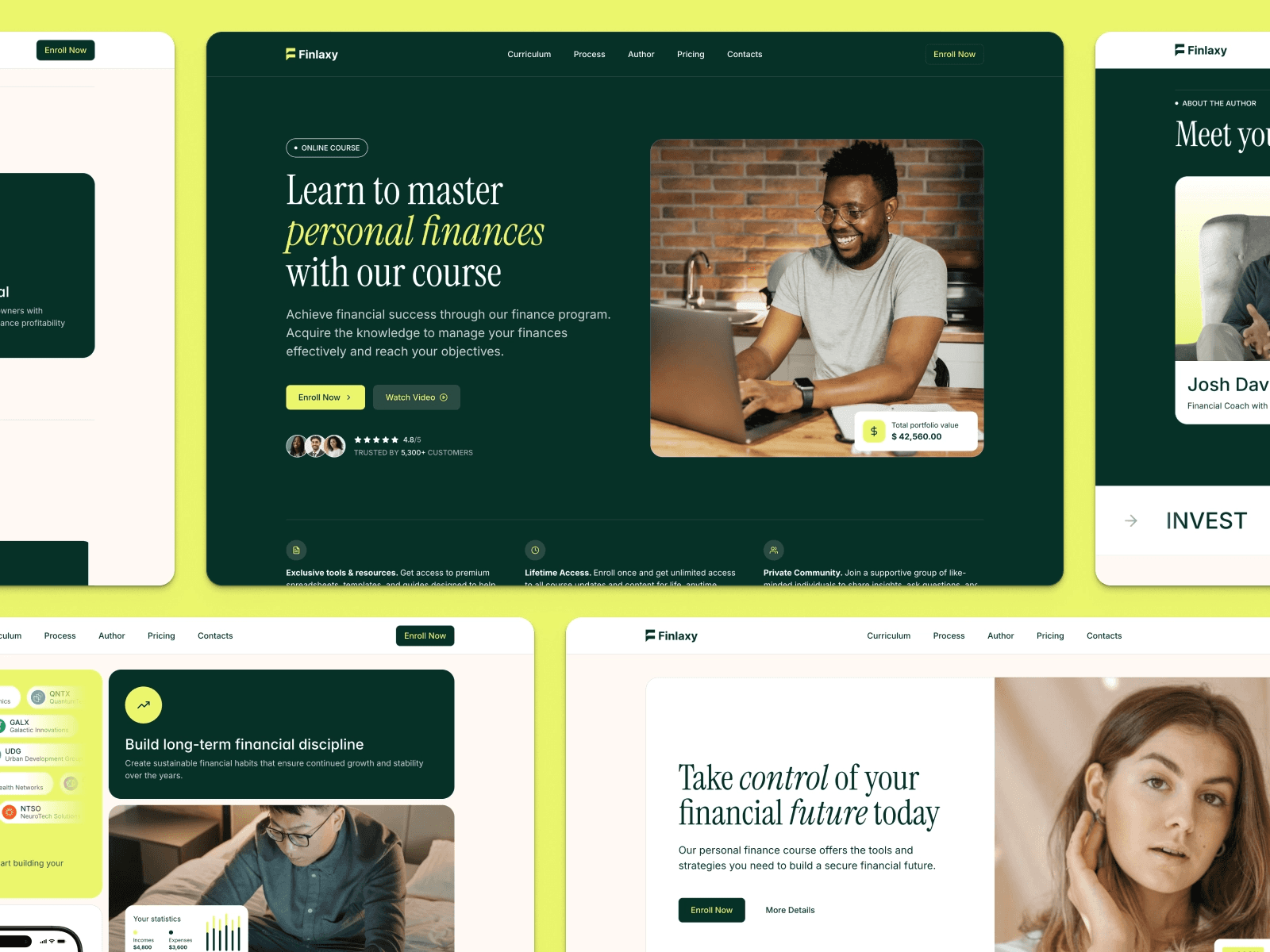
Created by Illia Shytov, Finlaxy is a premium Framer template designed with online course creators and educational platforms in mind. Priced at $49, it’s tailored to showcase your curriculum while simplifying the registration process.
Responsiveness
Finlaxy is built to look great on any device. Its fully responsive design ensures a seamless experience, complete with clean layouts and smooth micro-interactions, whether viewed on a smartphone, tablet, or desktop.
Customization Options
This template makes customization a breeze. With its drag-and-drop, no-code tools, you can easily tweak text, images, and styles to match your brand without needing any technical expertise.
CMS Integration
Finlaxy comes with an integrated CMS, making it simple to manage dynamic content. You can effortlessly update course details, add new lessons, or share educational materials. This feature ensures your platform always stays current and engaging.
Ideal For
This template is perfect for online course creators, schools, and educational resource providers who want a professional, user-friendly platform. It’s designed to highlight the quality of your curriculum while making enrollment smooth and hassle-free. If presenting educational content with credibility and ease is your goal, Finlaxy has you covered. Up next, we’ll dive into another template built to boost course conversions.
View Finlaxy Framer Template Now
5. Monetize - Online Course Framer Template
Designed by Ramish Aziz, Monetize is a premium Framer template available for $79. It offers high-end features at a price point that makes it accessible for many.

Responsiveness
This template is built with a fully responsive design, ensuring smooth performance across smartphones, tablets, and desktops. It’s particularly tailored to enhance the student registration process and showcase curriculums effectively, making it simple for learners to explore and enroll in courses.
CMS Integration
Monetize comes with an integrated content management system (CMS) that makes handling course materials, lessons, and dynamic content hassle-free. Whether you’re updating the curriculum, adding new modules, or tweaking existing content, the process is quick and straightforward. This ensures your platform stays current as your course catalog grows.
Customization Options
Thanks to Framer's no-code customization tools, you can easily adjust layouts, tweak brand colors, and choose fonts to suit your style - all without any coding knowledge. As a forward-thinking template, it includes AI-ready components and modern SEO features to help your courses rank higher in search engines.
Ideal Users
Monetize is perfect for course creators, educators, and digital product sellers seeking a platform that’s designed to convert. If your goal is to launch a professional online learning site that builds credibility and drives enrollment, this template equips you with everything you need to succeed.
View Monetize Framer Template Now
6. MonksHub - Online Course Framer Template
MonksHub, available for $59, is a sleek and professional template designed by Design Monks. It’s tailored to help course creators and agencies build trust and drive conversions.

Responsiveness
This template works seamlessly across all devices - whether it’s a smartphone, tablet, or desktop. Your content will look great no matter where it’s viewed.
CMS Integration
With built-in CMS functionality, Monks Hub makes it easy to manage course details, publish blog posts, and highlight case studies. You can efficiently update your offerings, share insights, and showcase your success stories.
Customization Features
Using Framer’s drag-and-drop editor, you can quickly tweak layouts with pre-designed elements and flexible settings - no need for advanced design skills.
Best Fit
Monks Hub is perfect for agencies, startups, and mid-sized businesses. Whether you’re a marketing expert, SEO consultant, or business coach, this template helps position you as a credible authority while turning visitors into loyal students. Up next, we’ll dive into another template designed to enhance course engagement.
View MonksHub Framer Template Now
7. Speako - Online Course Framer Template
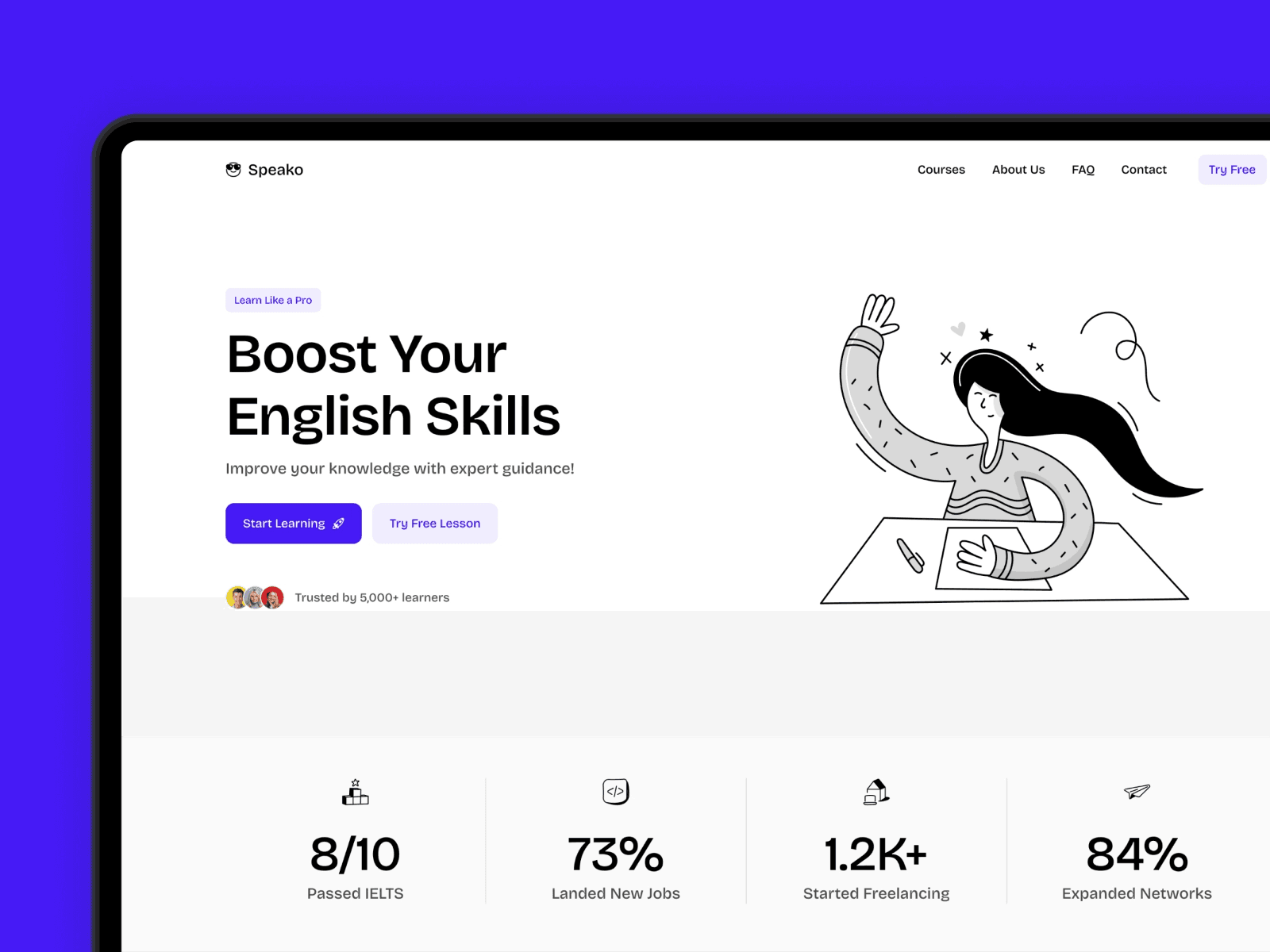
Speako is a landing page template designed to turn visitors into students. Its clean typography and well-placed call-to-action buttons are crafted to encourage enrollment.
CMS Integration
With built-in CMS functionality, Speako makes managing your courses simple. You can organize lessons, modules, and instructor profiles, keeping your curriculum updated and easy for students to navigate.
Responsiveness
Speako looks great on any device. Its fully responsive design ensures the layout stays visually appealing and functional, no matter the screen size.
Customization Options
This template gives you plenty of flexibility. You can adjust global colors and typography, and it includes sections for your curriculum, instructor bios, testimonials, FAQs, and video placeholders. All of these can be easily customized using Framer's editor, making it a great choice for quickly creating polished, high-conversion landing pages.
Who Should Use Speako?
Speako is perfect for creators launching video-based courses or workshops. It’s designed to help you tell your story, showcase your knowledge, and build trust with potential students - all while driving conversions.
View Speako Framer Template Now
8. Tradelab - Online Course Framer Template
Tradelab is a sleek and polished online course template designed for effective content presentation. Its layout focuses on delivering information clearly while incorporating visually appealing elements.
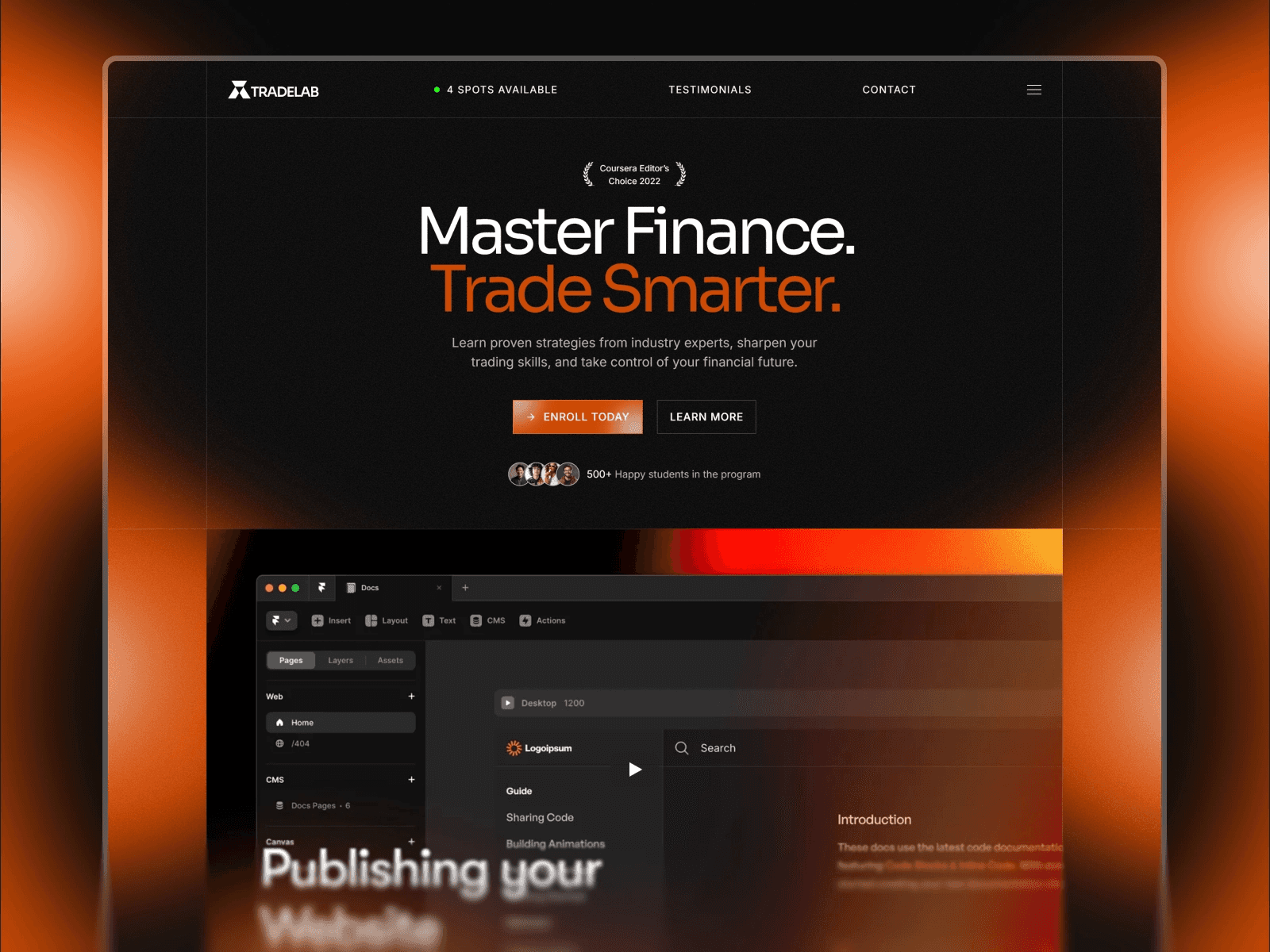
To explore its features and customization options in detail, check out the template's dedicated page. With its straightforward design and focus on usability, Tradelab stands out as a strong choice among course templates.
View Tradelab Framer Template Now
9. CourseSite - Online Course Framer Template
CourseSite offers a sleek and user-friendly platform tailored for web design and development educators. This template is designed to simplify course management while creating an engaging learning environment. With its clean, professional layout and interactive features, it helps keep students focused and involved in the material.
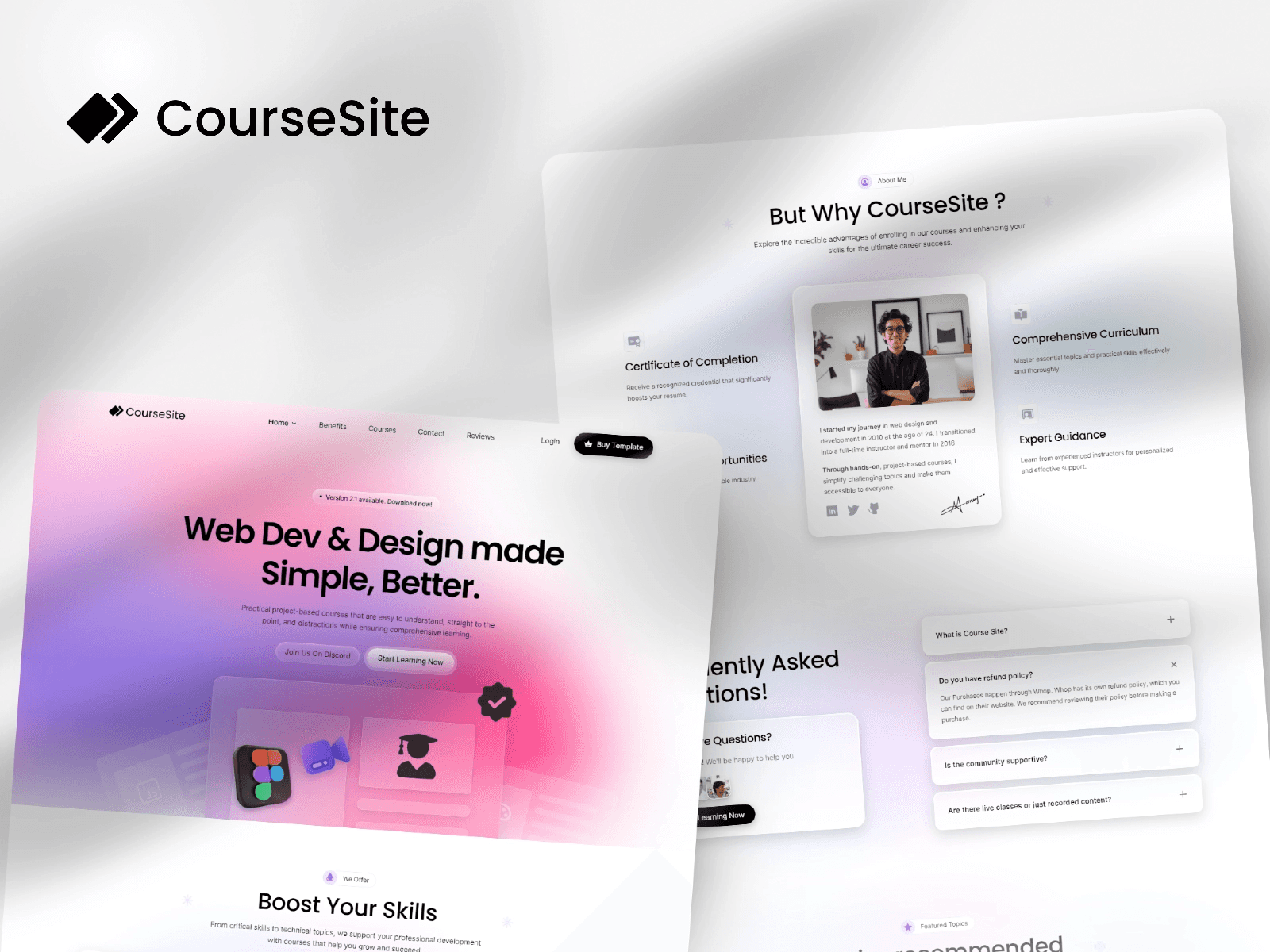
You can purchase the CourseSite template for $59 on the Framer Marketplace. This one-time fee includes source files compatible with both Figma and Adobe CC, giving you the flexibility to customize the look and feel of your course site before launching. It also comes with pre-built pricing structures you can modify to fit your subscription plans.
CMS Integration
The template leverages Framer's CMS to make course management straightforward. You can easily create, organize, and update your course content without needing to write a single line of code. Whether you're teaching UI/UX design or JavaScript, the system supports multiple courses and even accommodates project-based learning. Plus, it includes placeholders for content duration and completion certificates.
Responsiveness
CourseSite ensures a fully responsive experience on all devices. Whether students are accessing your courses on a desktop, tablet, or smartphone, the layout adjusts effortlessly to provide a smooth and user-friendly experience. This adaptability keeps your content accessible and makes the registration process hassle-free.
Customization Level
With the included Figma and Adobe CC source files, you can personalize every aspect of your site. From interactive course grids to FAQ sections, testimonial carousels, and pricing tables, the template is packed with features to help you tailor the platform to your needs. It also includes grids for organizing featured topics and sections that spotlight the unique benefits of your courses. These tools allow you to craft a learning platform that aligns perfectly with your teaching style and goals.
View CourseSite Framer Template Now
10. Educore - Online Course Framer Template
Educore takes a career-focused approach to design education, specifically tailored for professionals in UI/UX design. Unlike generic course templates, this one caters to creative individuals looking to advance their careers. With its vibrant color schemes and bold typography, the template is designed to grab the attention of a design-savvy audience.
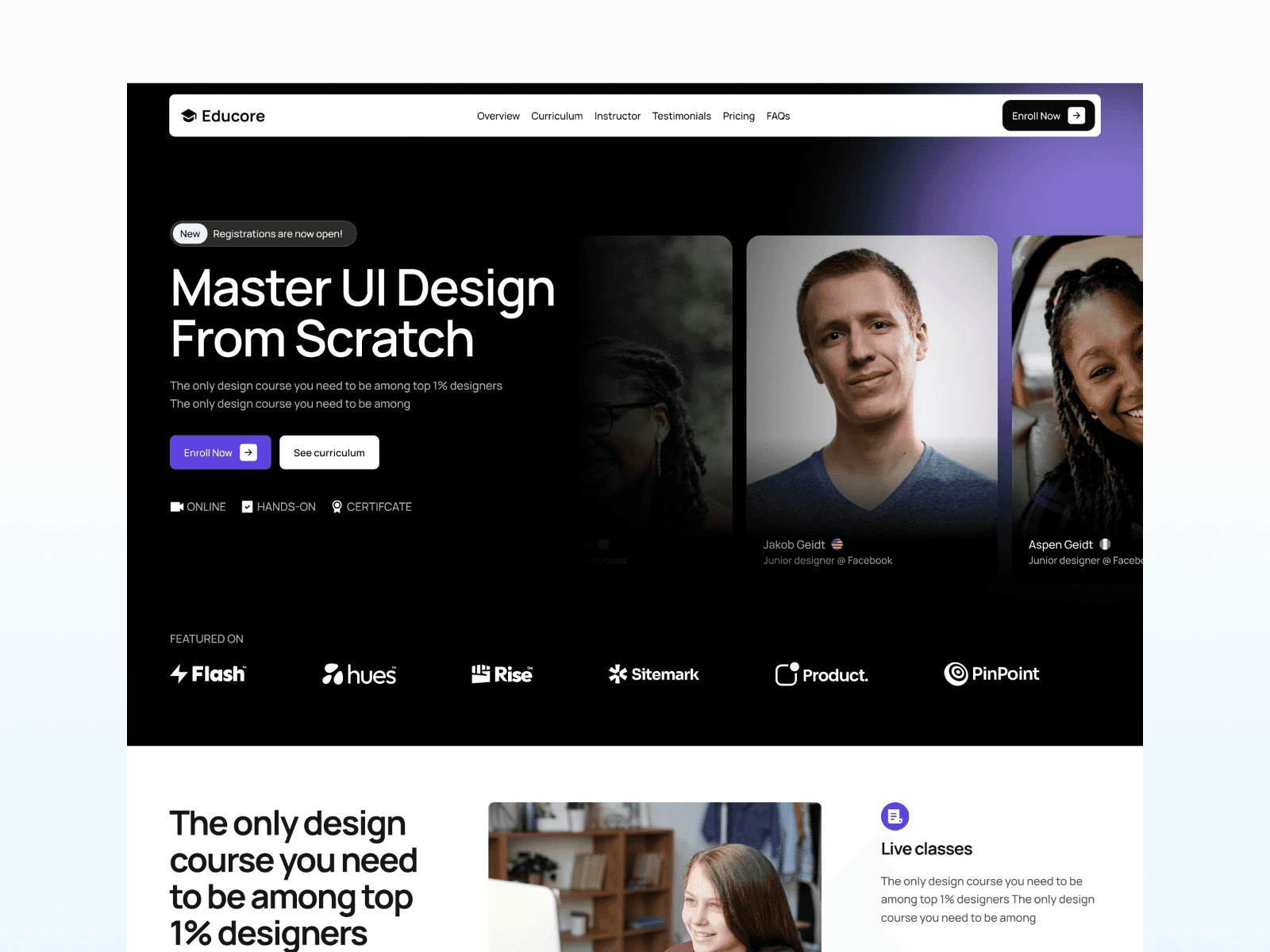
Educore is available for a one-time purchase of $59 on the Framer Marketplace. The creator, Omakase, offers complete support to assist with setup and customization, ensuring you get the most out of your purchase.
CMS Integration
Educore is built for high-conversion landing pages and includes four core pages: Home, 404, Terms, and Privacy. It’s perfect for showcasing a flagship course with detailed information, such as a curriculum breakdown of over 60 hours of video lessons organized into modules. While it’s not designed for managing multiple courses, it excels as a focused sales page for a single, standout offering.
Responsiveness
The template is fully responsive, ensuring a seamless experience on desktops, tablets, and mobile devices. Its design adapts beautifully to any screen size, allowing potential students to explore your course effortlessly, no matter how they access it.
Customization Level
Educore provides extensive customization options. You can adjust colors, typography, and pricing sections to align with your brand. Highlight curriculum details, professional certifications, and portfolio-building features. It also includes pre-built sections for alumni testimonials from major tech companies, an instructor bio, and integration points for community tools like Slack channels. These features help establish credibility and showcase networking opportunities for your students.
Target Use Cases
Educore is ideal for educators launching career-focused design courses. If your course emphasizes professional certifications, portfolio development, and employability, this template is a great fit. With its strategic use of social proof and clear value propositions, Educore is designed to convert visitors into enrolled students, making it a powerful tool for educators teaching specialized design skills.
View Educore Framer Template Now
Template Comparison Table
The table below provides a side-by-side look at key features of some popular online course templates, making it easier to decide which one suits your needs. Each template's strengths align with specific use cases, as outlined below.
Template | CMS Integration | Responsiveness | Customization Level | Best Use Cases |
|---|---|---|---|---|
Course Hub | Yes (with FramerAuth support) | Fully responsive | High | Professional instructors and membership platforms |
Courseline | Landing pages only | Fully responsive | Medium | Single-course launches |
Tradelab | Enterprise-level CMS | Fully responsive | High | Corporate training and curriculum management |
Educore | Yes | Fully responsive | High | Creative courses, especially in UI/UX design |
Course Hub stands out as the only free option, offering seamless integration with FramerAuth, making it perfect for professional instructors or membership-based platforms.
For corporate environments, Tradelab provides an enterprise-ready CMS, ideal for managing complex training programs or multi-layered curricula.
If you're in the creative field, Educore is designed with UI/UX courses in mind, offering high customization to match your aesthetic needs.
Looking to launch a single flagship course? Courseline is a great choice, featuring a sleek dark theme and a conversion-focused landing page.
Each template is tailored to meet different goals, ensuring there's an option for everyone, regardless of the project's scale or focus.
Conclusion
Building a professional course site has never been easier - no coding required. These 10 Framer templates offer everything you need to design a sleek and functional educational platform. From CMS-powered content management to secure membership integration with FramerAuth, there's a template tailored to your needs. Whether you're an individual instructor launching a single course or overseeing a multi-course academy, these templates simplify the process with powerful features.
Thanks to their no-code design, you can launch your course platform in minutes. Each template comes equipped with essential features like lesson pages, pricing tables, and student dashboards. Course Hub is available for free, while premium options range from $49 to $79, ensuring there’s a solution for every budget.
Every template is built with responsive design and optimized performance in mind. Features like dark mode support, mobile-friendly layouts, and smooth animations ensure your site looks great and functions seamlessly across all devices, keeping students engaged.
When selecting a template, think about your main goal. If selling exclusive content is your priority, choose a template with FramerAuth integration. For scaling with multiple instructors, opt for enterprise-level CMS features like those found in Tradelab. And if you're promoting a single flagship course, a conversion-focused landing page like Courseline could be the ideal choice.
Ready to get started? Head over to the Framer Marketplace to explore these templates. Use the preview feature to test the student experience, review the included pages, and ensure the design aligns with your brand. Visit the Framer Marketplace today and find the perfect template to bring your course to life.
FAQs
What should I look for in a Framer template to create an effective online course?
When choosing a Framer template for your online course, look for features that enhance both the student experience and the overall management of your course. The right template can make a big difference in how smoothly everything runs.
Start with templates that offer secure access for premium course content, along with built-in tools for payment processing and student management. It’s also crucial to pick a design that’s responsive across desktops, tablets, and smartphones, ensuring a seamless experience for all users. Accessibility options, like light and dark modes, can further improve usability for a diverse audience.
Additionally, templates that include SEO-friendly features and analytics tools can help you attract more students and better understand their needs. Easy customization options and integrations with tools like email marketing platforms or CRM systems can simplify setup and ongoing operations. These features together create a polished, user-friendly course that’s designed to grow with you.
Should I choose a free or premium Framer template for my online course?
Deciding whether to go with a free or premium Framer template comes down to your budget, project requirements, and future plans. If you're working with limited funds or simply testing an idea, free templates can be a good starting point. They usually come with the basics, like responsive design and simple CMS functionality, but might lack more advanced features such as e-commerce capabilities or membership tools.
On the other hand, premium templates require an upfront investment but often deliver more advanced features. These might include multi-page layouts, built-in payment systems, and access to priority support. If you're aiming for a professional, scalable design that can adapt as your course offerings expand, premium templates are worth considering. Plus, the time saved and potential for increased enrollments might make the extra cost a smart choice in the long run.
Can I customize Framer templates without knowing how to code?
Framer templates are crafted for a no-code workflow, meaning you can fully customize them without needing any programming knowledge. From colors and fonts to images and layouts, everything can be adjusted using the visual editor and the built-in style guide. You can even add new sections with ease, thanks to the intuitive drag-and-drop interface.
With pre-built components and a user-friendly design, these templates make it simple for anyone to create a personalized look that aligns with their brand - all without writing a single line of code.
Share article

$249
$3601
All Access
Save with our all access bundle - get access to all premium Framer templates.
38
+
Framer Templates
51
+