
Jan 6, 2026

Pawel Gola
Framer & Webflow Expert
Your graphic design portfolio is your first impression on potential clients. Framer templates make creating a professional portfolio website simple, even without coding. These templates offer drag-and-drop customization, built-in CMS tools for easy updates, and responsive designs that look great on any device. Prices range from free to $129, catering to various budgets.
Here's a quick rundown of the top templates:
Fabrica ($129): Bold design, 9 pre-designed pages, Lenis smooth scrolling, and advanced CMS features.
Nitro (Free): Sleek dark design, floating card animations, and mobile-first layout.
Lyniq ($129): Agency-focused with dynamic animations and flexible customization.
Hanzo (Free): Monochromatic, high-converting design with engaging animations.
Mike (Free): Minimalist with dynamic CMS and smooth animations.
Quattro (Free): Single-page, fast-loading with bold typography.
Destello ($79): Clean grid layout, subtle animations, and CMS integration.
Other (Free): Simple, no-code customization with scroll animations.
Arpeggio ($129): Typography-driven, polished animations, and video hero sections.
Alexfolio ($69): Minimalist, bold visuals, and light/dark modes.
Kanso ($79): Balanced design with blog integration and smooth animations.
Zayla ($79): Bold visuals, interactive features, and SEO-focused.
These templates vary in design styles, features, and price points. Whether you're a beginner or a seasoned designer, there's an option to match your needs and budget.
Quick Comparison
Template | Price | Key Features | Best For |
|---|---|---|---|
Fabrica | $129 | Lenis scrolling, CMS, 9 pages | |
Nitro | Free | Floating cards, sleek dark design | Designers on a budget |
Lyniq | $129 | Dynamic animations, flexible design | Agencies |
Hanzo | Free | High-converting, engaging animations | Solopreneurs |
Mike | Free | Minimalist, dynamic CMS | Professionals |
Quattro | Free | Single-page, bold typography | Freelancers |
Destello | $79 | Clean grid, CMS | Designers & developers |
Other | Free | No-code, scroll animations | Beginners |
Arpeggio | $129 | Typography-driven, video hero sections | High-end portfolios |
Alexfolio | $69 | Bold visuals, light/dark modes | Personal portfolios |
Kanso | $79 | Blog integration, smooth animations | Balanced design needs |
Zayla | $79 | Bold visuals, SEO-focused | SEO-conscious creatives |
Choose a template based on your design preferences, budget, and the features you need to showcase your work effectively.
How to Edit Any Framer Template & Build Your Dream Portfolio
1. Fabrica - A refined studio website template
Fabrica grabs attention with its bold monochrome design and striking typography that puts your work front and center. Priced at $129, this template has racked up an impressive 81,800 views on the Framer Marketplace, making it a favorite among creative studios and agencies. Designed by Anatolii Dmitrienko, Fabrica is crafted with a clear purpose in mind:
"FABRICA® Framer template delivers what actually matters to your clients: clarity, professionalism, and results."
It comes with 9 pre-designed pages - Home, Blog, Article, Projects, Project, Studio, Contact, Legal, and 404 - covering all the must-haves for a professional portfolio. Its high-contrast visuals and clean layouts ensure your work gets the attention it deserves without unnecessary distractions.
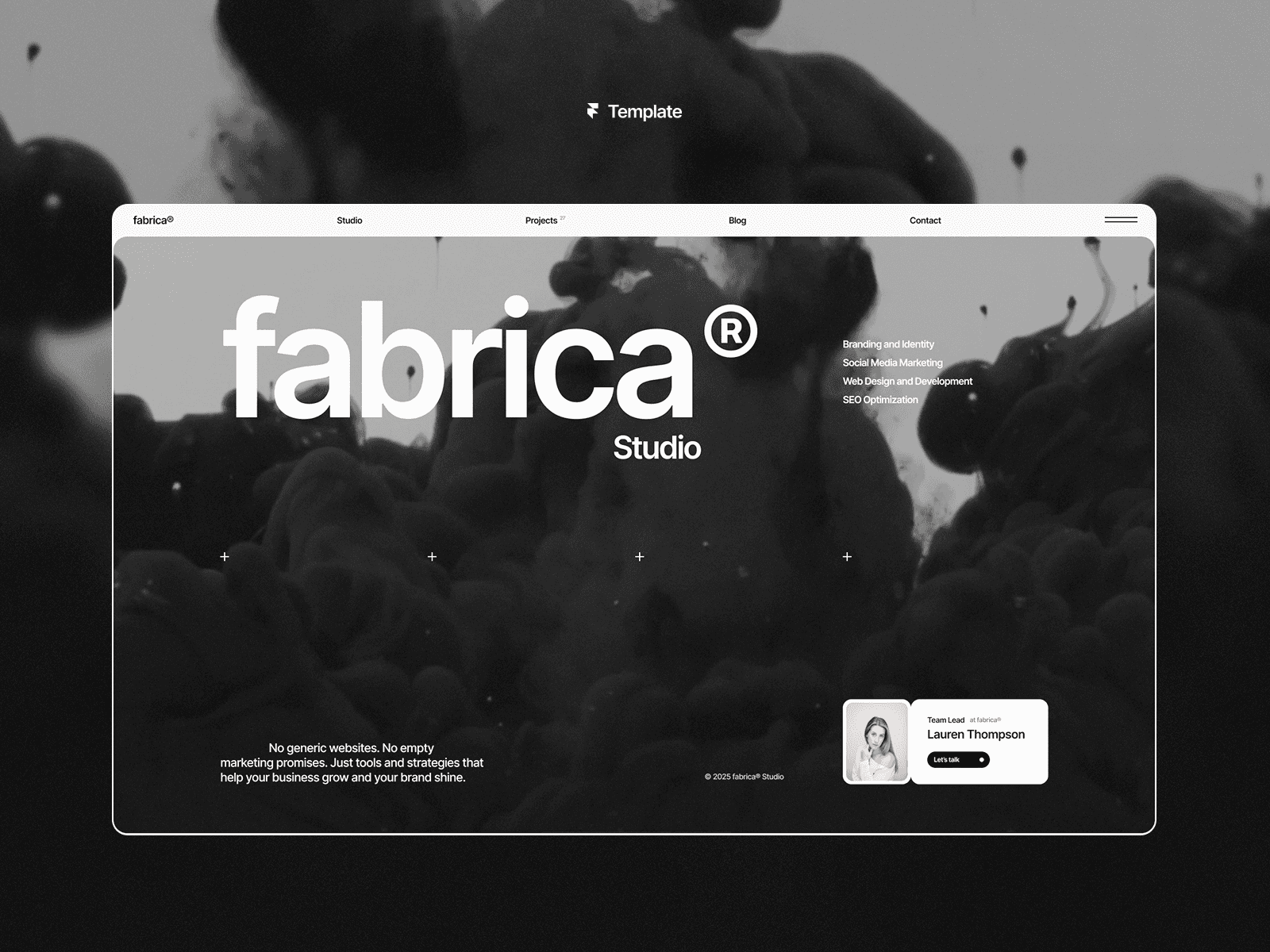
Responsive Design
Fabrica is built to look great on any device - whether it’s a desktop, laptop, tablet, or smartphone. The recent 1.07 update replaced the standard smooth scroll with Lenis from darkroom.engineering, offering a smoother, more responsive scrolling experience. It also includes updates for Chrome and fixes for Safari 26 hero animations, ensuring a polished and consistent performance across browsers. This makes it perfect for showcasing graphic design portfolios with precision and style.
CMS Integration
Managing your portfolio is easy with the built-in Framer CMS. It streamlines updates for Projects, Blog posts, and Contact/Legal pages. You can directly customize fields for the Projects page on the canvas, adding sorting and search options to help visitors quickly find specific work. This user-friendly setup means you don’t need technical expertise to keep your portfolio fresh and engaging.
Animation and Interactivity
Fabrica uses eye-catching animations to leave a lasting impression without overshadowing your content. Features like a video player on project pages, optimized video backgrounds, and Lenis-powered smooth scrolling add a layer of sophistication. Everything is customizable - adjust the monochrome palette, typography, and layout directly on the canvas to align with your brand. The "Fit image" feature ensures your visuals are displayed just the way you want, replacing external image components effortlessly. With strategically placed CTAs and sections for testimonials, Fabrica isn’t just visually appealing - it’s designed to help turn visitors into clients.
Up next, we’ll dive into another dynamic template option.
2. Nitro - Free Portfolio Template
Nitro stands out with its sleek, dark design that emphasizes bold typography and a structured grid layout. Perfect for agencies and graphic designers, this template includes eight key pages: Home, Projects, About, Blog, Contact, Project, Blog, and 404. Together, these pages create a complete portfolio setup, making it easy to showcase your work effectively.
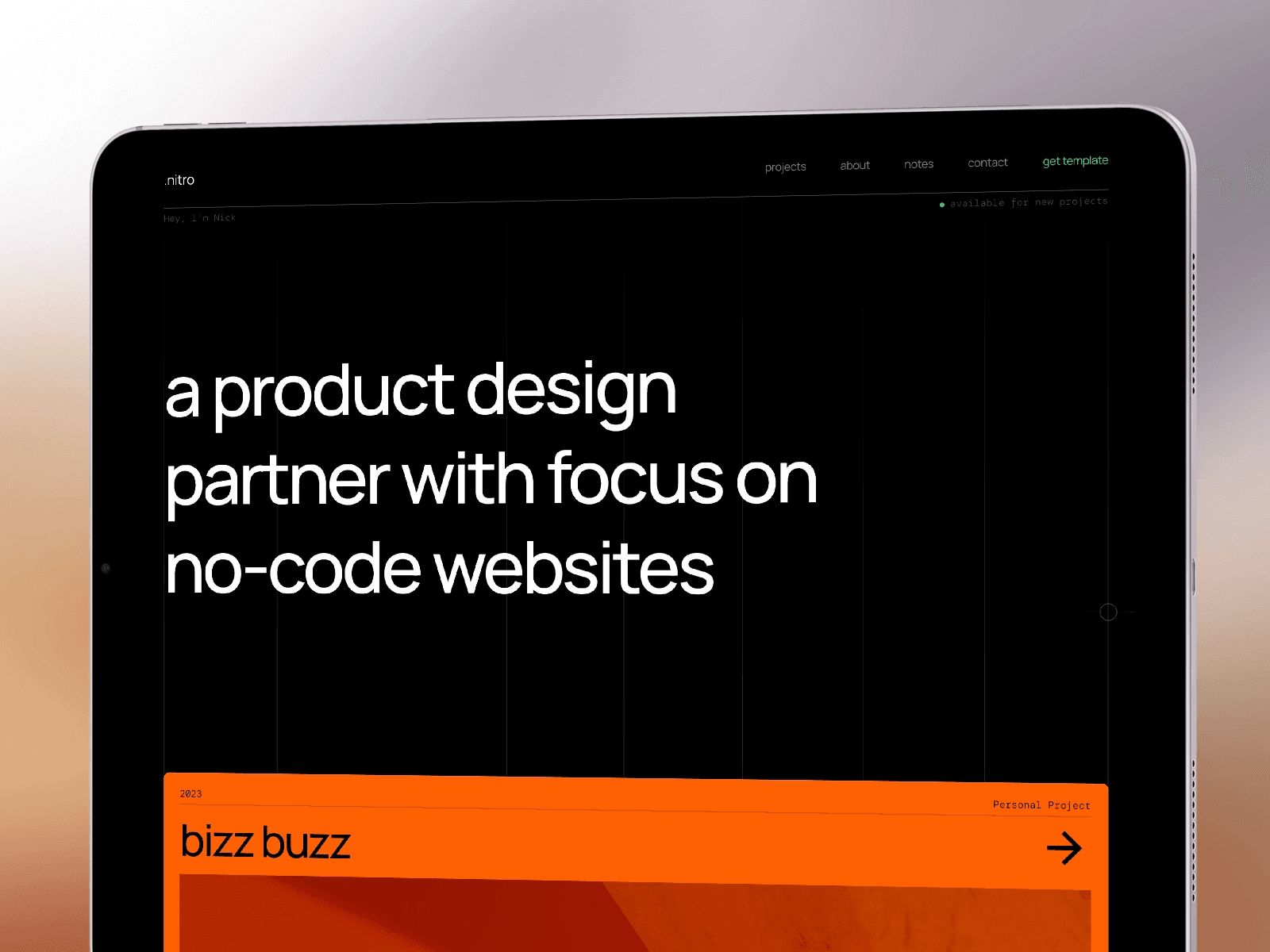
Animation and Interactivity
One of Nitro's standout features is its use of a floating cards effect. This interactive element adds depth to your portfolio, making individual projects pop as visitors scroll through. It’s a subtle yet impactful way to draw attention to your work while keeping the overall design cohesive.
CMS Integration
With built-in CMS integration, updating your projects and blog content is effortless. This feature ensures your portfolio stays fresh and relevant without any hassle.
Responsive Design
Nitro is designed with a mobile-first approach, ensuring it looks great on any screen size. From smartphones to desktops, the template maintains its sharp typography and sophisticated project displays. Up next, we’ll compare these templates to explore what makes each one unique.
3. Lyniq - Design agency website template
Lyniq is a sleek, agency-ready template designed specifically for graphic design portfolio websites. With 11 pages included and a price tag of $129, this template has drawn significant attention - over 64,000 views on the Framer Marketplace - making it one of the most sought-after professional options.
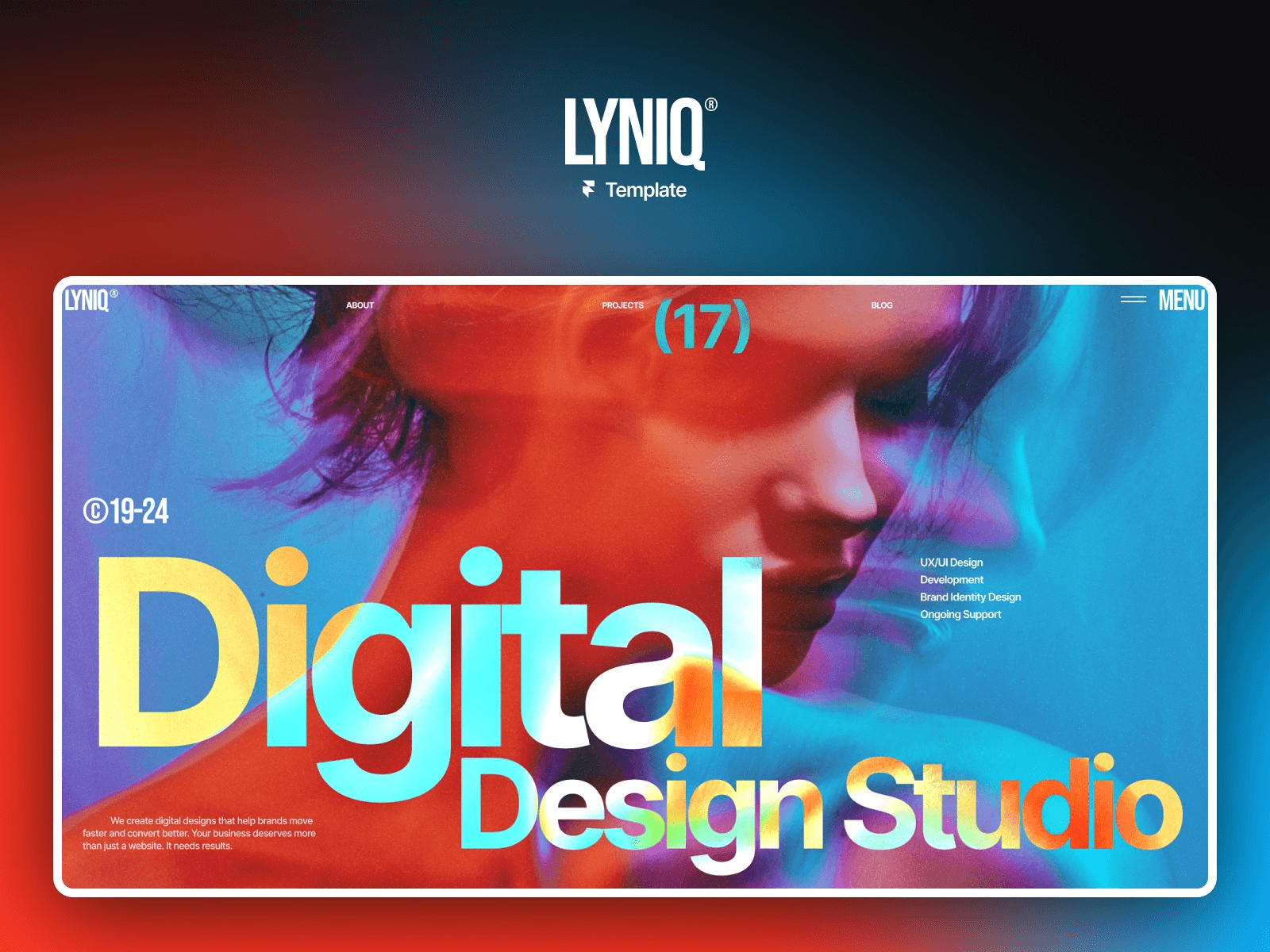
Anatolii Dmitrienko, the creator, emphasizes its purpose:
"A good design agency website should do more than just look nice. It needs to communicate what you do, build trust and help you win business."
Animation and Interactivity
Lyniq stands out with its dynamic animations and interactive features. It includes a splash screen component with animations that are optimized to work seamlessly across all browsers, even Safari. The page transitions are fluid and professional, supported by a preloader connector that guides visitors smoothly into the Hero section. Additionally, the projects page integrates a video player, making it easy to showcase motion graphics or process reels alongside static visuals.
CMS Integration
This template takes full advantage of Framer CMS, offering features like custom sorting and a "Fit image" option to preserve the proportions of your work. These tools ensure that your portfolio looks sharp and consistent across various screen sizes. Dynamic project pages automatically pull updated content from the CMS, saving you time while keeping your site fresh.
Customization Options
Lyniq is built with flexibility in mind, using Framer's "Layout Templates" and a redesigned header to make customization quick and straightforward. It includes editable sections for services, case studies, testimonials, and business statistics, giving you the freedom to tailor the site to your specific needs. The 11 pre-designed pages - such as Home, Projects, Blog, and Articles - offer a strong foundation to align the template with your brand.
Responsive Design
Lyniq is fully responsive, ensuring a polished and consistent experience across desktops, tablets, and mobile devices. Special attention has been given to performance on Safari, with smooth transitions for mobile splash screens and optimized display settings. Up next, we’ll dive into another exciting template option.
4. Hanzo - Free Agency Template
Hanzo is a free template designed to simplify the creation of graphic design portfolio websites. With over 106,900 views on the Framer Marketplace, it has gained attention for its sleek monochromatic style that puts your work front and center. Created by Easyfast, this template is ideal for solopreneurs and productized agencies aiming to convert portfolio visitors into paying clients. Its standout feature?
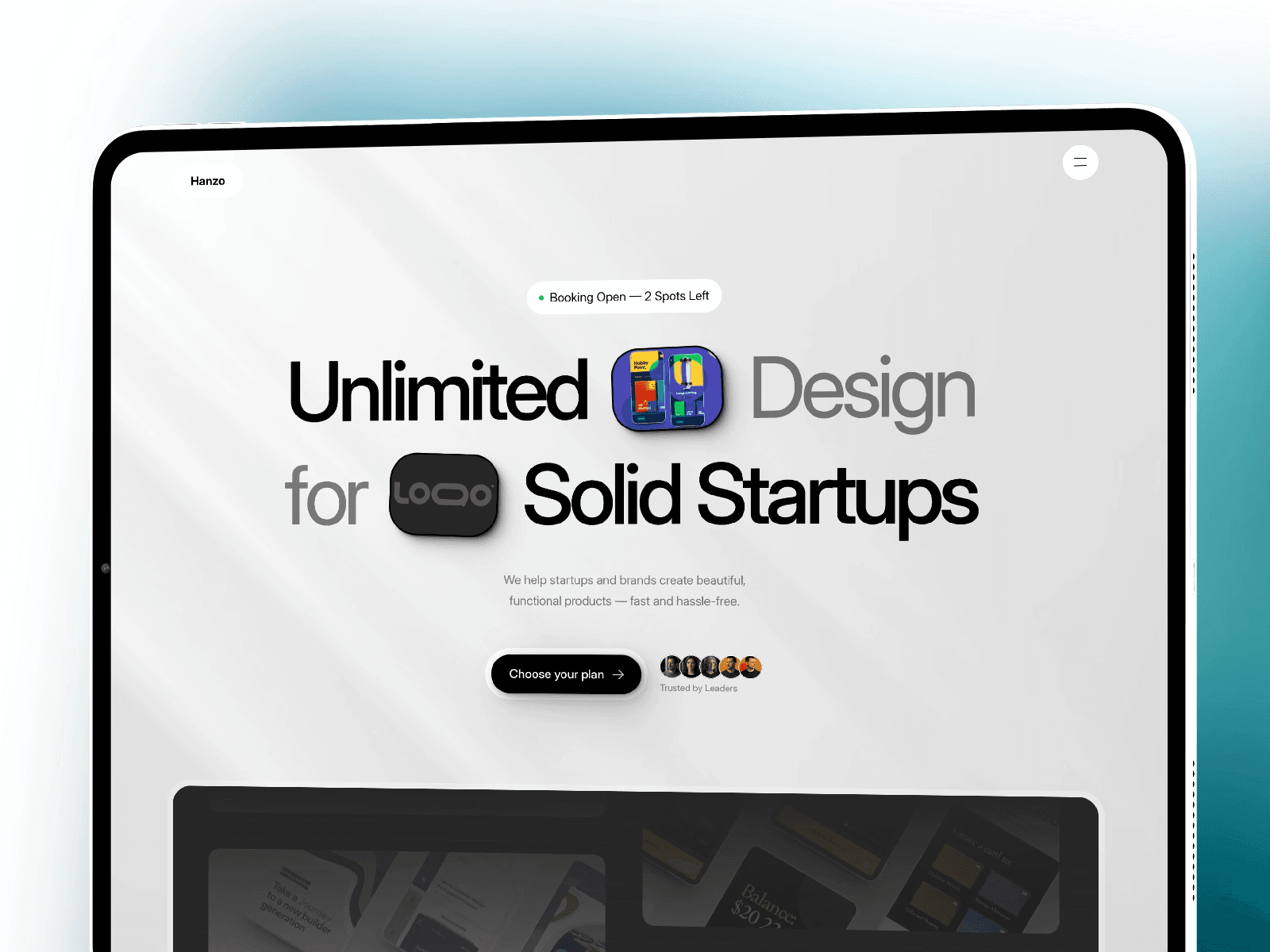
Engaging animations that captivate users.
"Hanzo is a bold, high-converting agency website template for solopreneurs running productized services. Launch fast, sell smarter, and turn visitors into clients."
Animation and Interactivity
Version 2.0 of Hanzo introduces polished animations and interactions, all while preserving fast load times. One highlight is the Recent Work Teaser Section, located just below the hero section, which immediately grabs attention. The hero section itself incorporates trust-building elements to establish credibility, while vibrant service tags in the intro section keep things organized and visually appealing. These interactive features elevate the user experience without compromising clarity or speed, ensuring visitors stay engaged across all devices.
Customization Options
Hanzo’s modular design gives you the flexibility to tailor your site to your needs. It includes sections like Process + Testimonials, About, Pricing, and FAQs, which can be rearranged or toggled on and off. Additionally, a bonus pack of five mini-templates expands your layout possibilities. For those purchasing through select marketplaces, a list of 100 design lead sources is included to help grow your client base. With its component-based structure, Hanzo makes it easy to create a professional-looking site without the hassle of complex design decisions.
Responsive Design
Whether viewed on a desktop, tablet, or mobile device, Hanzo delivers a seamless and fast experience. The template comes with three essential pages - Home, Project Page, and 404 - all optimized for performance. Updates in Version 2.0 have further enhanced speed and resolved bugs, ensuring smooth functionality on any screen size. This makes Hanzo a dependable choice for showcasing your graphic design work to potential clients, no matter how they access your portfolio.
5. Mike - Free Portfolio Template
Mike is a free template designed by Tymofii Bak, racking up an impressive 28,500 views on the Framer Marketplace. It’s tailored for showcasing visual work with a minimalist flair. By pairing simple, clean text with bold, vibrant images, this template ensures your graphic design projects command attention.
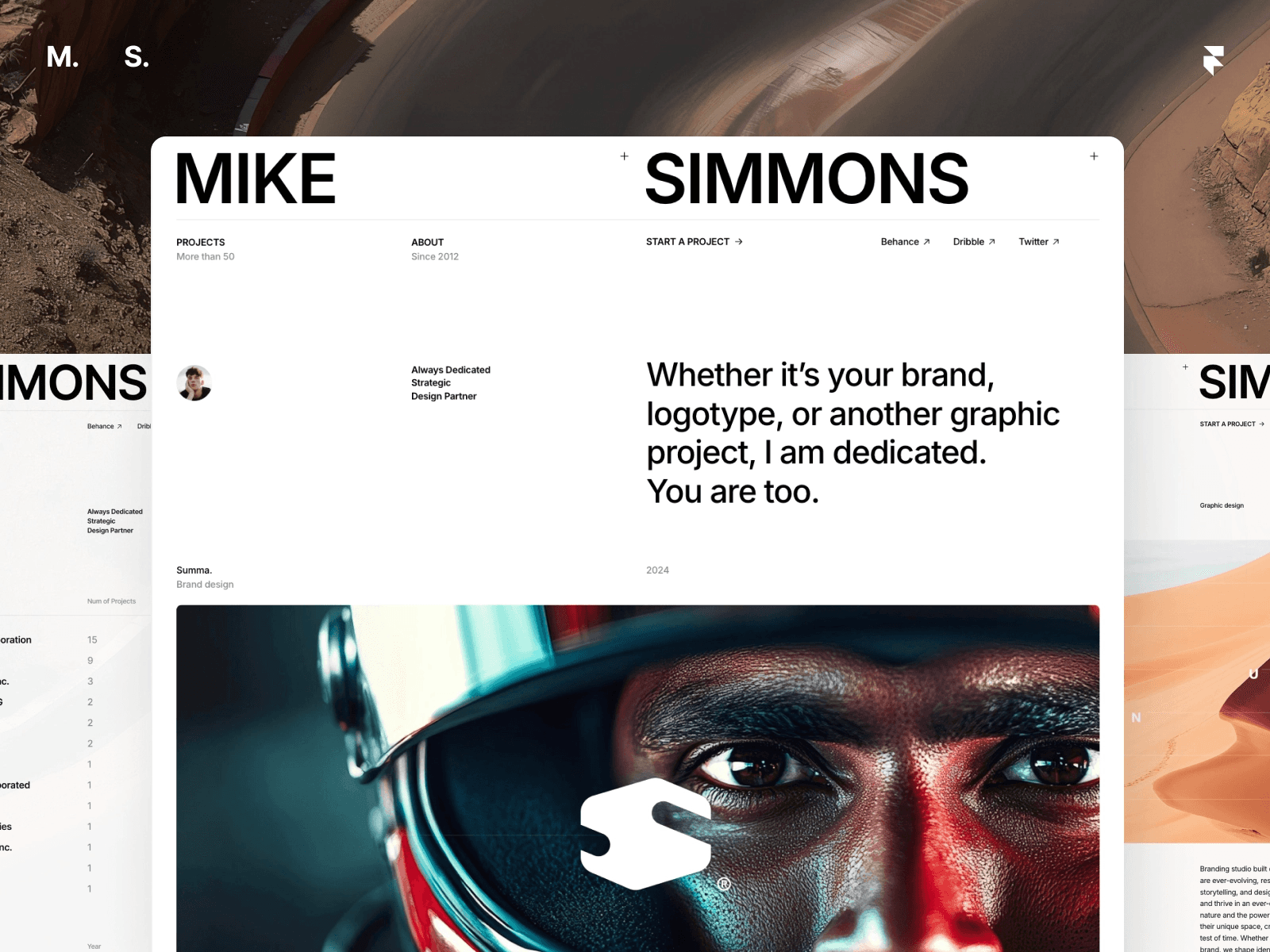
It comes with eight essential pages, giving you all the tools you need to launch a polished, professional portfolio.
"The contrast between the minimalism of the website text and the large, vibrant images emphasizes that the visual aspect of your work is above all else."
CMS Integration
Mike doesn’t just look good - it also simplifies project management. Its dynamic portfolio CMS allows you to update projects effortlessly, without touching a single line of code. Whether you’re adding new work or revising existing pages, the system keeps your portfolio fresh while preserving the template’s sleek, image-focused design.
Animation and Interactivity
The template also enhances user experience with smooth animations and interactive elements. These subtle motion effects add a layer of sophistication without distracting visitors. The result? A modern, professional feel combined with quick load times, keeping potential clients engaged and focused on your creative portfolio.
Customization Options
Mike is built to adapt seamlessly to your brand. Tymofii Bak designed it with flexibility in mind, allowing you to tweak layouts, colors, and typography to align perfectly with your personal or professional style. The included "Start a Project" page acts as a clear and effective call to action, helping to turn visitors into potential clients. Its modular structure ensures that your portfolio remains visually striking and uniquely yours across all platforms.
Responsive Design
Whether viewed on a desktop, tablet, or smartphone, Mike delivers a consistent, high-quality experience. Its responsive design preserves the template’s hallmark balance of minimal text and bold imagery, no matter the screen size. Recent updates have also ensured compatibility with the latest Framer features, making it a dependable choice for designers who want their work to shine across every device.
6. Quattro - Dark Free Portfolio Template
Quattro is a free, single-page portfolio template created by Easyfast, designed with speed and simplicity in mind. With an impressive 33,900 views on the Framer Marketplace, it boasts a sleek, dark, and cinematic look, highlighted by bold typography.
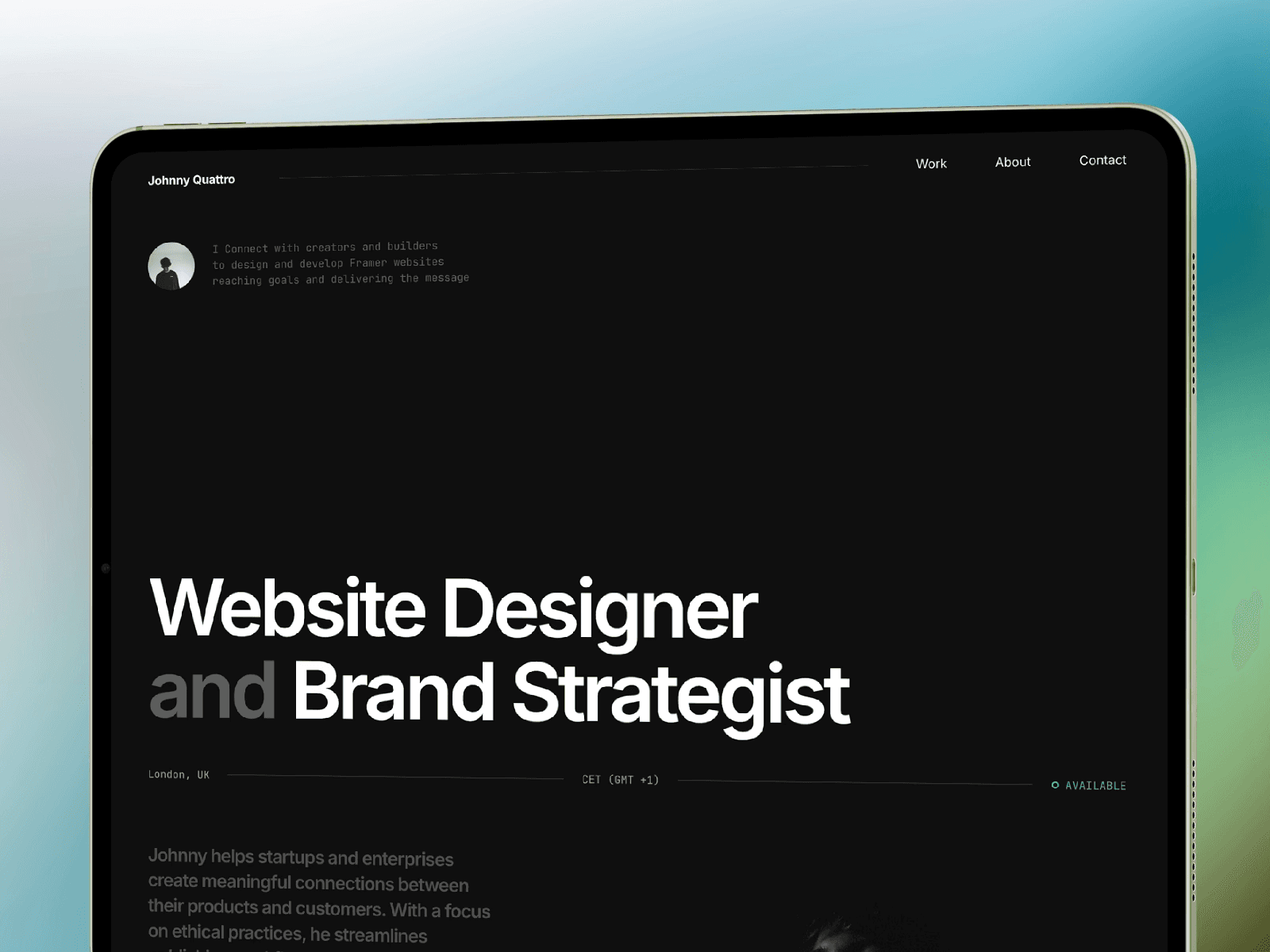
This makes it a perfect choice for graphic designers, freelancers, and studios who want to showcase their work with minimal effort.
"It's fast, it's simple, it's cool. Load your projects and get new clients with a simple and effective portfolio template." – Easyfast
Animation and Interactivity
Quattro incorporates subtle motion effects and smooth transitions to elevate the browsing experience. These features are carefully balanced to maintain fast loading times and effortless navigation.
Customization Options
With Quattro's pre-built structure, you can quickly replace placeholder text and upload your visuals, making it possible to launch your portfolio in just minutes.
Responsive Design
Quattro adapts seamlessly to any device, from desktops to smartphones. Its clean layout and bold typography ensure that the dark, polished aesthetic and fluid navigation remain consistent - whether someone views your portfolio on a tablet during a commute or a desktop at a client presentation. Up next, take a look at another template that builds on these streamlined features.
7. Destello - Premium Studio Template
Destello is a sleek and minimal portfolio template designed by Zaid Khan, available for $79. It’s tailored for designers, developers, and creative studios, offering a clean grid layout and refined typography to showcase your work at its best.
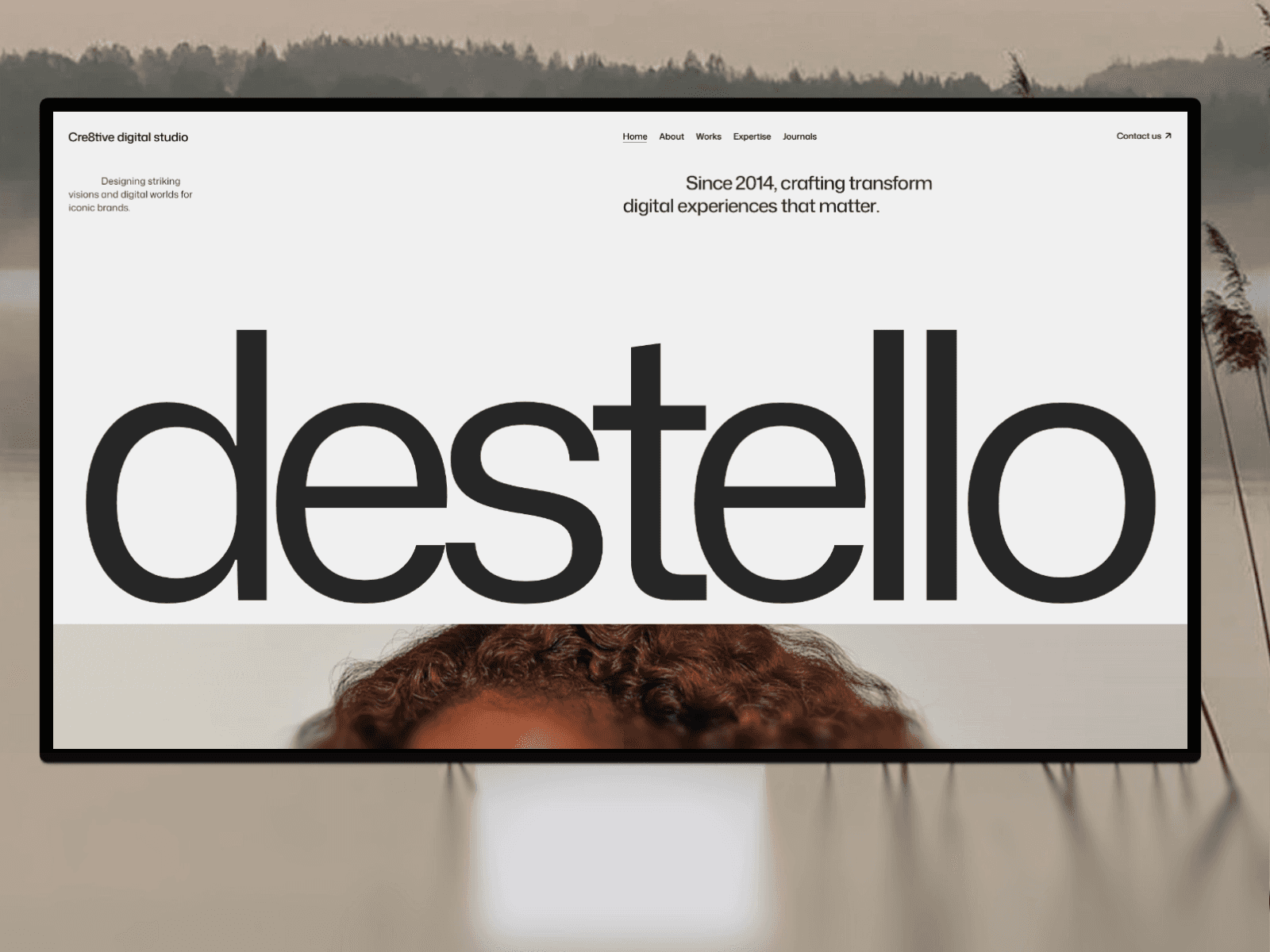
"With a clean grid, elegant typography, and smooth subtle motion, it helps you present your work in a way that feels both refined and approachable." – Zaid Khan, Template Creator
Animation and Interactivity
Destello incorporates smooth, understated animations that add a touch of elegance without overpowering your content. These animations not only enhance the browsing experience but also ensure quick performance, keeping visitors engaged as they explore your portfolio.
CMS Integration
This template comes with 10 pre-structured pages, including dedicated layouts for Works and Journals, along with detailed pages for each. It integrates seamlessly with Framer's CMS, allowing you to update projects or blog posts effortlessly - no coding required. This setup ensures your portfolio stays fresh and consistently organized.
Customization Options
Destello allows you to tweak layouts, colors, and typography to align with your brand while maintaining its clean and minimalist aesthetic. The package includes 3 months of Framer Pro access, lifetime updates, and ongoing support from Zaid Khan.
Responsive Design
Whether viewed on a desktop, tablet, or smartphone, Destello ensures your portfolio looks polished and performs smoothly. Its responsive design adapts seamlessly to any screen size, keeping your work professional and visually appealing. Up next, we’ll dive into another standout template option.
8. Other - Free Portfolio Template
Other is a free graphic design portfolio template developed by JP. Unlike premium templates, it eliminates any financial hurdles, giving you the chance to create a professional online presence without spending a dime.
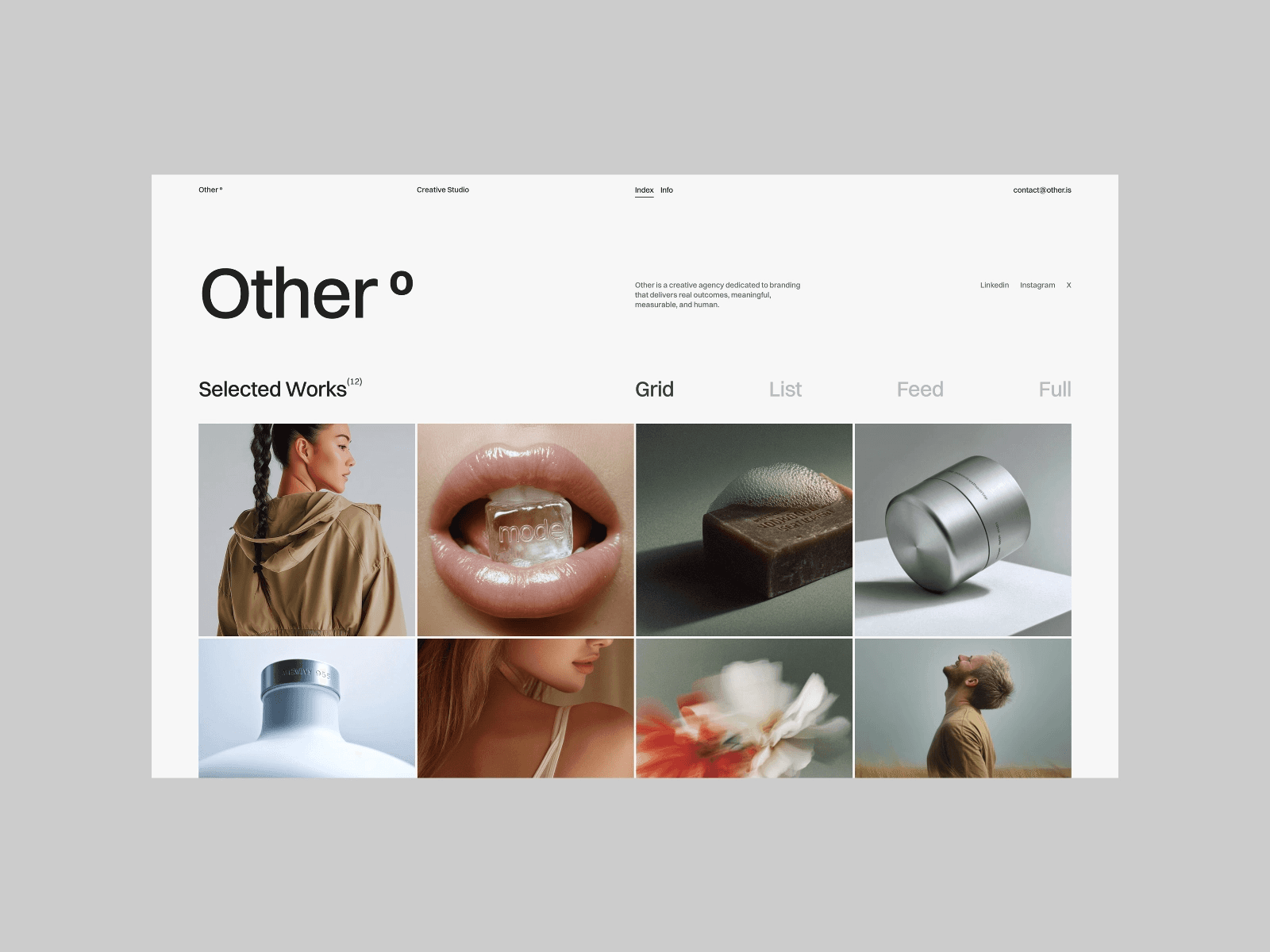
Designed to look sharp across all devices, Other highlights your creative problem-solving skills and showcases your projects in a clean, visually appealing way. Let’s take a closer look at how its customization tools can help you build a portfolio that reflects your personal brand.
Customization Options
Other offers plenty of flexibility when it comes to personalizing your portfolio. You can tweak colors, fonts, images, and layouts to align with your style. Upload your own logos, color schemes, and typography directly into the template - no coding required. This straightforward, no-code setup allows you to focus on your work and design choices instead of struggling with technical challenges. Plus, the built-in CMS collections make it easy to update projects, case studies, or blog content whenever needed.
Animation and Interactivity
To make your portfolio stand out, Other includes scroll animations, hover effects, and dynamic content. These interactive features are designed to engage visitors while maintaining fast load times and strong SEO performance. This means your portfolio will not only look polished but also rank well in search engines. Up next, we’ll dive into another template that brings its own set of strengths to the table.
9. Arpeggio - Digital Agency Template
Arpeggio is a high-end graphic design portfolio template with a price tag of $129, created by Tamas Bodo to help designers turn their portfolios into client-converting tools. With more than 53,200 views on the Framer Marketplace, this template has gained attention for its clean, typography-driven design and sleek animations.
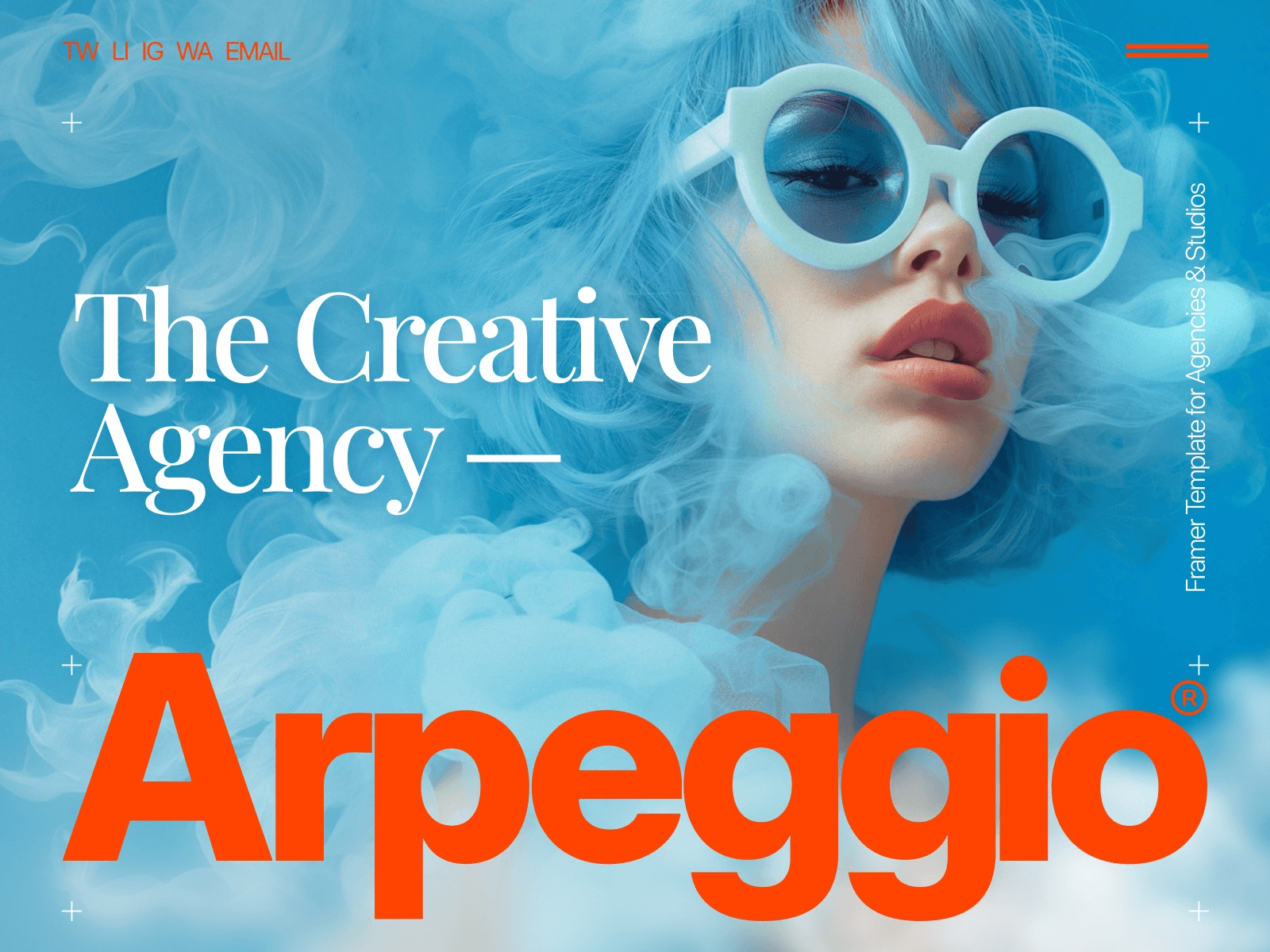
"Arpeggio is a premium Framer template built to turn your portfolio into a client conversion tool." - Tamas Bodo, Creator
The template comes with eight essential pages - Home, Work, Projects, About, Contact, Blog, Legal, and 404. It also offers lifetime support and a Quick Start Guide to get users up and running quickly. Here’s an overview of its standout features:
Responsive Design
Arpeggio is designed to look great on any device, whether it’s a desktop, laptop, tablet, or smartphone. Its bold typographic style, known as "Large Type", remains sharp and easy to read even on smaller screens. Plus, its performance-optimized foundation ensures faster loading times, which can improve search engine rankings.
CMS Integration
The built-in CMS is a powerful tool for managing content for both "Projects" and "Journal" sections. For case studies, the Projects CMS provides dedicated areas to highlight challenges, solutions, and measurable results. A recent update (Version 1.33) introduced support for video hero sections - just upload a video file and leave the image field blank to create a dynamic visual header.
Animation and Interactivity
Arpeggio includes smooth animations and interactive elements that make browsing a more engaging experience. These polished transitions and effects help keep visitors interested while maintaining fast performance. Project pages also support interactive video hero displays, adding an extra layer of visual appeal.
Customization Options
With Arpeggio, you don’t need coding skills to make it your own. Pre-built components allow for easy customization, and the Quick Start Guide ensures a seamless setup process. The CMS-driven Projects and Journal sections are fully customizable, giving you the flexibility to align the template’s design with your branding goals across all eight pages.
10. Alexfolio - Portfolio for Creatives/Designers
Alexfolio is a striking portfolio template priced at $69, designed specifically for creative professionals. With 15,000 views on the Framer Marketplace, it stands out with its minimalist design, bold typography, and sleek monochrome palette. This template is perfect for showcasing your graphic design work in a clean, professional way.
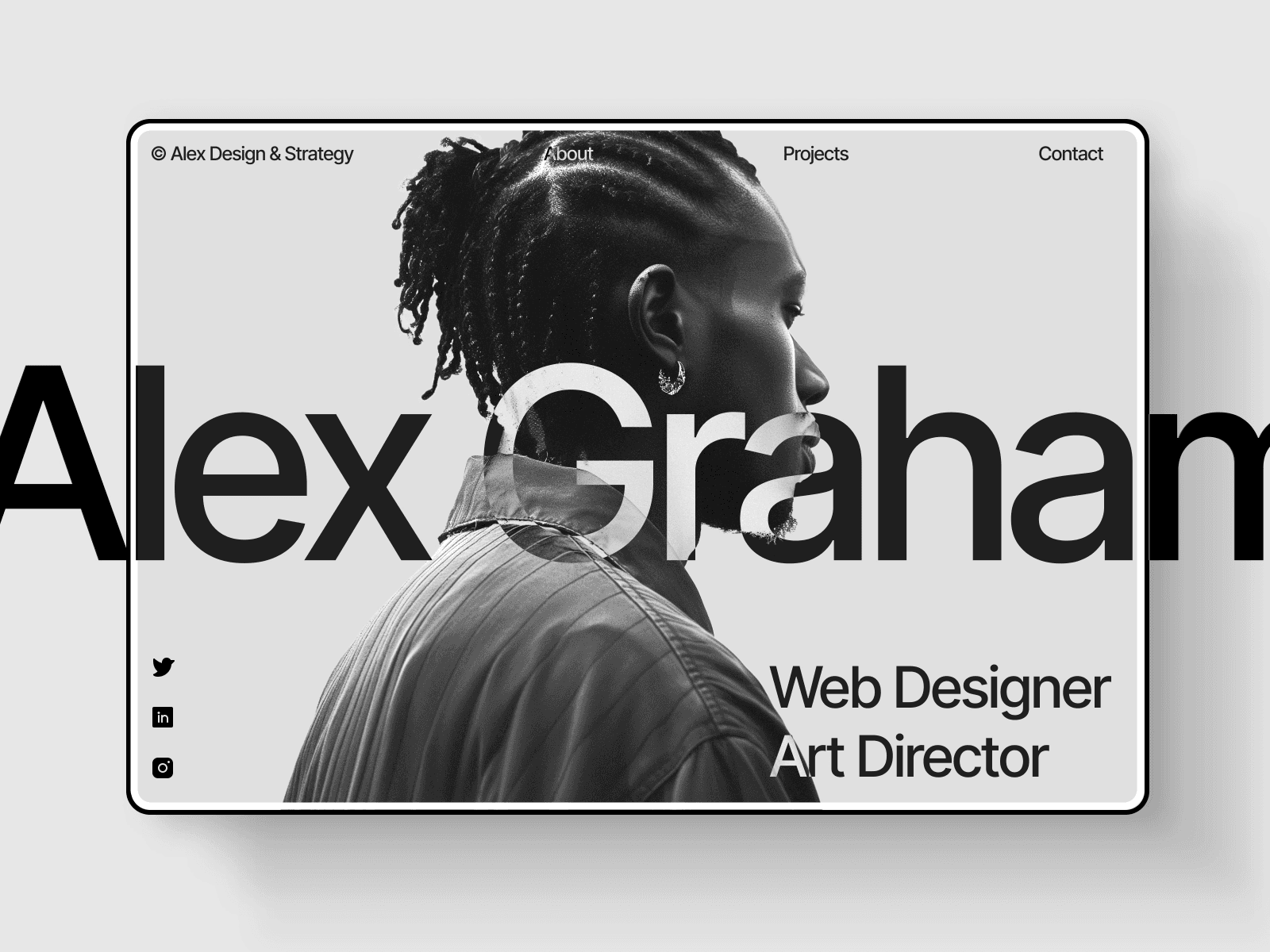
It comes with six essential pages: Home, Project Lobby, Project Page, About, Contact, and a 404 error page. These pages provide everything you need to build a complete and polished portfolio. The bold typography and high-contrast visuals create a gallery-like setting that emphasizes your creative projects. Let’s dive into how Tdalexfolio delivers on responsive design, smooth animations, and easy customization.
Responsive Design
Tdalexfolio adapts seamlessly to any screen size, ensuring your portfolio looks sharp and professional whether it’s viewed on a desktop, tablet, or smartphone. The bold typography and high-contrast layouts adjust effortlessly, making your work look impressive during a client presentation or when viewed on the go.
Animation and Interactivity
This template incorporates smooth, understated animations that enhance the user experience without detracting from the minimalist design. These subtle transitions add a dynamic touch, keeping visitors engaged and focused on your creative work - perfect for impressing potential clients.
Customization Options
Alexfolio offers built-in light and dark modes, giving you flexibility in how you present your portfolio. The template is designed for easy customization, allowing you to tweak the monochrome color scheme and bold typography to align with your personal style. You can also adjust the high-contrast design elements across all six pages without needing any coding skills, making it simple to create a portfolio that truly reflects your brand.
11. Kanso - Design Agency Template
Kanso is a Framer template designed by Thaer Swailem, tailored for designers who want a polished and professional way to showcase their work. Priced at $79, it has earned a 4.9/5 rating from over 100 businesses globally, establishing itself as a trusted choice for graphic design portfolio websites.
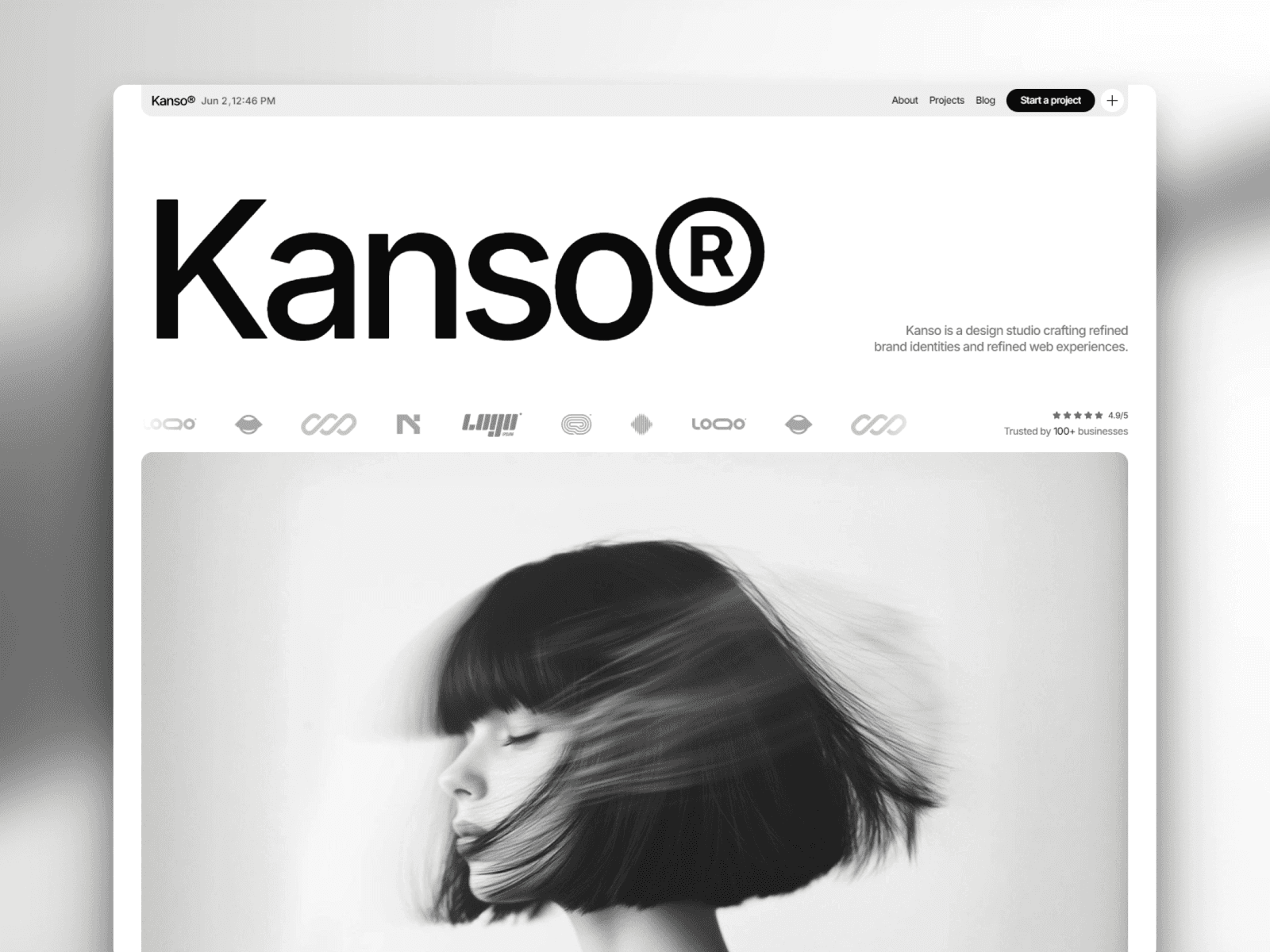
This template strikes a balance between style and functionality, ensuring your work takes center stage. It includes all the essential sections - Selected Work, Services, Process, Pricing, Testimonials, and a Blog - optimized for smooth navigation across devices. Here's a closer look at what makes Kanso stand out.
Responsive Design
Kanso’s responsive framework ensures your portfolio looks sharp on any device. With thoughtful use of whitespace and a well-paced layout, it maintains clarity and visual appeal, no matter the screen size.
"They delivered a design system that not only looks great but works across every screen and touchpoint." - Markus R., Product Lead
CMS Integration
The template features a built-in Blog (or Insights) section integrated with Framer's CMS. This means you can update your content effortlessly, without needing any coding skills.
Animation and Interactivity
Kanso incorporates subtle animations and interactive elements to engage visitors without overshadowing your work. These refined touches add depth and sophistication, keeping the focus on your portfolio.
Customization Options
Kanso offers a range of customization features, allowing you to tailor typography, colors, modular content, pricing toggles, and layouts to reflect your brand identity.
"Kanso understood our brand better than we did. Their ability to find the essential and express it simply is what sets them apart." - Sofia Ford, Founder
12. Zayla - Bold Portfolio Framer Template
Zayla stands out as a Framer template that combines bold design with seamless interactivity. Created by Zaid Khan, this premium template costs $79 and includes a lifetime license, along with 3 months of Framer Pro access. With over 8,400 views, it’s a favorite among creatives looking to showcase striking visuals and compelling narratives.
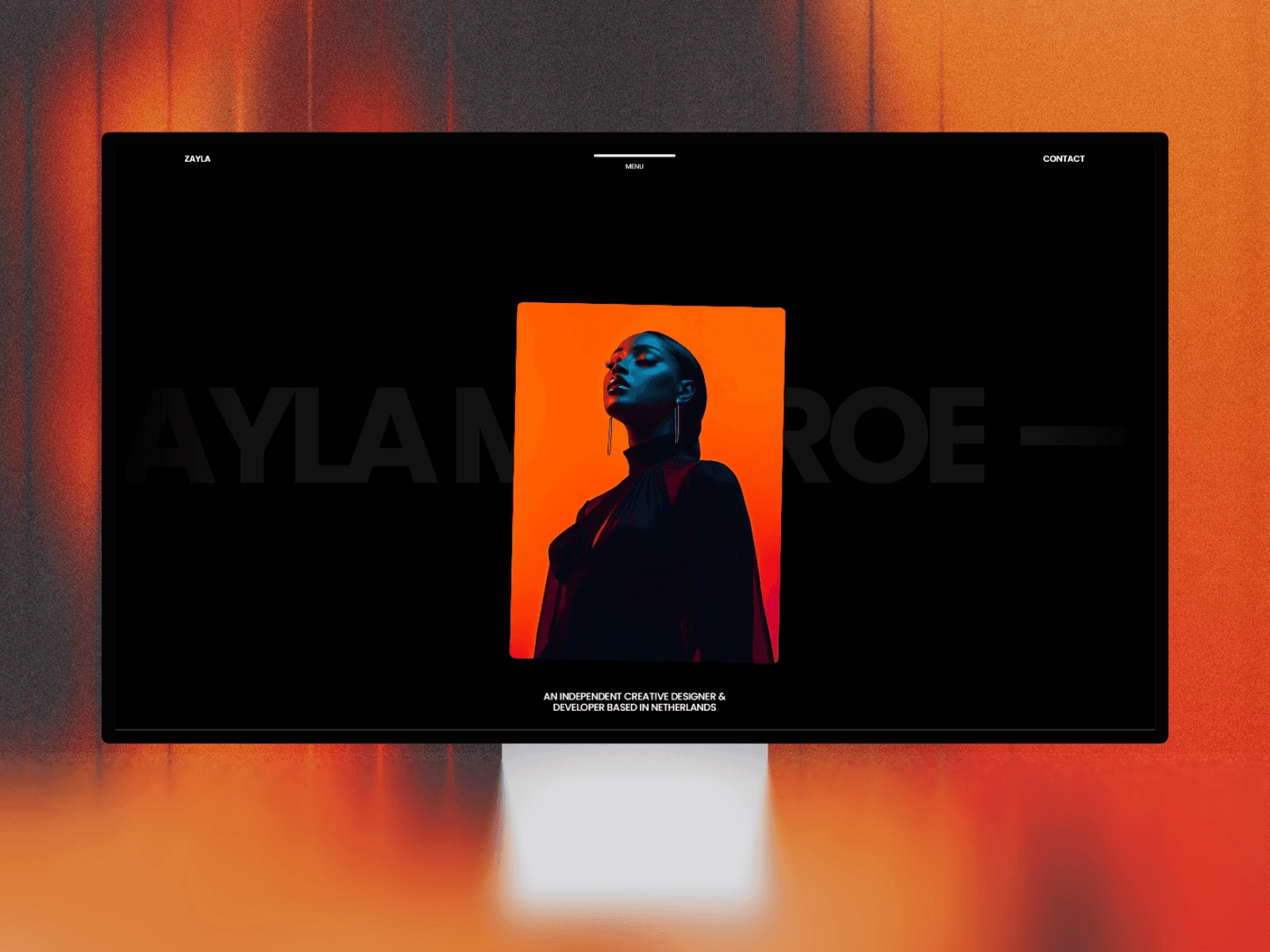
This template comes packed with 7 pre-designed pages: Home, About, Projects, Project Single, Playground, Contact, and a 404 page. It’s everything you need to build a polished graphic design portfolio website. Here’s why Zayla shines.
Responsive Design
Zayla ensures your portfolio looks flawless on any device. Its responsive design adapts effortlessly, keeping your work front and center, no matter the screen size.
Animation and Interactivity
With dynamic animations and interactive features, Zayla grabs attention right away, creating an engaging experience that enhances your storytelling.
"Zayla is a dramatic yet refined Framer template designed for those who embrace bold visuals and high-impact storytelling." - Zaid Khan
Customization Made Simple
Zayla offers no-code tools to tweak colors, fonts, and layouts, letting you align the website with your brand effortlessly. Plus, its built-in performance and SEO optimizations make it easier for your portfolio to get noticed online. These features make Zayla a standout choice for creatives.
Template Comparison
Picking the right template boils down to your budget, design preferences, and the features you need. Below, you'll find a side-by-side comparison of 12 graphic design portfolio templates to help you decide.
Five templates are completely free: Nitro, Hanzo, Mike, Quattro, and Other. These are perfect for beginners or those looking to keep costs low. For paid options, templates fall into three price ranges: $69 (TD_Alexfolio), $79 (Destello, Kanso, Zayla), and $129 (Fabrica, Lyniq, Arpeggio). The $129 options are tailored for seasoned designers or agencies aiming for a more polished, professional look.
Content management systems (CMS) make organizing and updating your portfolio easier. Fabrica stands out with a robust CMS setup, including collections for Projects, Blog, Contact, and Legal. Nitro, despite being free, offers Projects and Blog collections. Mike also comes with a dynamic CMS for projects, while Zayla supports CMS functionality for seamless updates.
When it comes to animations, the templates vary widely. Fabrica integrates Lenis smooth scroll for enhanced performance, while Nitro includes floating card effects and smooth transitions. Zayla features responsive animations that boost interactivity and engagement. These design elements are key if you want your portfolio to feel dynamic and modern.
Here's a quick overview of the key differences:
Template | Price | CMS | Key Animation Features | Best Use Case |
|---|---|---|---|---|
Fabrica | $129 | Projects, Blog, Contact, Legal | Lenis smooth scroll, optimized performance | Creative studios & agencies |
Nitro | Free | Projects, Blog | Floating cards effect, smooth transitions | Graphic & web designers |
Lyniq | $129 | Yes | Not specified | Graphic design portfolios |
Hanzo | Free | Yes | Not specified | Minimalist graphic design |
Mike | Free | Projects (Dynamic CMS) | Customizable typography & animations | Creative professionals |
Quattro | Free | Yes | Not specified | Graphic design portfolios |
Destello | $79 | Yes | Not specified | Graphic design portfolios |
Other | Free | Yes | Not specified | Minimalist portfolios |
Arpeggio | $129 | Yes | Not specified | High-end graphic design |
TD_Alexfolio | $69 | Yes | Not specified | Personal portfolios |
Kanso | $79 | Yes | Not specified | Clean, minimalist design |
Zayla | $79 | Yes | Responsive framework animations | SEO-focused creative portfolios |
Conclusion
Building your graphic design portfolio website doesn’t have to be expensive or time-consuming. With these 12 Framer templates, you have a solid starting point to showcase your work. Whether you opt for one of the free Framer templates or invest in a premium template (typically priced between $79 and $129), you’ll find a solution that matches your needs.
Framer’s no-code editor makes it easy to focus on presenting your designs without worrying about technical hurdles. The integrated CMS allows for quick updates, and responsive design ensures your portfolio looks great on any device. Plus, if you’re a Figma user, the smooth sync between your design files and your live site simplifies your workflow and helps maintain a polished, consistent portfolio.
Take a look at the comparison table above to review the features and styles of each template. Think about your budget, the functionality you need, and the aesthetic that aligns with your brand. If you’re unsure, start with a free template and upgrade later as your portfolio grows. Choose a template that truly highlights your creativity and lets your work stand out.
FAQs
What’s the difference between free and paid Framer templates for graphic design portfolios?
Free Framer templates are an excellent way to kick off your graphic design portfolio without spending a dime. They come with essentials like responsive layouts, light and dark mode options, and an easy-to-use drag-and-drop interface. That said, they often fall short when it comes to more advanced features or dedicated support.
On the other hand, paid templates - priced between $39 and $129 - offer a more polished experience. These templates include features like a built-in CMS for managing dynamic content, SEO-friendly designs, and professional animations such as floating cards or micro-interactions. Plus, they come with added perks like commercial licenses, priority support, and regular updates to keep them aligned with the latest Framer tools.
The main distinctions between free and paid templates boil down to cost, advanced functionalities (like CMS and animations), support availability, ongoing updates, and commercial usage rights - a critical factor if you're working on client projects.
What’s the best way to choose a template for my graphic design portfolio?
Choosing the right template for your graphic design portfolio is key to showcasing your work and drawing in potential clients. Start by identifying a style that aligns with your brand - whether that's sleek and minimalist, bold and eye-catching, or something more contemporary. The design should complement your creative identity, making your portfolio feel like an extension of your personal or professional brand. With Framer templates, you get fully responsive designs that look fantastic on any device. Plus, there's no coding required, so customizing them is straightforward and hassle-free.
Think about the features you’ll need to make your portfolio shine. Templates with Framer CMS make managing projects a breeze, while built-in SEO tools can help your work get noticed online. If it suits your brand, consider extras like light/dark mode, animation effects, or custom font options. Pricing is flexible, ranging from free to premium options ($79–$129), so there’s something for every budget.
Before committing, take the time to test a few templates. Preview live demos and upload some sample projects to see how the layout fits your content and how easy it is to personalize. By balancing style, functionality, and cost, you’ll land on a template that not only showcases your work beautifully but also grows with you as your career evolves.
Can I customize these graphic design portfolio templates without knowing how to code?
Yes, you can! These graphic design portfolio templates are completely customizable with Framer's easy-to-use no-code editor. No coding skills? No problem! You can tweak every detail to reflect your personal style and preferences. Just drag, drop, and adjust elements effortlessly to craft a portfolio that truly makes an impression.
Share article
$249
$3601
All Access
Save with our all access bundle - get access to all premium Framer templates.
38
+
Framer Templates
51
+