Feb 3, 2026

Pawel Gola
Framer & Webflow Expert
When it comes to starting or upgrading your blog, choosing the right website template is crucial. A good template not only improves readability but also keeps your audience engaged and helps grow your subscriptions. Below are nine standout templates from the Framer Marketplace, designed for various needs and budgets. They include free and paid options, all offering responsive designs and CMS integration for easy content management.
Quick Highlights:
Kingsley ($39): Minimalist design, ideal for professionals and leaders.
FeaturedTime ($29): Bold and modern, great for news sites and digital magazines.
Duration (Free): Simple and clean, perfect for general blogging.
Eventart (Free): Structured layout, tailored for event-focused blogs.
Pering (Free): Supports articles and podcasts, suitable for digital publishers.
Denzel (Free): Retro-inspired style, best for lifestyle and culture blogs.
Lusia (Free): Light, grid-based design, great for personal blogs.
Onedollar ($79): Sleek and professional, built for storytelling and news sharing.
FullStory ($79): Editorial-focused, ideal for news outlets and feature writers.
Each template is user-friendly, responsive, and designed to make your content shine. Whether you're managing a personal blog, a magazine, or a news platform, these templates offer a variety of styles and functionalities to match your vision.
Quick Comparison:
Template | Price | Best Use Case | Design Style | CMS Integration | Customization |
|---|---|---|---|---|---|
Kingsley | $39 | Professionals, leaders | Minimalist | Yes | No-code |
FeaturedTime | $29 | News sites, magazines | Bold, modern | Yes | No-code, SEO |
Duration | Free | General blogging | Clean and simple | Yes | No-code |
Eventart | Free | Event-focused blogs | Structured, modern | Yes | No-code |
Pering | Free | News, podcasts | Typographic, pastel | Yes | Multi-format |
Denzel | Free | Lifestyle, culture blogs | Retro, typographic | Yes | Flexible |
Lusia | Free | Personal blogs | Light, grid-based | Yes | Branding |
Onedollar | $79 | Professional storytelling | Minimalist, sleek | Yes | No-code |
FullStory | $79 | News, feature writing | Editorial-focused | Yes | Flexible |
These templates make it simple to launch or revamp your blog with professional designs that prioritize usability and content visibility. Explore them on the Framer Marketplace to find the one that fits your goals.
1. Kingsley
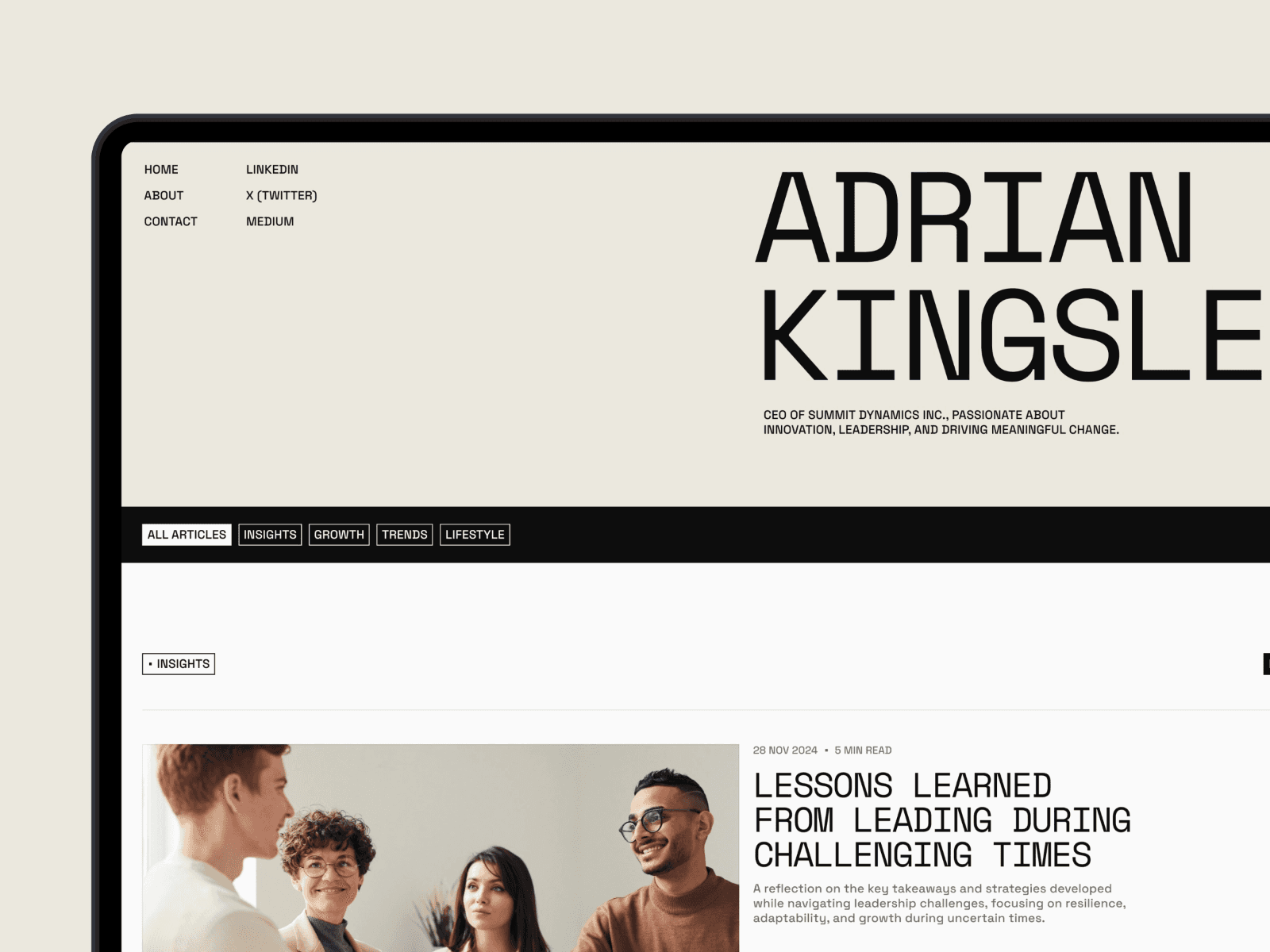
Kingsley is a $39 template with 3,000 views, designed to keep things simple and distraction-free, allowing your content to take center stage. Created by NutsDev, it’s tailored for leaders, entrepreneurs, and creative professionals eager to showcase their ideas.
Design Aesthetic
This template embraces a clean, minimalist approach that puts readability first. With clear typography, intuitive navigation, and plenty of white space, it ensures that your writing remains the star of the show.
CMS Integration
Kingsley comes with a well-organized structure across nine pages, including sections for "Insights", "About", and "Contact." This setup makes content updates a breeze through the CMS. Whether you're publishing long-form articles, leadership insights, or industry commentary, you can easily add posts, adjust categories, and manage your entire content library - no coding required.
Ease of Customization
Thanks to Framer's drag-and-drop interface, customizing colors, fonts, and layouts is straightforward. Plus, the template’s responsive and SEO-friendly design ensures your site looks polished on any device.
Best Use Case
With its sleek design and user-friendly features, Kingsley is perfect for CEOs, thought leaders, and creatives who want to share personal growth stories, leadership advice, or industry insights. The professional layout enhances the reading experience, encouraging visitors to return. As NutsDev puts it:
"the perfect platform for professionals, leaders, and creatives to share their thoughts, experiences, and ideas in an elegant, easy-to-navigate format."
2. FeaturedTime
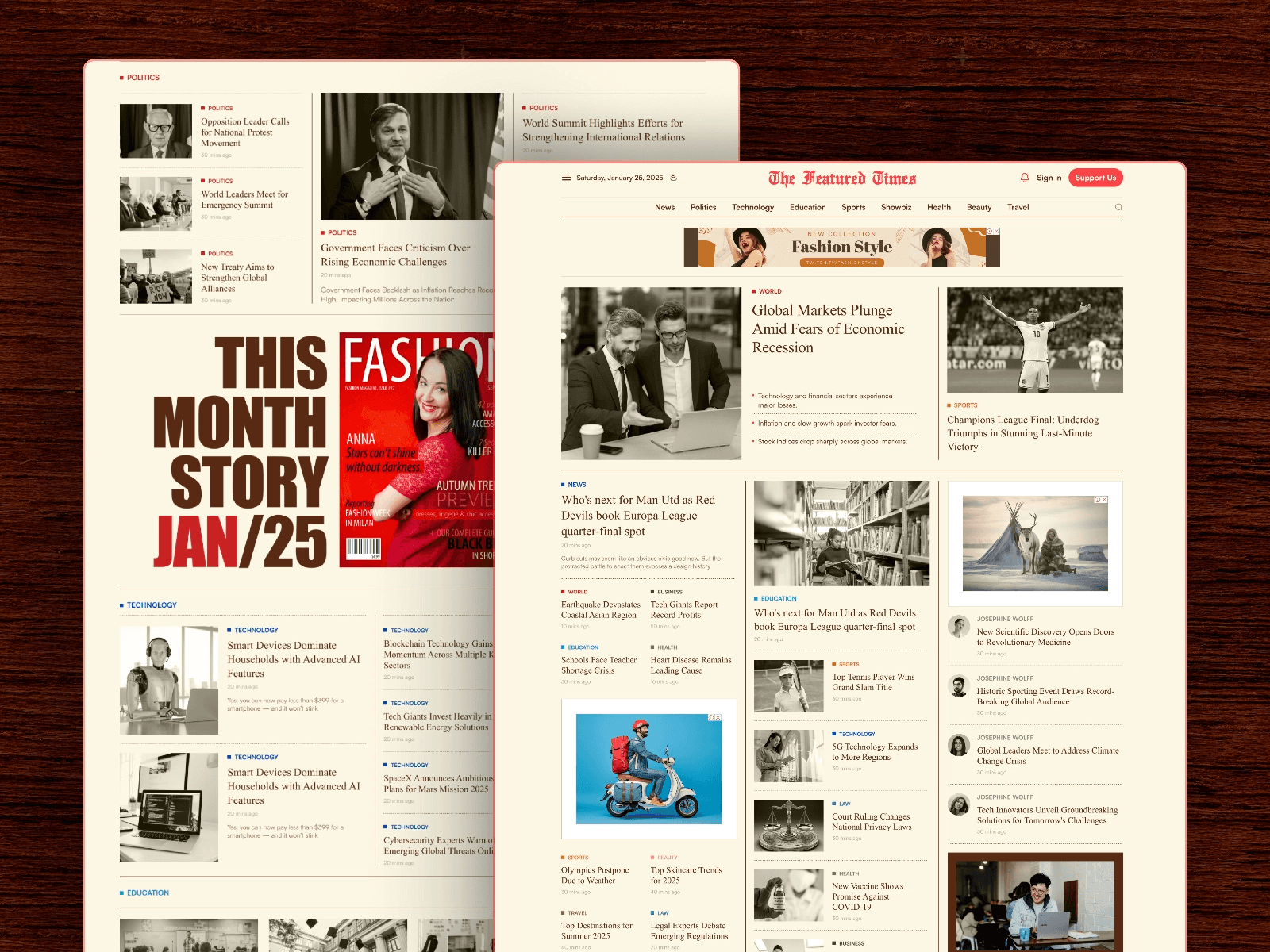
FeaturedTime is a $29 template from FramerDevs with over 4,200 views. Designed specifically for fast-paced news sites and digital magazines, it comes with four pre-built pages - Home, News Details (CMS), FAQ, and Contact - making it a ready-to-use solution. Let’s take a closer look at its design and CMS capabilities that enhance the content experience.
Design Aesthetic
Featuredtime stands out with its bold, modern design that combines clean layouts with smooth navigation, ensuring readers stay engaged. Subtle yet striking animations add a dynamic touch without compromising site performance. As described in the Framer Marketplace:
"The Features Times blends gorgeous style with simple tools to make your blog or magazine glow online."
Its responsive design ensures your content looks sharp and accessible across all devices.
CMS Integration
The template includes an easy-to-use CMS that simplifies content management. Its "News Details" CMS page automatically generates article pages, allowing you to upload new stories or updates in just a few clicks. You can also organize content into categories like sports, lifestyle, or local news, creating a clear structure that helps readers navigate effortlessly.
Ease of Customization
Featuredtime offers flexible layouts that make it simple to highlight top stories, introduce your team, or promote upcoming features. With Framer’s drag-and-drop interface, you can tweak colors, fonts, and layouts to match your brand’s personality. Additionally, the purchase includes a free Figma file, enabling you to plan and prototype changes before applying them.
Best Use Case
This template is perfect for digital magazines, newspapers, or niche blogs that require frequent content updates. Writers and editors will appreciate its streamlined CMS and built-in SEO features, which help improve visibility in search results. Plus, with lifetime free support and updates, Featuredtime is built to grow with your publication, whether you’re managing a personal blog or a larger news platform.
3. Duration
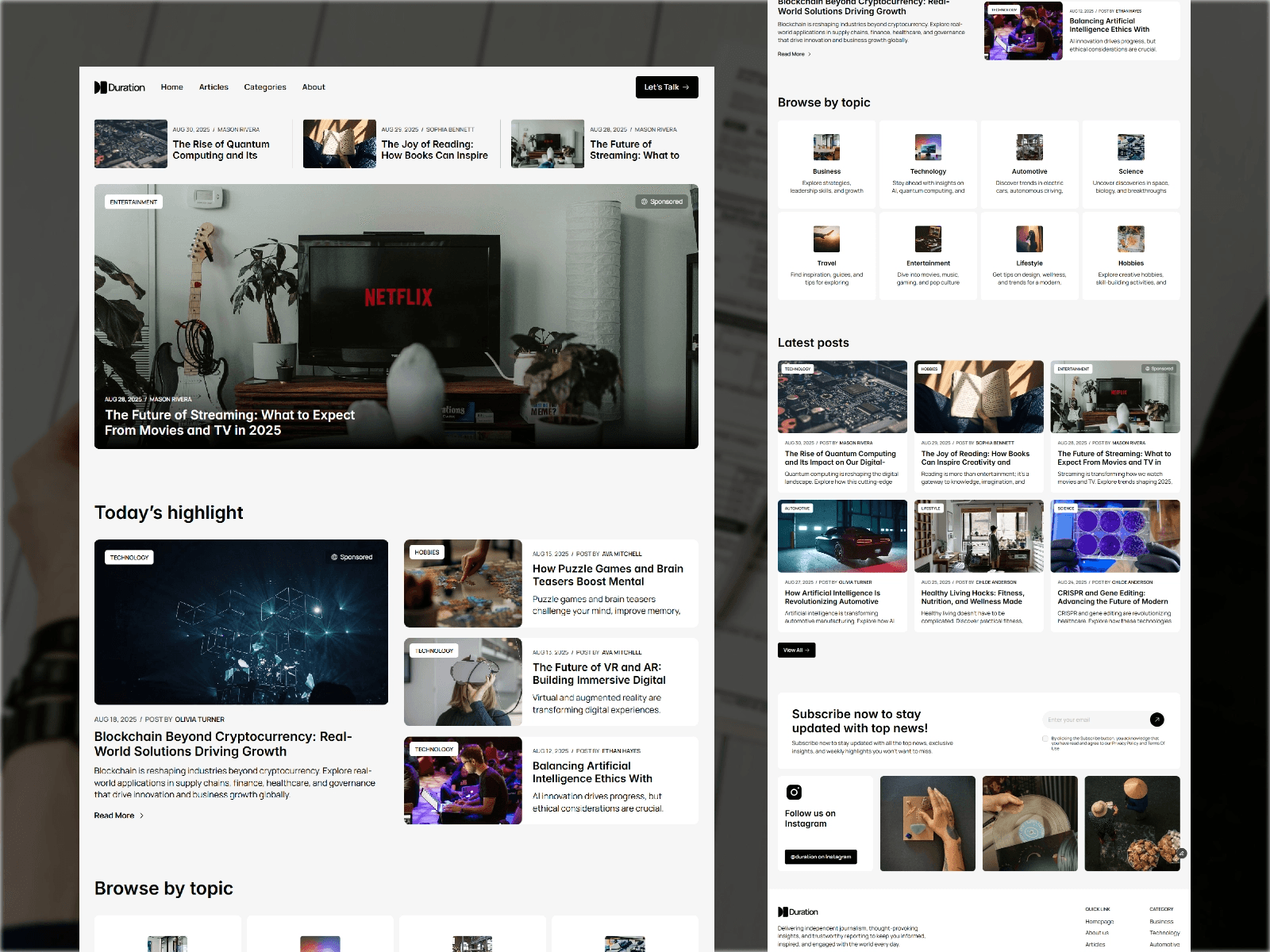
Duration is a free template created by Erapee, designed to make your writing stand out with a minimalist approach. Its clean layout and user-friendly navigation ensure a smooth reading experience across all devices, making it easy for readers to discover your content effortlessly. It's a great option for creators looking to grow their audience without any upfront expenses.
Design Aesthetic
This template focuses on readability and user engagement, ensuring your content looks great whether viewed on a smartphone or a desktop.
CMS Integration
Duration seamlessly integrates with Framer's native CMS, allowing you to manage posts, categories, and author pages without needing coding skills. The CMS supports dynamic content creation, making it simple to add new articles - just fill out a form. Readers can browse your archive in multiple ways, thanks to the intuitive system, which pairs perfectly with the template's adaptable design.
Ease of Customization
Built on Framer's no-code platform, Duration allows you to tweak colors, fonts, and layouts to reflect your personal style. With global style controls, you can update your site's appearance instantly, making it easy to maintain a polished, professional look without hiring a developer.
Best Use Case
Duration is perfect for writers and journalists on a budget, offering a professional platform at no cost. The design encourages subscription growth, making it ideal for creators aiming to build a loyal audience. Whether you're running a personal blog, travel journal, tech commentary, or food diary, Duration's clean and adaptable design helps you connect with readers while keeping the focus on your content.
4. Eventart
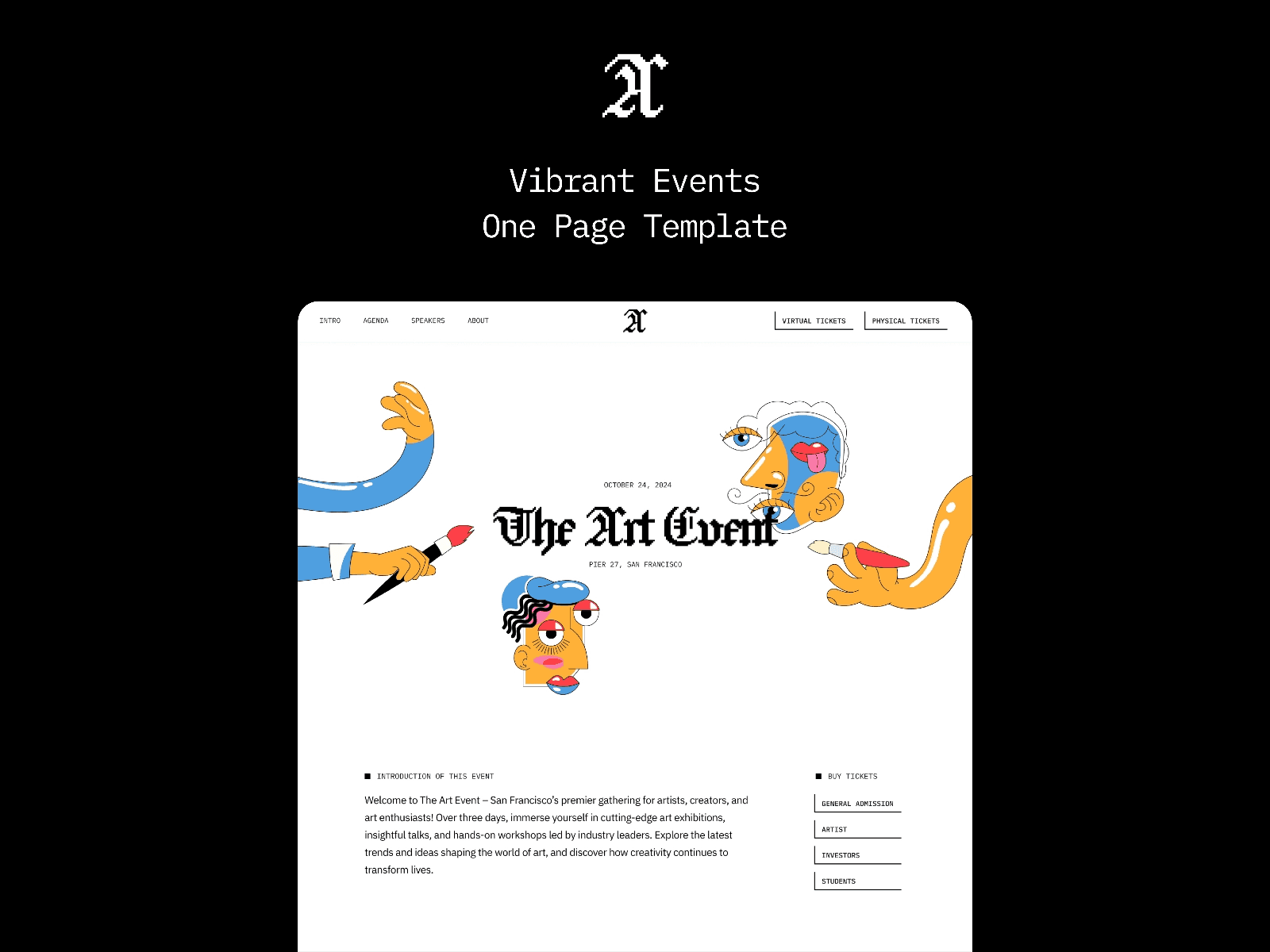
Eventart stands out among blog website templates with its emphasis on event-focused content. This free offering from Omakase combines a sleek, modern design with a bold hero section that transitions effortlessly into well-organized content areas. While originally crafted for conferences and seminars, its structured layout is equally effective for blogs featuring industry events, scheduled content series, or multi-author contributions.
Design Aesthetic
The template boasts a visually impactful hero section paired with a clean and polished layout. Its design ensures content is presented in a clear and professional manner across all devices. This makes it ideal for spotlighting featured blog posts or event announcements. As Omakase describes it:
"Perfect for showcasing conferences or seminars with a clean, responsive design".
CMS Integration
Eventart comes equipped with built-in CMS features, simplifying updates for event details like speaker profiles, agendas, and schedules. It also includes a downloadable .ical calendar, a convenient tool for managing industry events or webinars.
Ease of Customization
The template's modular sections - Hero, Introduction, 3-day Agenda, and Speakers - can be tailored to suit your blog's needs. Its responsive design ensures smooth adjustments for desktops, tablets, and smartphones. The Speakers Showcase section, for instance, can be adapted to feature guest writers, while the agenda layout is perfect for organizing content chronologically, such as article series or scheduled updates.
Best Use Case
Eventart shines when used for event-focused blogs or professional sites covering conferences, multi-day gatherings, keynote speakers, or structured timelines. Its integrated ticket purchase links make it easy to engage your audience directly, enhancing its utility for event-driven content.
5. Pering
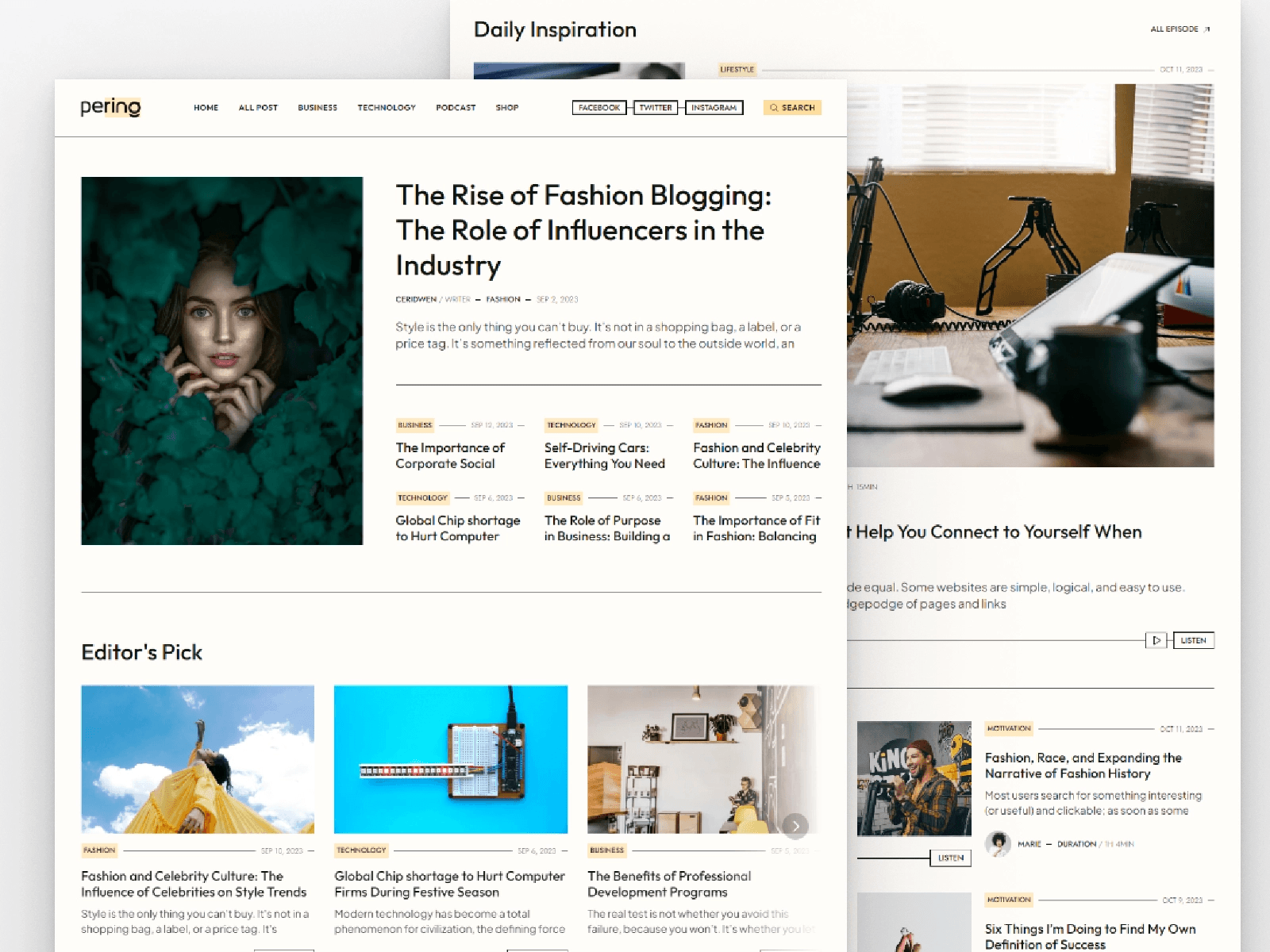
Pering stands out as a template that caters to both articles and podcasts, making it a versatile option for digital publishers. Offered for free by Marcframe, this template combines clean typography with a grid-based layout and soft pastel colors, giving it a polished magazine-like appearance. With over 10,100 views on the Framer Marketplace and a recent update in January 2026, it’s clearly struck a chord with creators.
Design Aesthetic
Pering’s design emphasizes readability and visual appeal. The structured grid layout, paired with light pastel tones, creates a professional yet inviting space for long-form journalism. Marcframe sums it up perfectly:
"A modern, responsive design for dynamic storytelling and seamless user experience. Engage your audience with customizable sections for articles and podcasts".
The responsive design ensures your content looks sharp, whether viewed on a smartphone during a morning commute or on a desktop at the office.
CMS Integration
This template leverages Framer's CMS, making content management straightforward and code-free. It includes features like dedicated post and category collections, SEO metadata management, and localized page paths. These tools make it easy to scale as your audience grows.
Ease of Customization
With 12 pages ready for editing, Pering offers plenty of flexibility to tailor the template to your brand. Whether you’re combining investigative articles with podcast episodes or running a lifestyle blog with audio commentary, the on-page editing feature makes updates simple and immediate.
Best Use Case
Pering is an excellent choice for independent journalists, podcast networks, and digital news platforms. It seamlessly integrates both written and audio content, making it ideal for keeping audiences engaged with news updates and podcast episodes. Next, take a look at the Denzel Blog Magazine Website for a more niche layout.
6. Denzel
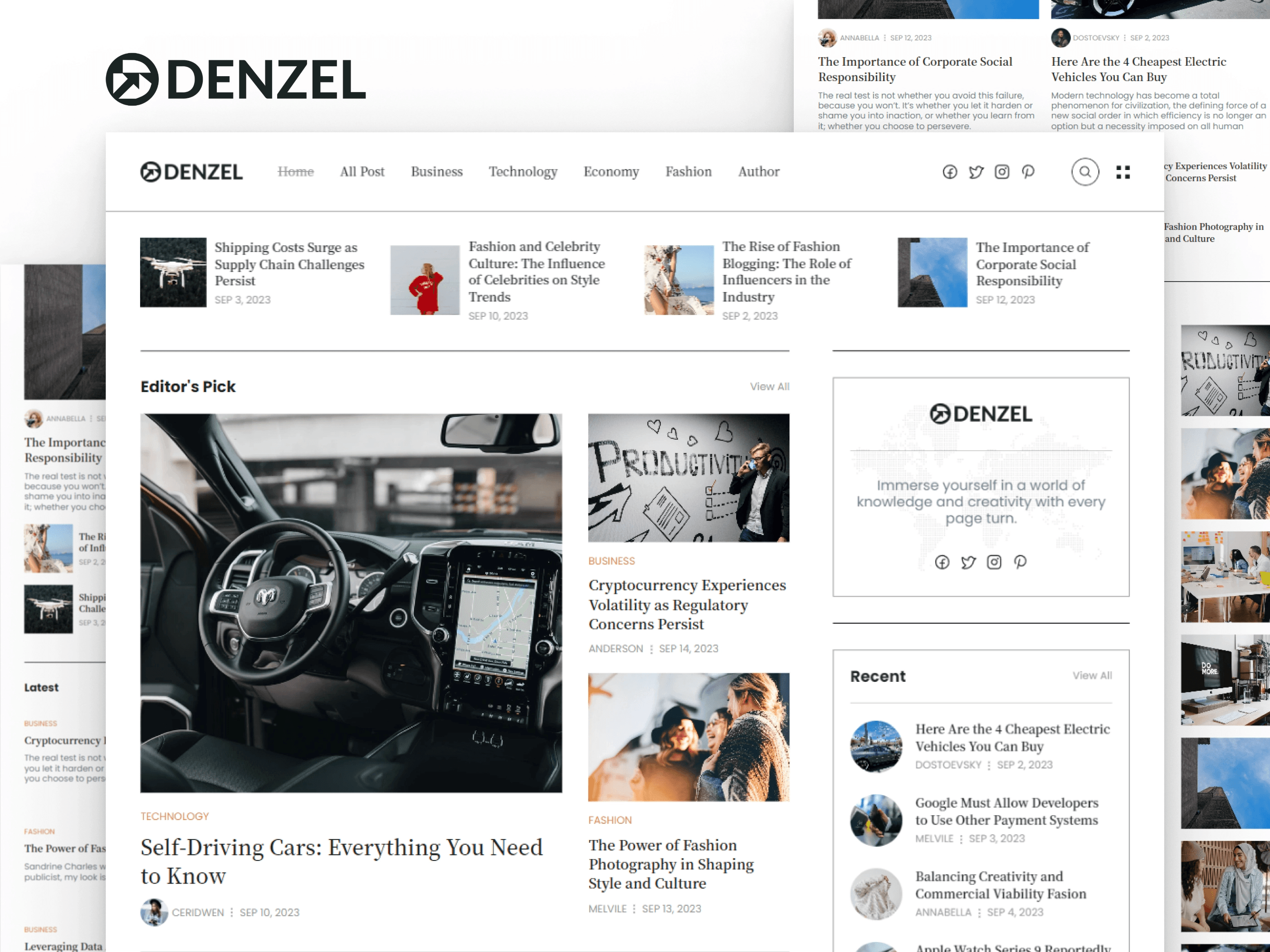
Denzel combines a retro vibe with modern typography, offering a fresh take on digital magazine design. Created by Marcframe and available for free, this template has garnered 14,500 views on the Framer Marketplace since its January 2026 update. Its clean, typographic-focused layout makes it a standout choice for content-heavy websites.
Design Aesthetic
The template features a grid-based layout, a light color scheme, and retro-inspired typography. This combination creates a polished and stylish look, making it an excellent choice for lifestyle and culture-focused publications. Plus, it's fully responsive, ensuring a seamless experience across all devices.
CMS Integration
Denzel goes beyond its visual appeal with robust CMS-powered pages for Home, Categories, Authors, and individual posts. Its intuitive navigation helps readers explore content effortlessly. The CMS supports articles, photo galleries, and multimedia, making it easy for users to update content frequently without needing technical skills. This is especially useful for active bloggers or news platforms.
Ease of Customization
Customizing Denzel is simple, thanks to its no-code visual editor and global style panels. You can quickly tweak layouts, colors, and typography across the entire site. Component-based editing and pre-set breakpoints for desktop, tablet, and mobile make adjustments both quick and efficient. These features make it a practical tool for crafting professional, visually engaging stories.
Best Use Case
This template is perfect for digital magazines, news websites, and blogs that feature a lot of multimedia, particularly those centered on lifestyle or cultural topics. Writers, journalists, and editors looking for a platform that’s easy to set up and manage will appreciate its functionality. With sections for top stories and built-in social media integration, Denzel helps you showcase trending content and boost reader interaction.
7. Lusia
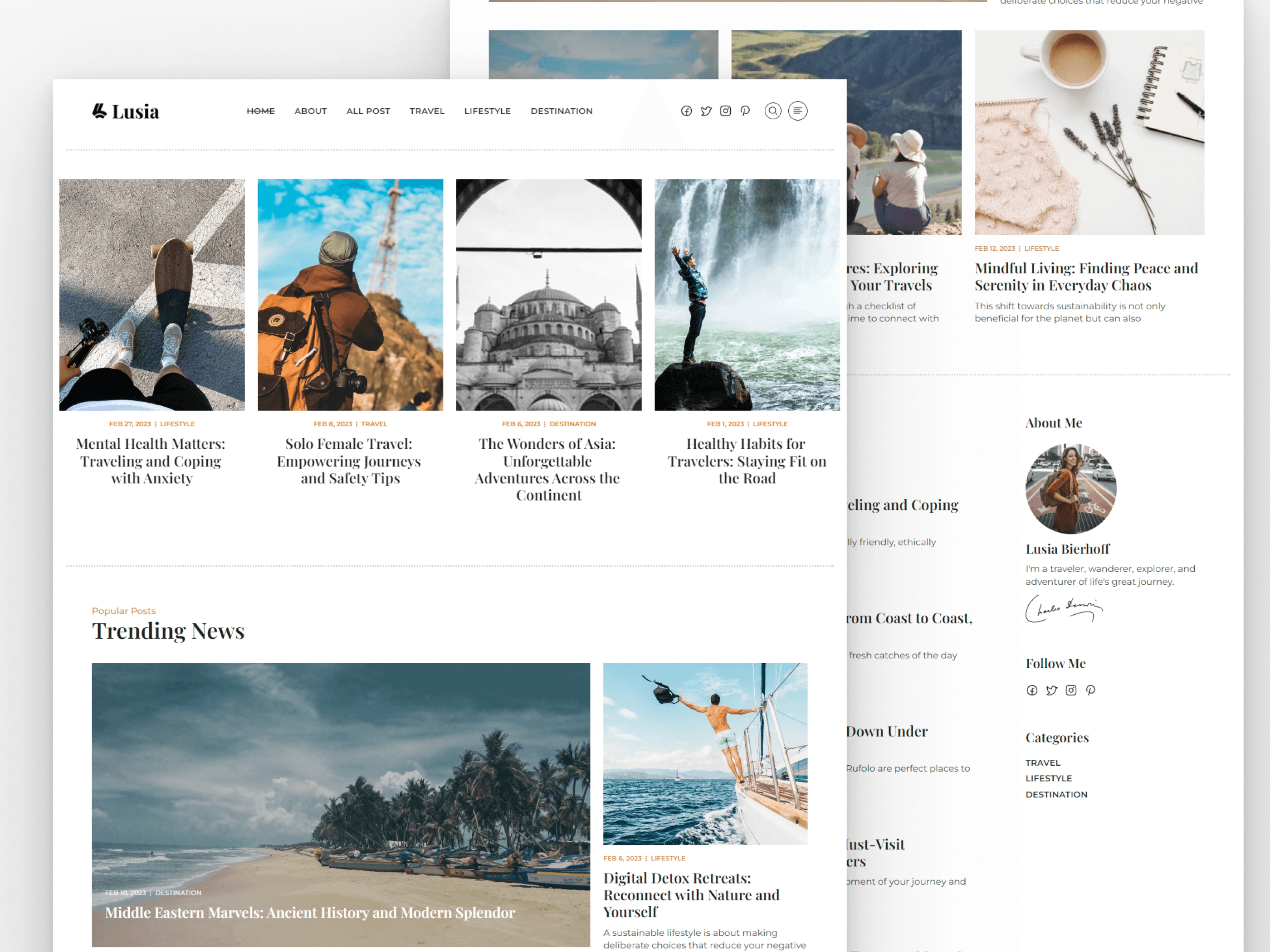
Lusia offers a sleek and clean layout designed to put your content in the spotlight. Developed by Marcframe and available for free, this template has garnered 12,400 views on the Framer Marketplace and was updated just last month. Its pastel color palette and grid-based design create an inviting and organized space for readers.
Design Aesthetic
The minimalist grid layout of Lusia gives your content a structured and professional feel. With soft pastel tones and a light overall color scheme, the design feels polished and uncluttered. It’s fully responsive, ensuring a seamless experience across devices, and its fast-loading performance boosts visibility on search engines.
CMS Integration
Lusia comes equipped with pre-built pages for essentials like Home, About, Blog, and Single Post. This makes it a great fit for personal blogs and digital magazines alike. The integrated CMS streamlines content management, making it easy to curate and maintain your site. As noted on the Framer Marketplace, "Its modern design and user-friendly features simplify content curation, ensuring an engaging and polished online experience". Additionally, global settings for colors and typography allow for quick customization to match your personal branding.
Ease of Customization
Customization is straightforward with Lusia, thanks to its intuitive design tools. Adjusting elements to suit your style or making design tweaks is effortless.
Best Use Case
Lusia is ideal for personal bloggers, digital magazine publishers, and professional writers who want a clean, distraction-free platform. Its design keeps the focus on content, making it perfect for those aiming for a professional and polished online presence. As Framerbite describes it, "Lusia is the ideal platform for bloggers and magazine creators who want a streamlined, stylish, and highly functional website that keeps readers focused on content".
8. OneDollar
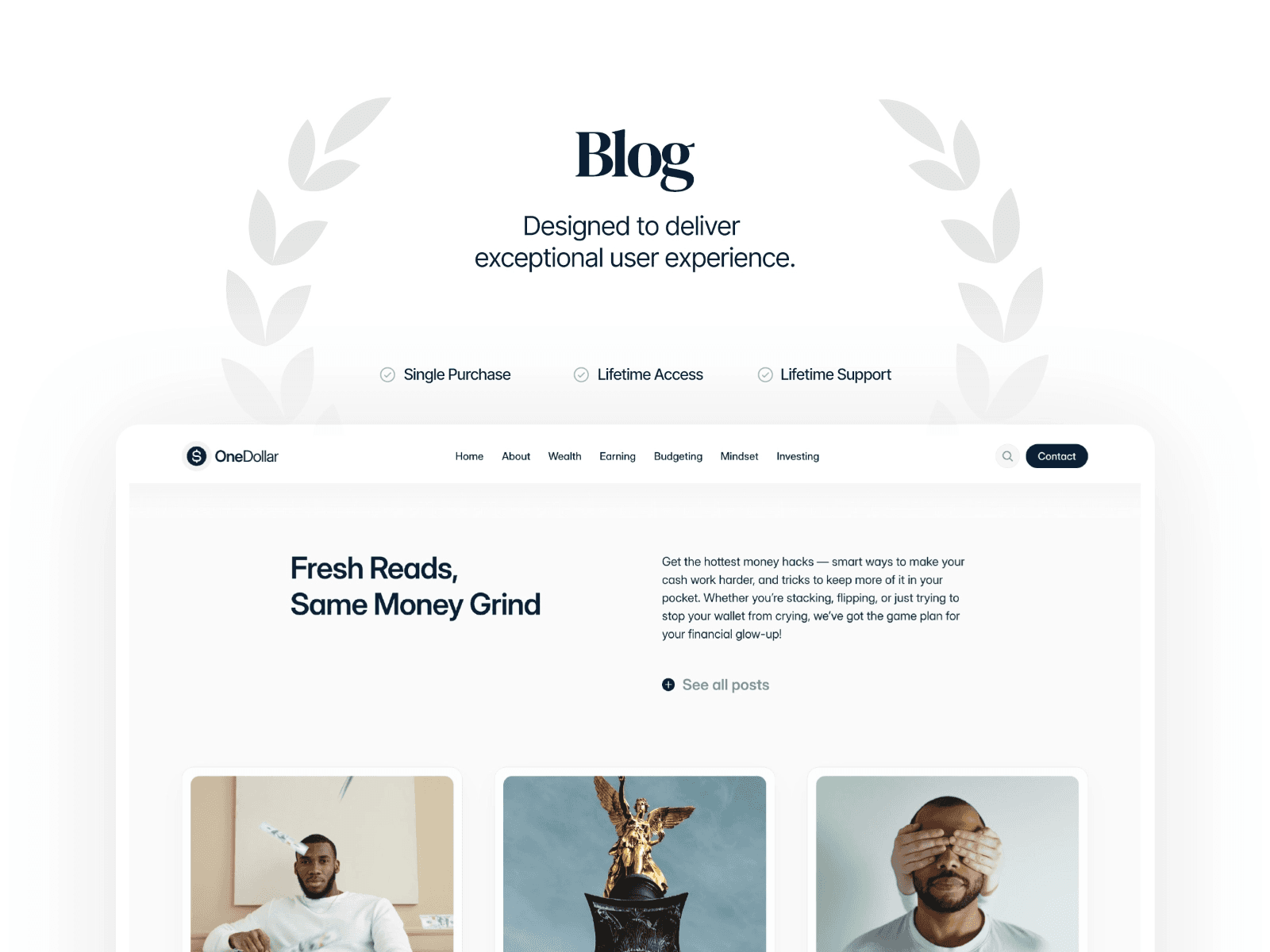
OneDollar stands out as a sleek and polished option for blog design. This premium template emphasizes simplicity with its minimalist approach, placing your content front and center. With over 16,300 views on the Framer Marketplace, it’s available for $79 as a one-time purchase, which includes lifetime updates and premium support. Its thoughtfully organized layout ensures your content gets the attention it deserves.
Design Aesthetic
The template’s grid-based layout is both functional and visually appealing. It includes essential navigation features like a Table of Contents, Breadcrumbs, Post Navigation, and Site Search. Sections such as "Fresh Reads" and "Handpicked" display useful metadata like reading time, category tags, and author details. Built with SEO in mind, OneDollar offers fast load times and a semantic structure. Plus, social sharing buttons and newsletter signup forms are seamlessly integrated, maintaining the clean and professional design.
CMS Integration
OneDollar takes full advantage of Framer's built-in CMS, making content updates easy and entirely code-free. The template comes with pre-designed pages for featured posts, categories, and related content, streamlining the content organization process. Essa Donzo describes it best:
"designed to help your content stand out, this Framer blog template is perfect for bloggers, writers, communicators, content creators, journalists and anyone who wants to share their story or journey with the world".
Ease of Customization
Customization is straightforward with OneDollar’s click-and-edit workflow. You can tweak global styles and components across your site effortlessly, saving time and avoiding repetitive tasks. Even if you’re new to web design, the no-code setup makes it easy to create a polished and personalized site.
Best Use Case
OneDollar is a great fit for professional bloggers, journalists, and content creators who want a high-performance platform for storytelling and news sharing. It’s also an excellent option for businesses looking to integrate a blog into their existing website to boost organic visibility and engage their audience.
9. FullStory
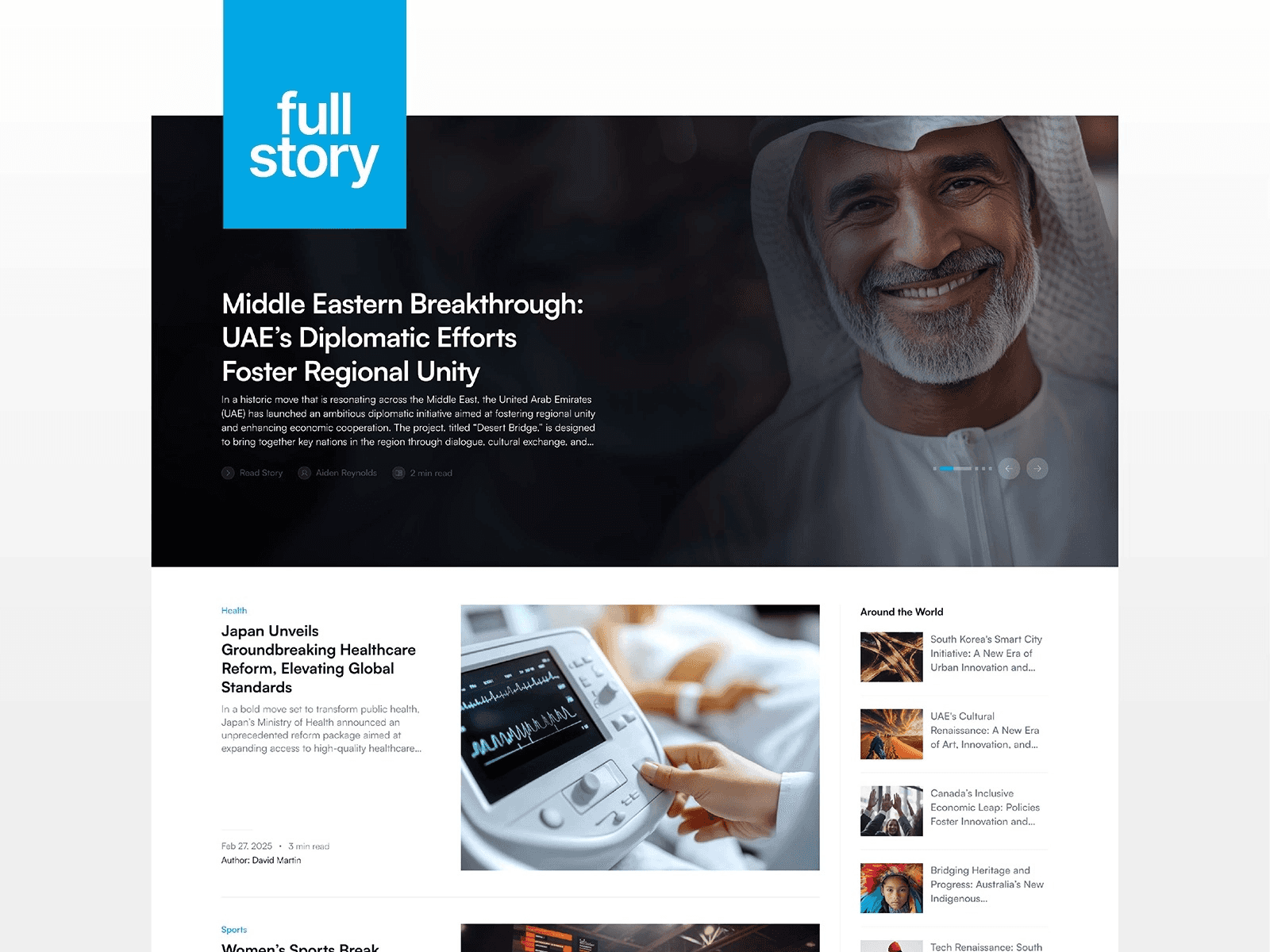
FullStory presents a sleek and polished blog design that places your content front and center, wrapped in a modern, minimalist aesthetic. With 16,000 views on the Framer Marketplace and a one-time price of $79, this template is built to make every blog post and news article shine. Created by Essa Donzo, it features a light color scheme and a grid-based layout, making it a great fit for both quick news updates and in-depth feature stories. Its design strikes a balance between visual appeal and practical functionality.
Design Aesthetic
FullStory's design focuses on readability and ease of navigation. The layout is tailored to highlight editorial content and seamlessly adapts to desktop, tablet, and mobile devices. It includes pre-built pages specifically designed for news and feature articles, ensuring a smooth and engaging user experience.
CMS Integration
FullStory leverages Framer's CMS to simplify article and category management. This integration allows you to organize and update your content effortlessly, without needing any coding skills. The template is structured to cater to news publications and feature writing, offering dedicated pages for articles and categories to keep everything well-organized.
Ease of Customization
Customization is straightforward with FullStory’s no-code setup. You can tweak the layout to align with your brand’s style - whether you’re covering tech, lifestyle, or corporate news - without any technical know-how. Essa Donzo describes the template as:
"With effortless customization and a sleek modern layout that keeps your content in the spotlight, FullStory is designed for creators who appreciate style that effortlessly blends modern design with intuitive functionality."
This flexibility ensures your platform reflects your unique voice while maintaining a professional appearance.
Best Use Case
FullStory is a perfect choice for news outlets, professional bloggers, and feature writers looking for a refined platform to showcase their work. Whether you're delivering breaking news or crafting detailed feature pieces, this template provides the tools to present your content with style and efficiency.
Template Comparison Table
Below is a quick overview of the main differences between the templates discussed earlier. These templates range from free options to premium ones, with pricing details included in the table.
The design styles vary significantly. FeaturedTime stands out with its bold, colorful, and professional look, designed to grab attention. In contrast, Denzel offers a sleek, modern, and minimalistic style, incorporating retro and typographic elements. Lusia leans toward a minimalist, modern design, using light and pastel tones. Meanwhile, Pering combines a modern, responsive layout with an emphasis on typography and pastel color schemes.
The table below provides a clear comparison of each template’s pricing, design style, intended use, CMS compatibility, and customization options.
Template | Price | Design Style | Best Use Case | CMS Integration | Customization |
|---|---|---|---|---|---|
Kingsley | $39 | Clean, minimalist | Leaders, entrepreneurs, creatives | Yes | No-code |
FeaturedTime | $29 | Bold, colorful, professional | News magazines, growth-focused blogs | Yes | No-code, SEO-smart |
Duration | Free | Clean, reader-focused | General blogging | Yes | No-code |
Eventart | Free | Modern, bold hero section | Event-focused content | Yes | No-code |
Pering | Free | Modern, typographic, pastel | News, magazines, podcasts | Yes | Multi-format support |
Denzel | Free | Minimal, retro, typographic | Business blogs, magazines | Yes | Customizable layouts, grid options |
Lusia | Free | Minimalist, light, pastel | Personal blogs | Yes | Personal branding focus |
OneDollar | $79 | Minimalist, grid-based | Professional blogging | Yes | No-code |
Fullstory | $79 | Professional, editorial-focused | News outlets, feature writing | Yes | No-code, flexible layouts |
Most modern Framer templates now include helpful features like dynamic read-time counters, social sharing tools, and automated category listings, all aimed at improving the user experience. If search engine performance is a priority, FeaturedTime offers built-in optimization for $29, making it a solid choice. On the other hand, free templates like Denzel, which has been viewed over 14,500 times on the Framer Marketplace, deliver professional results without requiring an upfront investment.
Conclusion
These nine blog website templates make it simple to launch a polished and functional blog. Whether you're creating a personal journal, starting a news-focused site, or building your personal brand, there's a template that fits your vision. Options range from free to premium, catering to various budgets and needs.
Each template offers easy-to-use, no-code customization, mobile-friendly designs, and built-in CMS tools to streamline content management. They’re optimized for mobile performance and SEO, ensuring your blog looks great on any device and ranks well in search results.
Ready to get started? Head over to the Framer Marketplace to explore these templates and find the one that aligns perfectly with your blogging goals.
FAQs
What should I consider when selecting a blog website template?
When picking a blog website template, a few essential factors can make all the difference. Start with the design and layout - choose something clean, visually appealing, and easy to navigate. A well-organized layout ensures your content stays engaging and accessible to readers. Next, focus on responsiveness and customizability. Your blog should look great on any device, whether it's a desktop, tablet, or smartphone, and you’ll want the flexibility to adjust colors, fonts, and other elements to match your personal or brand style. Lastly, think about the purpose of your blog. Is it personal, professional, or focused on a specific niche? Pick a template that highlights your content in a way that aligns with your goals. By balancing these factors, you’ll set the stage for a blog that’s both user-friendly and effective.
What are the key differences between free and paid blog website templates?
The key differences between free and paid blog website templates come down to features, customization, and support. Free templates are often quite basic, with simple designs and fewer options for tailoring them to your needs. They work well for small personal projects or experimenting with ideas but usually lack advanced tools like built-in CMS, e-commerce functionality, or access to dedicated customer support.
On the other hand, paid templates typically offer more design flexibility, advanced tools, and consistent updates. With paid options, you often get polished designs, extensive customization options, and professional support. These features make them a better fit for businesses or blogs that want a professional appearance and room to grow over time. Choosing a paid template can elevate your blog's overall user experience and help you achieve long-term goals.
Can I customize these blog website templates without knowing how to code?
Yes, you can! These blog website templates are made with ease of use in mind, so you don’t need any coding skills to get started. Thanks to intuitive visual editing tools, you can tweak layouts, change colors, pick fonts, swap out images, and adjust other elements to match your style or brand.
Getting started is straightforward: just duplicate a template into your workspace and begin personalizing it. Whether you’re new to this or have plenty of experience, these templates are designed to make the process smooth and enjoyable for everyone.
Share article
$249
$3601
All Access
Save with our all access bundle - get access to all premium Framer templates.
38
+
Framer Templates
51
+